Performing Analysis over a long period of time can result in performance issues or timeouts due to the complex calculations and large amounts of data.
This KB describes a strategy for long-term analysis.
Using the Historical Cache Key and Cache Expiration Analysis Settings Setting, we can cache historical calculations and recall them at a later time by accessing the cached value.
You must have a cache key per calculation and no changes can be made to the filter properties after it is saved or recalculation will occur.
See Analysis Data Points and Settings for information on Historical Cache Key and Cache Expiration
Example code:
Analysis Caching
Code |
def calculate():

	#Equipment to filter by
	eqPath = 'Enterprise\\Site 1\\OEE Area\\Packaging Line 1'

	#Name of your Analysis
	sasName = 'OEE'

	obj = system.mes.analysis.getMESAnalysisSettings(sasName)

	startDates = [system.date.getDate(2020, 2, 1), system.date.getDate(2020, 3, 1), system.date.getDate(2020, 4, 1)]
	endDates = [system.date.getDate(2020, 2, 31), system.date.getDate(2020, 3, 30), system.date.getDate(2020, 4, 31)]

	cacheKeys = ['OEEMarch2020','OEEApril2020','OEEMay2020']

	for i in range(len(cacheKeys)):
		params = {'Path':eqPath}

		obj.setSettingValues('Include Children=True,Historical Cache Key =' + cacheKeys[i] +',Cache Expiration=43200')

		results = system.mes.analysis.executeAnalysis(startDates[i], endDates[i], obj, params)

		print results.getDataset()

import datetime
startTime = datetime.datetime.now()
calculate()
print 'runtime',datetime.datetime.now() - startTime |
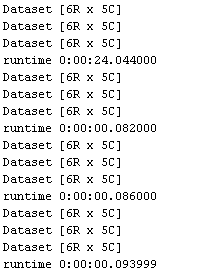
Viewing the output, we can see the first calculation was 24 seconds. Subsequent executions using the same keys and settings are performed sub-second.
Using this example, you would then populate tables or charts with historical data while calculating current data.
Dataset manipulation would be necessary to achieve a successful historical report.
other method: