Examples of Serving Data via REST Request
There may be a need to share MES data with external tools. While we do not recommend going directly to the database tables, there are options to share MES data externally. We recommend using the built-in functions to extract data from the database.
Article Coverage
This KB article demonstrates two ways to serve up analysis data when a REST request is received from an external tool.
- Custom analysis settings - payload determines analysis executed
- Pre-made analysis settings - payload executes a predefined analysis
We will use Postman for testing. Documentation on Postman is beyond the scope of this KB and should be reviewed on the Postman (www.postman.com).
Web Services
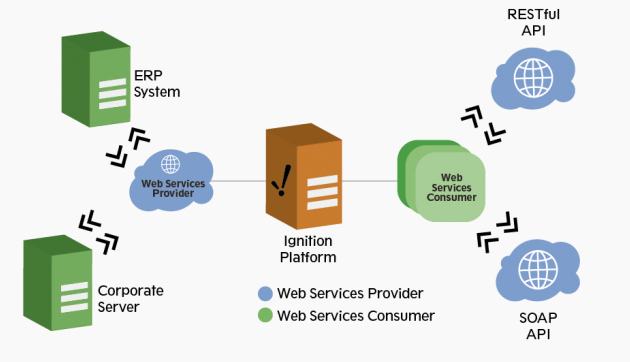
The Web Services module from Sepasoft provides the means to create both Consumers and Providers using either REST or SOAP. This KB will focus on building a REST provider, although a SOAP provider could be built to mimic the same behavior if needed.
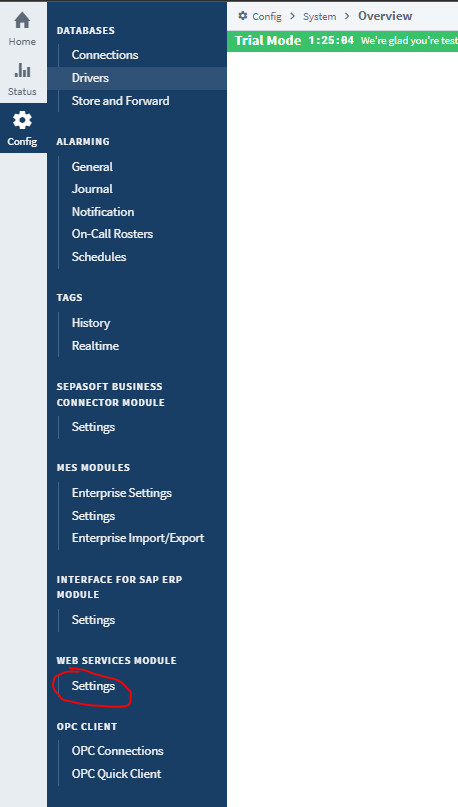
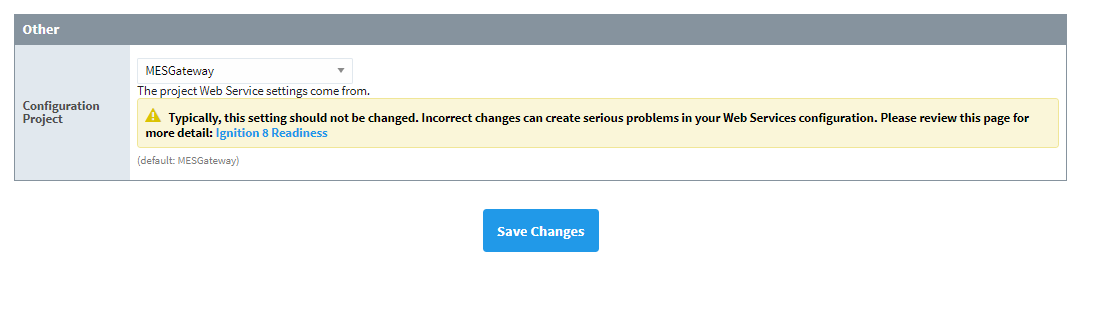
On installation of the Web Services module, you will see the Web Services module appear in the MES Gateway project by default. You can change this behavior on the gateway if you would like to use a different project to make your configurations.
Configuration
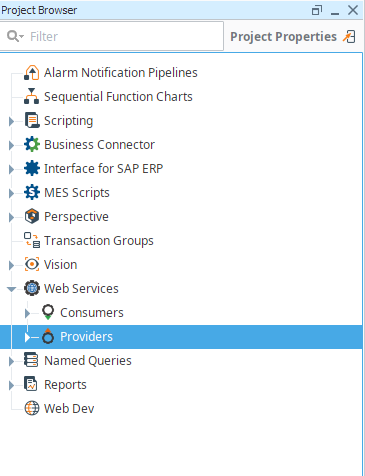
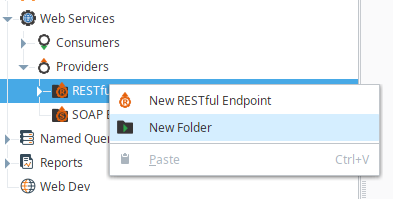
From the designer, open web services → Providers. Right Click on RESTful Endpoints and create a New Folder. It is best practice to "wrap" your web service endpoints in a version number. You will be able to make changes and test endpoints without affecting "production" endpoints. Tools and users relying on your endpoints will then be able to migrate at their convenience.
Helper Functions
 |
There are a few helper functions included with both example scripts which can be migrated to project scripts for reuse. They were included with each script for example purposes. - parseDate - takes in a date in iso ISO 8601format.
- equipmentExists - checks if the equipment path passed in is valid
- datasetToDictList - converts the dataset returned from analysis to a python dictionary, respecting ordering to return as JSON to the requester.
- createAnalysisSetting - validates and creates an analysis settings object to be executed
|
Example 1
Create a structure like so, ending with CustomQuery:
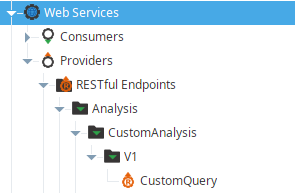
This path will end up becoming your URL path. You can verify by right-clicking the endpoint, copying the RESTful endpoint URL, and pasting the text somewhere.
For this method, we will use a POST request due to being able to use the request body to send complex data structures.
Paste the following script in the script block:
CustomQueryEndpoint
|
import java
DATE_FORMAT = "yyyy-MM-dd'T'HH:mm:ssXXX"
def parseDate(date):
try:
dateObj = system.date.parse(date, DATE_FORMAT)
return dateObj
except:
return None
def equipmentExists(eqPath):
if eqPath:
filter = system.mes.object.filter.createFilter()
filter.setEnableStateName('ENABLED')
filter.setPrimaryMESObjectPath(eqPath)
results = system.mes.searchMESObjects(filter)
if len(results) != 0:
return True
return False
def datasetToDictList(ds, orderBy = None, descOrder=True):
import operator
data = []
for row in range(ds.getRowCount()):
rowDict = {}
for col in range(ds.getColumnCount()):
rowDict.update({ds.getColumnName(col):ds.getValueAt(row,col)})
data.append(rowDict)
if orderBy:
sortedData = sorted(data, key = operator.itemgetter(*orderBy), reverse=descOrder)
return sortedData
return data
def createAnalysisSetting(datapoints,groupBy,orderBy,filterBy,settings):
analysis_setting = system.mes.analysis.createMESAnalysisSettings("test_setting")
analysis_setting.addParameter('eqPath')
expression = " Equipment Path = @eqPath"
if len(filterBy) is not 0:
filterBy = expression + " AND " + filterBy
for key in settings:
analysis_setting.addSettingValue(key,str(settings[key]))
if(set(groupBy).issubset(set(datapoints)) or set(orderBy).issubset(set(datapoints)) ):
analysis_setting.setDataPoints(datapoints)
analysis_setting.setGroupBy(groupBy)
analysis_setting.setOrderBy(orderBy)
analysis_setting.setFilterExpression(filterBy)
return analysis_setting
elif( (orderBy[0] == '' or groupBy[0] == '' ) and datapoints[0] != ''):
analysis_setting.setDataPoints(datapoints)
analysis_setting.setFilterExpression(filterBy)
return analysis_setting
else:
return None
req_body = request['body']
logger = system.util.getLogger('API.CustomQuery')
logger.info(str(req_body))
"""Example payload
{
"eqPath":"New Enterprise\\Site 1\\Area 1\\Packaging Line 1",
"startDate":"2021-07-24T08:14:1-08:00",
"endDate":"2021-07-26T10:14:12-08:00",
"dataPoints":["Line Downtime Reason", "Line State Duration"],
"groupBy":["Line Downtime Reason"],
"orderBy":["Line Downtime Reason"],
"filterBy":"Line Downtime Reason != ''",
"settings":{
"row limit":5,
"descending order":true
}
}
"""
requiredInputs = set(['eqPath','startDate','endDate','dataPoints','groupBy','orderBy','filterBy','settings'])
if not requiredInputs.issubset(req_body.keys()):
missing = []
diff = requiredInputs.difference(req_body.keys())
for item in diff:
missing.append(item)
res_content = {
'error': 'Missing items',
'data': missing
}
return {'code': 400, 'headers': {}, 'content': res_content}
eqPath = req_body['eqPath']
datapoints = req_body['dataPoints']
groupBy = req_body['groupBy']
orderBy = req_body['orderBy']
filterBy = req_body['filterBy']
settings = req_body["settings"]
startDate = parseDate(req_body['startDate'])
endDate = parseDate(req_body['endDate'])
if not startDate or not endDate:
res_content = {'error': 'Unparseable Date or Missing Date',}
return {'code': 400, 'content': res_content}
if len(datapoints) is 0:
res_content = {'error': 'Datapoints are required',
'data':datapoints}
return {'code': 400, 'content': res_content}
if not equipmentExists(eqPath):
res_content = {
'error': 'Equipment not found',
'data':eqPath
}
return {'code': 400, 'content': res_content}
params = {'eqPath' : eqPath}
analysis_setting = createAnalysisSetting(datapoints,groupBy,orderBy,filterBy,settings)
if (analysis_setting is None):
res_content = {'error': 'Invalid Group By or Filter By Parameters',
'data':{ "Group By": str(groupBy), "Order By" :str(orderBy)}}
return {'code': 400, 'content': res_content}
result = system.mes.analysis.executeAnalysis(startDate, endDate, analysis_setting,params).getDataset()
dictList = datasetToDictList(result, orderBy, settings['descending order'])
res_code = 200
res_content = {'data': dictList,
'eqPath':eqPath
}
return {'code': res_code, 'content': res_content}
|
 |
Save your project
|
This first example endpoint will create analysis settings based on what is passed in via the POST body.
To test this endpoint, copy the RESTful Endpoint URL
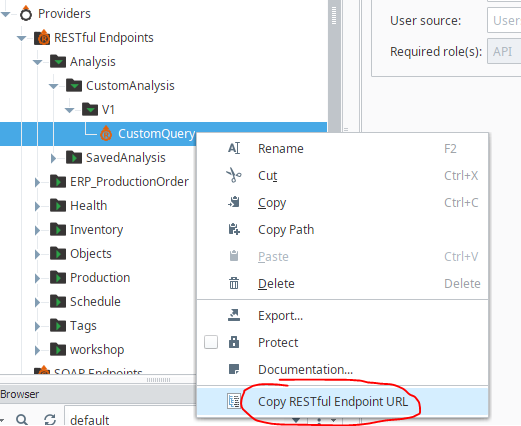
Opening our Postman, we can develop a request to test our new endpoint.
Paste in the copied URL into a new POST request in Postman. Using Environmental variables is optional but useful for testing different environments.
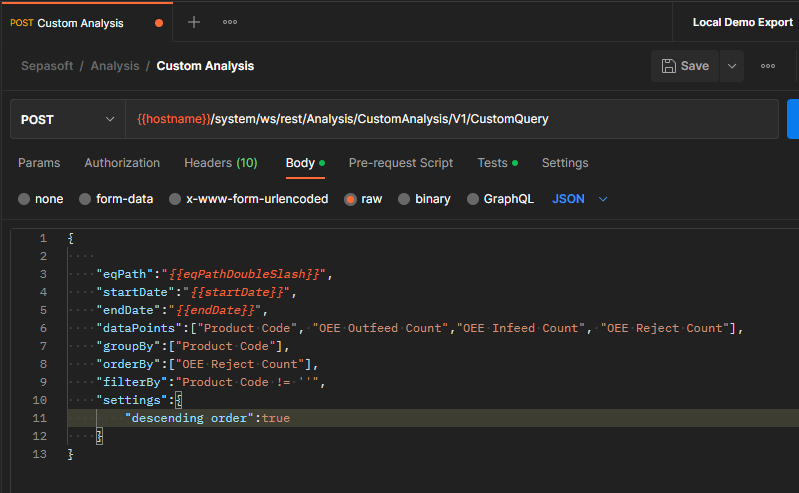
In the Body section, paste in raw JSON (replace values with your relevant data):
request body
|
{

    "eqPath":"Enterprise\\El Dorado Hills\\Packaging Area\\Packaging Line 1",
    "startDate":"2023-01-05T15:04:59Z",
    "endDate":"2023-01-05T23:04:59Z",
    "dataPoints":["Product Code", "OEE Outfeed Count","OEE Infeed Count", "OEE Reject Count"],
    "groupBy":["Product Code"],
    "orderBy":["OEE Reject Count"],
    "filterBy":"Product Code != ''",
    "settings":{
        "descending order":true
    }
} |
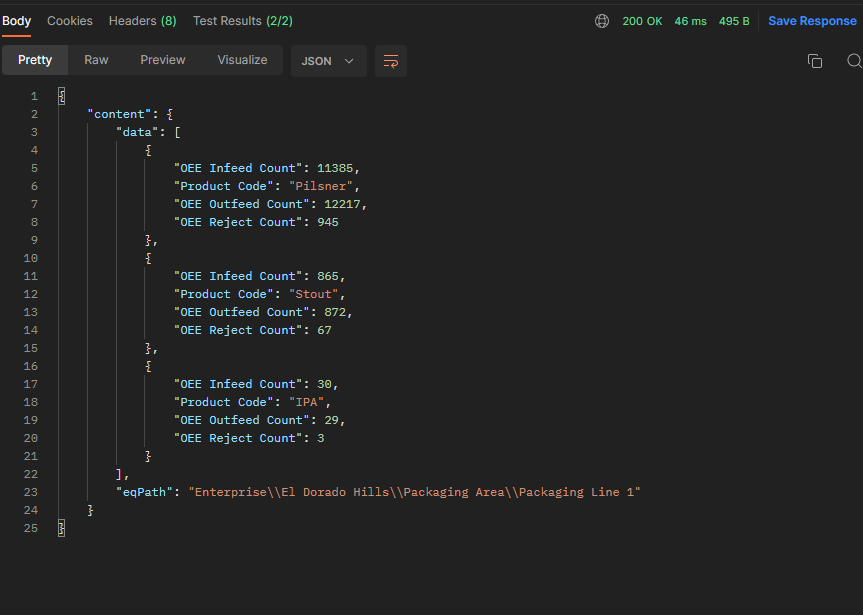
This particular request would give us OEE counts by product code, sorted from the greatest number of rejects to least.
If this executed correctly, we should receive a 200 HTTP code and response data.
Here is an example:
Example 2
You may want to create multiple endpoints for tools to consume without knowing how to use analysis. In this example we will create an endpoint that will execute and return analysis where the requester only needs to know minimal data like the equipment path, start date, and end date.
Create a structure like so, ending with PartsStartedVsIdealHourly:
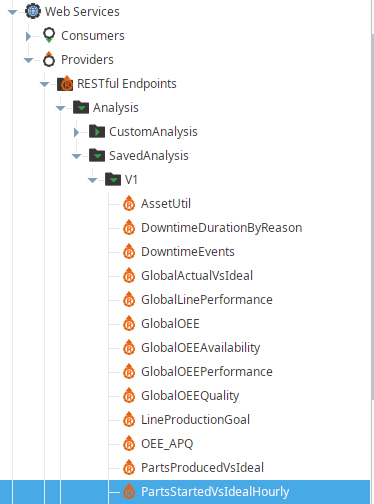
This path will end up becoming your URL path. You can verify by right-clicking the endpoint, copying the RESTful endpoint URL, and pasting the text somewhere.
For this method, we will use a GET Request with a few parameters.
Paste the following script in the script block:
PartsStartedVsIdealHourly Endpoint
|
import java
DATE_FORMAT = "yyyy-MM-dd'T'HH:mm:ssXXX"
def parseDate(date):
try:
dateObj = system.date.parse(date, DATE_FORMAT)
return dateObj
except:
return None
def equipmentExists(eqPath):
if eqPath:
filter = system.mes.object.filter.createFilter()
filter.setEnableStateName('ENABLED')
filter.setPrimaryMESObjectPath(eqPath)
results = system.mes.searchMESObjects(filter)
if len(results) != 0:
return True
return False
def datasetToDictList(ds, orderBy = None, descOrder=True):
import operator
data = []
for row in range(ds.getRowCount()):
rowDict = {}
for col in range(ds.getColumnCount()):
rowDict.update({ds.getColumnName(col):ds.getValueAt(row,col)})
data.append(rowDict)
if orderBy:
sortedData = sorted(data, key = operator.itemgetter(*orderBy), reverse=descOrder)
return sortedData
return data
req_query = request['query']
"""
Input params:
-eqPath
-startDate
-endDate
"""
requiredInputs = set(['eqPath','startDate','endDate'])
if not requiredInputs.issubset(req_query.keys()):
missing = []
diff = requiredInputs.difference(req_query.keys())
for item in diff:
missing.append(item)
res_content = {
'error':'Missing items',
'data': missing
}
return {'code': 400, 'headers': {}, 'content': res_content}
eqPath = req_query['eqPath']
startDate = parseDate(req_query['startDate'])
endDate = parseDate(req_query['endDate'])
if not startDate or not endDate:
res_content = {'error': 'Unparseable Date'}
return {'code': 400, 'headers': {}, 'content': res_content}
if not equipmentExists(eqPath):
res_content = {
'error': 'Equipment not found',
'data':eqPath
}
return {'code': 400, 'headers': {}, 'content': res_content}
analysisName = 'Parts Started vs Ideal - Hourly'
params = {'eqPath' : eqPath}
analysis_setting = system.mes.analysis.createMESAnalysisSettings("API_LineProductionGoal")
datapoints = [
"Top of Hour Interval",
"Infeed Standard Count",
"OEE Infeed Count"
]
analysis_setting.setDataPoints(datapoints)
analysis_setting.addParameter('eqPath')
analysis_setting.setFilterExpression("Equipment Path = @eqPath")
analysis_setting.setGroupBy("Top of Hour Interval")
result = system.mes.analysis.executeAnalysis(startDate, endDate, analysis_setting, params).getDataset()
dictList = datasetToDictList(result)
res_code = 200
res_headers = {}
res_content = {'data': dictList}
res_content.update({'eqPath':str(eqPath)})
return {'code': res_code, 'headers': res_headers, 'content': res_content}
|
|
Save your project
|
Copy your RESTful Endpoint URL from the project browser:
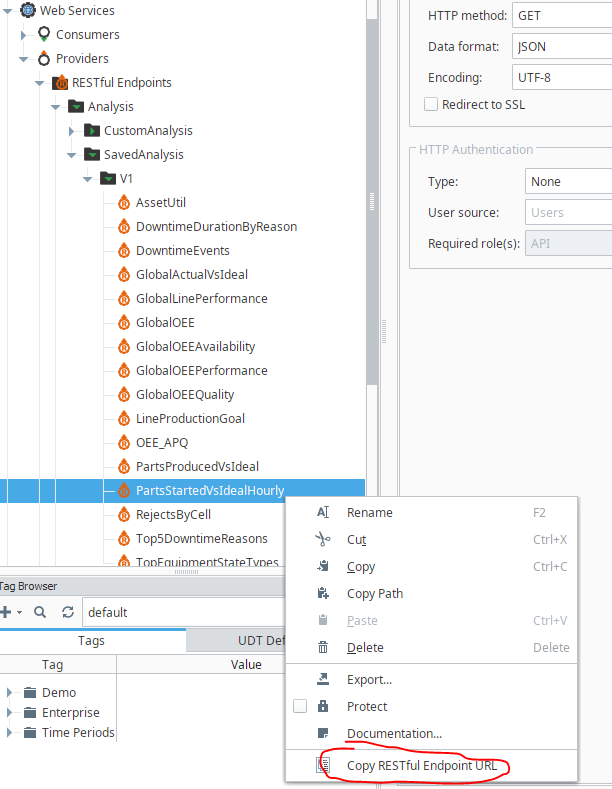
Create a new GET request in Postman and paste your RESTful endpoint URL in the address bar.
As you add Params, it will build the url for you. Environmental variables are optional and beyond the scope of this KB.
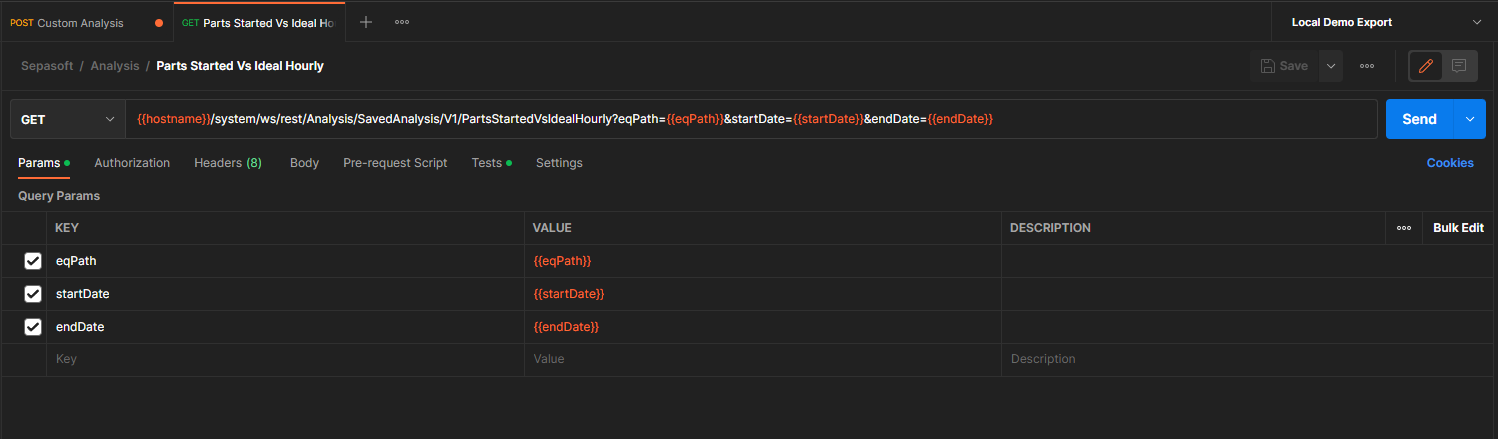
Use Single backslashes for your equipment path here. The time format is the same.
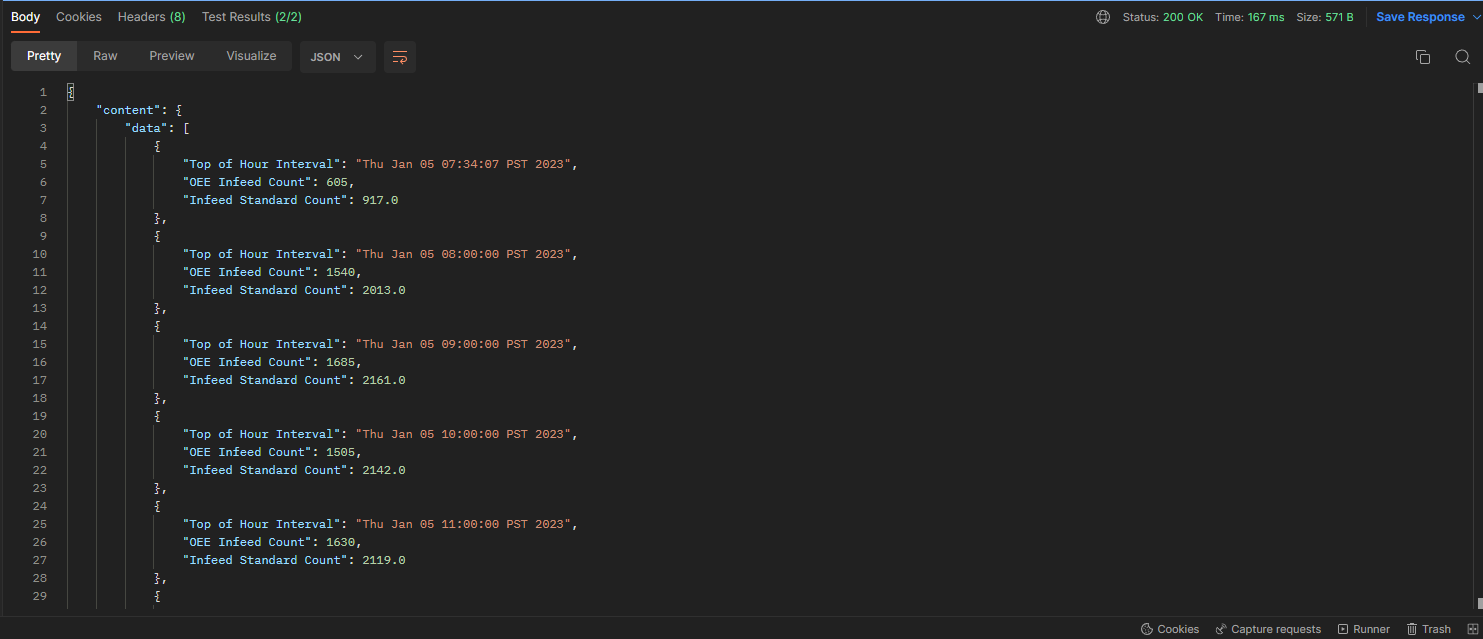
The endpoint should return time series data giving hourly actual count vs target count based on the OEE standard Rate.
Summary
These are just two examples of what you can do with the Web Service endpoints while leveraging the Sepasoft modules as the data source.
This is the best practice method for exposing data to external tools, whether custom or other COTS tools such as PowerBI or Tableau.