OEE Features
OEE Feature Overview
The OEE Downtime Module is built in compliance with the ISA-95 standard that provides a consistent terminology for supplier and manufacturer communications, information and operations models for clarifying application functionality and how information is to be used. It uses the same object model as the Track & Trace module to provide seamless integration between your lot tracking, production control and downtime tracking solution.
Enhanced Production Scheduling
Scheduler is now based on the same components as the Track and Trace module providing Work Order Drag and Drop capability, Auto-Delay feature, custom categories (hold schedule) and routes.
Shift Management
OEE Downtime now provides support for using the Ignition Schedule Management component for creating complex and composite shift rotations. However if you need something different, you can simply provides us the shift information via a tag and we'll associate that piece of information along with the production data we capture.
Equipment Modes
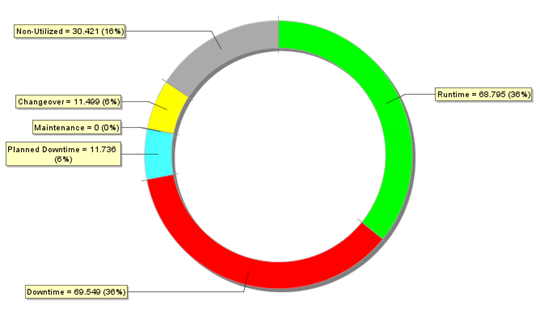
The OEE Downtime Module now provides support for creating Equipment Modes. You can now track utilization, at line level and below in the Production Model, by IDLE TIME, CHANGEOVER, PRODUCTION, MAINTENANCE, TRAINING, TESTING, even custom modes, and decide if they are to be considered in the OEE calculation.
Equipment States
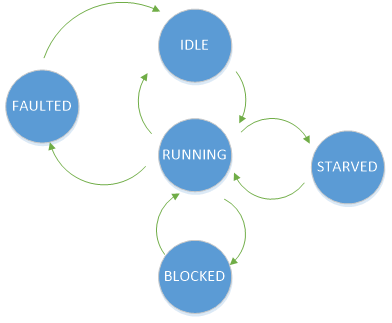
Equipment States can now be grouped, allowing multiple states such as Loading, Heating, Molding all to be considered as Running by OEE. True equipment state is now captured and stored allowing for greater cycle time and TaKt time analysis.
Machine State can now be configured to be Operator Selectable - REQUIRED when you require an operator to select the actual cause or add a note for a certain event. Downtime table component will flag the events that need to be over-ridden. User roles can also be configured on who can select operator selectable reasons.
Downtime Detection Modes
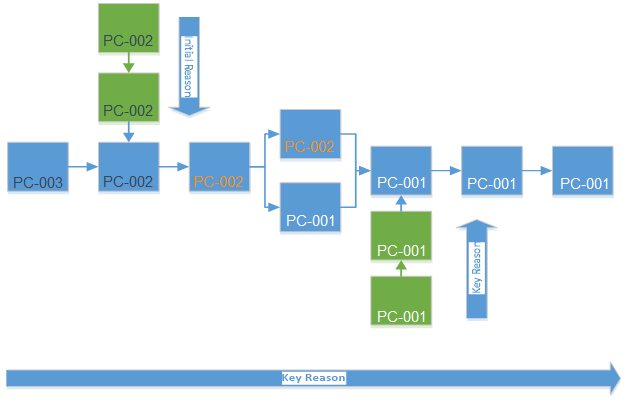
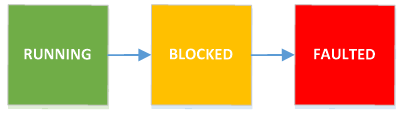
Key Reason Detection now supports primary cells anywhere within a line. Select a process cell in your line that you consider the bottleneck or primary cell and set that to Key Cell. As long as your primary cell is running, OEE will consider the production line to be running, but if your primary cell goes down, OEE will determine which piece of equipment is blocking or starving your primary cell and record that as the cause of the line down.
Data Capture and Runtime Monitoring
Equipment Mode, State, counts, shift and standard rate tags are always monitored and recorded. Never miss another production run because a run wasn’t scheduled. You can now create multiple ‘live’ OEE values for user defined time periods. How often these values are updated is now user configurable and uses an optimized cache to provide real-time values that can be displayed for run-time monitoring. Users will now be able to see real-time OEE metrics and production counts updated as often as they want.
Work-Center and Sub-Line OEE Operation
Running Changeovers
The OEE Downtime Module now supports running changeovers in that multiple products can be processed on a production line at the same time.