Configure Sample Definition Manager
- Create a view named Configure
This screen is comprised of 3 components:
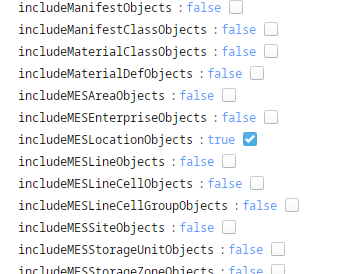
1. MES Object Selector (Include Location Objects selected)
2. Button
3. Sample Definition Manager
- Drag an SPC Sample Definition Manager component to the view.

- Drag a Button to the view and set the label to Create.
- Right click the button and create a new event script.
- Paste the following script to the Script block:
- Python
	# =============================================================================
	# ===== Create a Sample Definition Class and a Sample Definition ==============
	# ===== then assign Attributes, a Location, Rules and Control Limits ==========
	# ===== then update a Location property and an existing Sample Definition =====
	# =============================================================================
	# Define variables for use in configuring properties later
	definition_class_name = 'SPC Tutorial Samples'
	interval_name = 'Manual' # or 'Every x Value Changes'
	definition_name = 'Dimension Sample B'
	attributes = ['Diameter', 'LocationX', 'LocationY']

	location_path = self.getSibling("mesObjectSelector").props.selectedMESObject.equipmentPath

	rule_names = ['Individual Outside']
	limit_names = ['Individual UCL', 'Individual LCL']


	try:
		samp_def = system.mes.loadMESObject(definition_name, 'SampleDefinition')

	except:

		# Create the Sample Definition and assign core properties
		samp_def = system.mes.createMESObject('SampleDefinition')

		samp_def.setName(definition_name)
		samp_def.setInterval(interval_name)
		# samp_def.setDefaultSampleSize(1) # defaults to 1
		# samp_def.setComingDueMinutes(0.0) # defaults to 0.0
		# samp_def.setOverdueMinutes(0.0) # defaults to 0.0
	#	samp_def.setIntervalCount(0.0)
	#	samp_def.setIntervalDuration(0.0)
		samp_def.setAutoApprove(True) # defaults to false

		# Add a Location
		samp_loc = samp_def.addLocation(location_path)
		samp_loc.setInterval(interval_name) # NEW !!
		# samp_loc.setTag('Scripted') # Defaults to None
		# samp_loc.setComingDueMinutes(0.0) # Defaults to 0.0
		# samp_loc.setOverdueMinutes(0.0) # Defaults to 0.0
		# samp_loc.setIntervalCount(0.0) # Defaults to 0.0
		# samp_loc.setIntervalDuration(0.0) # Defaults to 0.0
		samp_loc.setAutoApprove(True) # Defaults to False

		# Add an Attribute
		for attribute_name in attributes:
			samp_attr = samp_def.addAttribute(attribute_name)
			samp_attr.setAttributeDataType('REAL') # Defaults to REAL - other options INTEGER, BOOLEAN, INSPECTED_COUNT, NONCONFORMING_COUNT, NONCONFORMITY_COUNT
			samp_attr.setSampleDefaultChart('INDIVIDUAL') # Defaults to NONE - other options XBAR_R, XBAR_S, INDIVIDUAL, MEDIAN, U, C, P, NP, HISTOGRAM, PARETO, CP, PP, PPM, ADT, BOX_AND_WHISKER, CPPP
			samp_attr.setFormat('#0.00')
			# samp_attr.setOrder(0) # Defaults to 0
			# samp_attr.setSampleSize(1) # Defaults to 1
			# samp_attr.setSampleDefaultValue(0) # Defaults to None
			# samp_attr.setSampleMinValue(0) # Defaults to None
			# samp_attr.setSampleMaxValue(100) # Defaults to None
			# samp_attr.setUnits('lbs') # Defaults to None
			# samp_attr.setSampleDefaultWeight(1.0) # Defaults to 1.0

		# Assign Rules
		for rule in rule_names:
		    samp_def.addRule(rule)

		# Assign Control Limits
		for limit in limit_names:
		    samp_def.addLimit(limit)

		# Create a Sample Definition Class
		try:
			samp_def_class = system.mes.loadMESObject(definition_class_name, 'SampleDefinitionClass')
		except:
			samp_def_class = system.mes.createMESObject('SampleDefinitionClass')
			samp_def_class.setName(definition_class_name)

		# Assign the Sample Definition as a child to the Sample Definition Class
		# (inverse relationship is also created at the same time)
		samp_def_class.addChild(samp_def)

		# Save the Sample Definition and Sample Definition Class objects
		save_list = system.mes.object.list.createList()
		save_list.add(samp_def)
		save_list.add(samp_def_class)
		system.mes.saveMESObjects(save_list)
- Drag an MESObject Selector to the view
- Set the IncludeLocationObjects property to true
- Note: The Object selector is used in the script to retrieve the sample location. Ensure the name of the component matches the script.