Setting Up Production Equipment Model for SPC
Let's create a simple equipment line with multiple cells, using the MES Equipment Manager component:
Create Production Model Equipment in the MES Equipment Manager
- Create a new Ignition Perspective window called MES Equipment Manager and place an MES Equipment Manager component on it. Go into Preview mode.
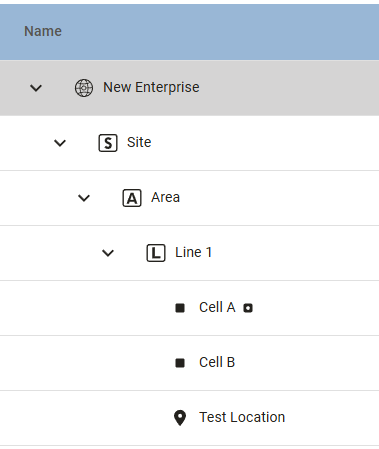
- Create the Production Equipment items shown under New Enterprise in the MES Equipment Manager component by clicking Add
 and selecting the type of equipment item to create:
- Create a Site called Site.
- Create an Area called Area.
- Create a Line called Line 1.
- In Line 1, create two Cells called Cell A and Cell B.
- In Line 1, create a Location called Test Location (this is for SPC).
- Activate new equipment created by using the Activate slider in the Equipment Manager toolbar

 |
Due to a deliberate restriction in the Activate functionality, it will not activate equipment items (and their children) that were previously deactivated manually. To activate these, select the highest parent level that is not activated, select Activate and answer Yes. Repeat for any other equipment items that were not activated by activating from the Site level. |
- Create Perspective Page for Equipment Manager
