TODO
Configure SPC 3.0 Tags
For this section of the tutorial, create the following Tag folder structure and one Tag (if you haven't already created it in a previous section). The paths are deliberately created to exactly match the Production Model, so the "{Equipment Path}" prefix can be used in scripting for the Equipment Path to simplify Tag handling (as well as being able to use the Copy Tag Path command in the Production Model when assigning tag paths).
Create Tag Folders
- Create the following folder tree in Tags in the Tag Browser, to match the the Production Model items in New Enterprise:
- Create a Site folder called Site.
- Create an Area folder called Area.
- Create a Line folder called Line 1.
- In the Line 1 folder, create two Cell folders called Cell A and Cell B.
- In the Line 1 folder, create a Location folder called Test Location.
Create Tag
- In the Test Location folder, create a Memory Tag called pH as data type Float.

Map Tag
- Navigate to the Equipment Manager
- Select the Test Location
- In the General panel, select Tag Collectors

- Find the Sample Attribute-Sample Definition Name-Attribute Name tag collector and type in {Equipment Path}\pH to match the tag created.
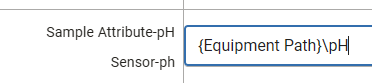
- It is also possible to use the
 button to find and map the tag manually.