Sepasoft MES Module Suite

Description
The End Block terminates chart operation and passes control back to the calling script. There are no associated property fields. Users must connect the End Block as the last block in the chart flow. This block is mandatory, but when a new chart is created, it will not already be in place on the Design Grid. More than one End Block may be used in a chart.
Connections
One connection is required:
Input — (input) Receives execution control from the previous Block in the sequence. Unlimited input connections are allowed, spread across up to three available edges (at least one edge must remain empty).
Properties
There are no configurable properties.
Usage
Connecting the End Block
- Drag the End Block onto the Design Grid.
- Click on the last Block in the Chart Sequence and draw a Connector to any edge on the End Block. Repeat for another input Block, if applicable (unlimited input connections are allowed, spread across up to three available edges, leaving at least one edge empty).
Example
In this example, after an Enclosing Chart Block executes, an Exception Block is used to check for a chart error. If an error exists, control passes directly to the nearby End Block, which terminates the chart and passes control back to the calling script. If no error, then the materials list is fetched by the SAP BAPI Action Block then saved by the Save MES Object Block and finally control passes to the other End Block, which terminates the chart and passes control back to the calling script.
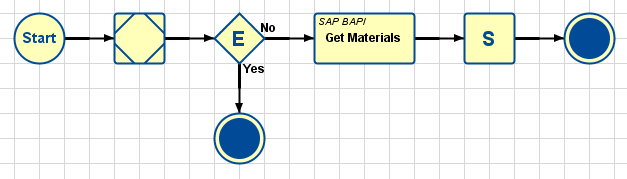
Note that this chart can also be constructed with a single End Block (more than one Connector can connect to an End Block):

Sepasoft MES Module Suite