Sepasoft MES Module Suite
MES Module Settings in Ignition Gateway
MES Advanced Settings include:
Authentication
- User Source Profile
- Auto Sync Users
- Auto Sync Rate
Backend Settings
- Required Roles to Edit MES Scripts
- Data Retention Period
- Analysis Query Cache Duration
- Analysis Read Lock Timeout
- Maximum Cached MES Objects
- Inactive MES Object Threshold
You find these settings on different pages from Ignition 8.1 and Ignition 8.3. Each is identified below.
See Below:
- Ignition 8.3.x
- Authentication
- Backend Settings
- Ignition 8.1.x
- Authentication
- Runtime Datasource
- Analysis Datasource
- MES Object Cache
Ignition 8.3.x
In Ignition Gateway, go to Platform > Sepasoft > Advanced Settings.
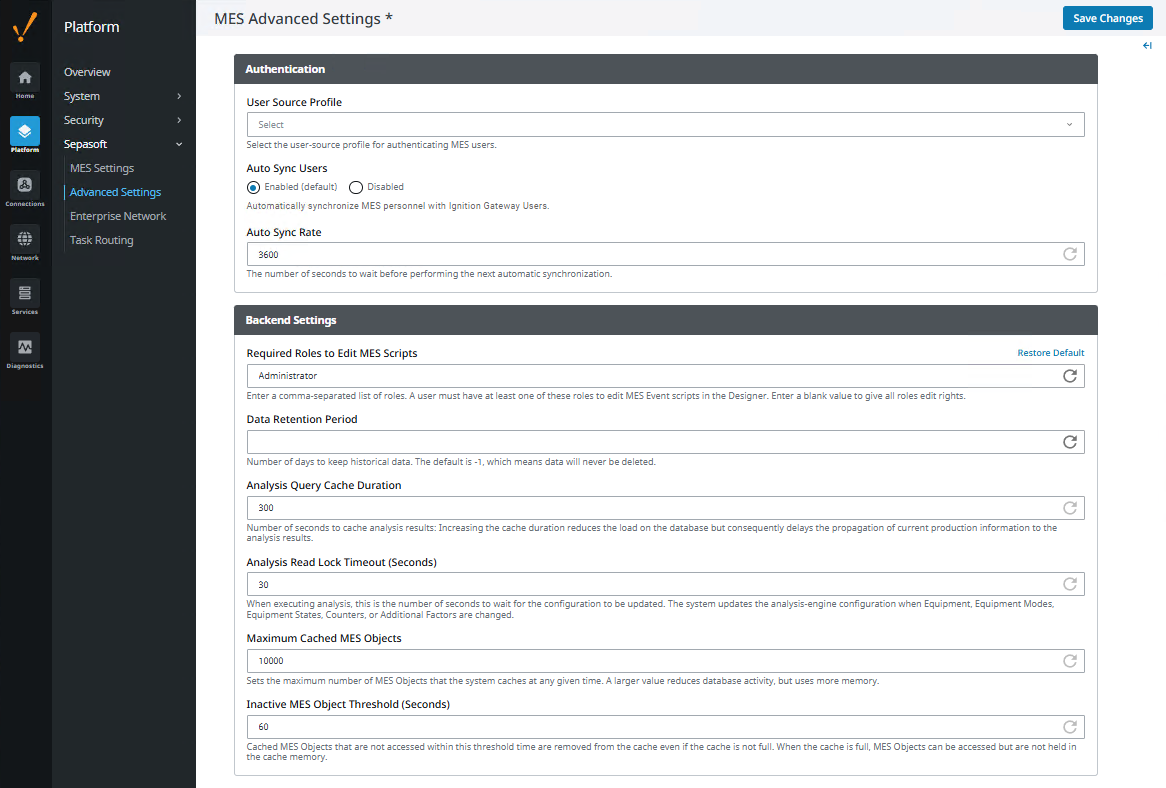
Authentication
- User Source Profile: MES Person objects are created for any users configured that have first or last name assigned. For more information, see the Ignition User Manual.
- Auto Sync Users: Enabled by default. MES Person objects periodically synchronize themselves with the current state of the selected Ignition User Source Profile.
- Auto Sync Rate: The number of seconds to wait before performing the next automatic synchronization. 3600 seconds by default.
Backend Settings
- Required Roles to Edit MES Scripts: A comma-separated list of roles. A user must have at least one of these roles to edit MES Event scripts in the Designer. Enter a blank value to give all roles edit rights.
- Data Retention Period: Number of days to keep historical data. The default is -1, which means data is never deleted.
- Analysis Query Cache Duration: Number of seconds to cache analysis results: Increasing the cache duration reduces the load on the database but consequently delays the propagation of current production information to the analysis results.
- Analysis Read Lock Timeout: When executing analysis, this is the number of seconds to wait for the configuration to be updated. The system updates the analysis-engine configuration when Equipment, Equipment Modes, Equipment States, Counters, or Additional Factors are changed.
- Maximum Cached MES Objects: Sets the maximum number of MES Objects that the system caches at any given time. A larger value reduces database activity, but uses more memory.
- Inactive MES Object Threshold: Cached MES Objects that are not accessed within this threshold time are removed from the cache even if the cache is not full. When the cache is full, MES Objects can be accessed but are not held in the cache memory.
Ignition 8.1.x
In Ignition Gateway > Config > MES Modules > Settings, see:
Authentication: user source profile, auto sync users, auto sync rate
Runtime Datasource: database to store runtime production data
See Knowledge Base topic VARCHAR Type and MSSQL Database Connection Property
Analysis Datasource: database and auxiliary database to store historical analysis production data, analysis query cache duration, analysis read lock timeout.

|
Auxiliary database has been removed in version 3.81.10 SP3 and later. |
MES Object Cache: maximum cached MES objects, inactive MES object threshold
Configuration Project: MES configuration project
See below for details about each setting.
Authentication
| User Source Profile | Select a user source profile. MES Person objects are created for any users configured that have first or last name assigned. Since Ignition can have multiple User Source Profiles, the MES system must be configured to know which one to use. User profiles are created in the gateway under Security > Users, Roles. For more information, see the Ignition User Manual. | ||||
| Auto Sync Users | MES Person objects periodically synchronize themselves with the current state of the selected Ignition User Source Profile. Synchronization
| ||||
| Auto Sync Rate (Seconds) | This setting dictates the rate (in seconds) to perform the synchronizing operation. | ||||
Runtime Datasource
Analysis DatasourceConfiguration of the database used for MES data storage is critical for best performance and avoiding conflicts while reading and writing data. | |||||
Analysis Database | The Analysis datasource points to the database used by:
| ||||
Analysis Database (Auxiliary) | The data that is written to the local analysis database is also saved in the auxiliary database. For single site implementations, set this to -none- . When you have MES running on multiple servers, setting up the Auxiliary database connection pushes MES data up to a central database to allow enterprise analysis to be performed. | ||||
Analysis Query Cache Duration | This setting represents the number of seconds to cache analysis results before refreshing the cached data. The cache is used to optimize gateway performance by maintaining analysis data in memory that can be accessed by clients, reducing the number of queries to the database. Reduce this duration if you need analysis results updated on a more frequent basis or use the system.mes.analysis.invalidateAnalysisCache() function to force the cache to refresh. | ||||
Analysis Read Lock Timeout | The number of seconds to wait when the analysis engine configuration is being updated. | ||||
Maximum Cached MES Objects | Used to affect database performance, this property refers to the maximum number of MES objects that is cached at a specific time interval. | ||||


MES Object Cache

Sepasoft MES Module Suite