Sepasoft MES Module Suite
SPC Controller
Use to format and feed sample definition data (objects) for evaluation of a production process into a graph. Most frequently the dataset is fed into a control chart and analysis tools.
|
The SPC Controller component is invisible at run-time. Displays as an SPC Controller icon in Ignition Designer at design-time. |

|
Perspective vs. Vision Charts

|
Keep in mind that Vision charts require an SPC Controller to obtain data; whereas, Perspective Charts binding to an SPC Controller is optional. Charts in the Perspective provide the option to directly reference Stored SPC Settings. Perspective chart properties explain the toggle datasource mode under the Property Source for a Chart. |

|
MES 3.81.7 RC1 and later Installed with the SPC Module |
Component Properties
Properties are provided that can be set to affect the operation and look of the component. They can be set through the Property Editor in the Designer or through scripting.
Python |
self.getSibling("spcController").spcChartSettings.autoRefresh = True |
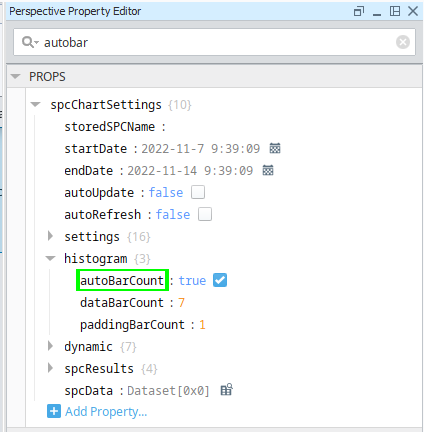
For ease of finding properties, the search results are highlighted in the list as you type in Search.
|
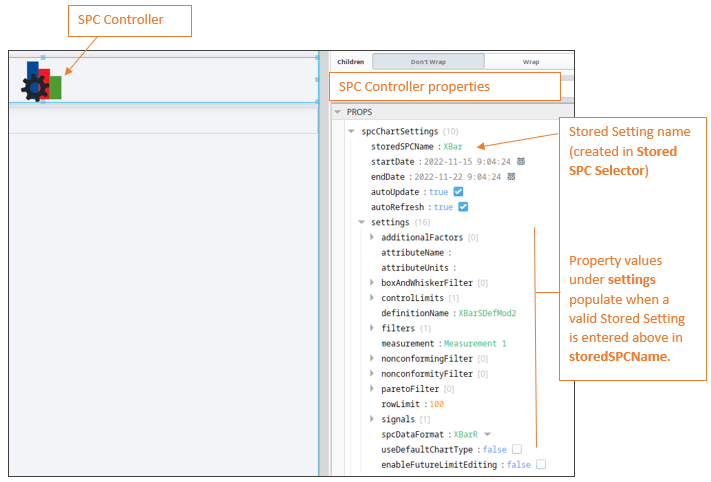
When you add an SPC Controller to a View and set the storedSPCName property to a valid Stored Setting, the values under the settings property populate with the values from the Sample Definition. |
| Name |
Property Value Descriptions |
||||||||||||||||||||||||||||||||||||||||||||||||||||||
| spcChartSettings |
|
||||||||||||||||||||||||||||||||||||||||||||||||||||||
|
|
|
||||||||||||||||||||||||||||||||||||||||||||||||||||||
|
|
settings |
|
|||||||||||||||||||||||||||||||||||||||||||||||||||||
|
|
histogram |
autoBarCount |
Boolean |
If true, the number of data bars that are displayed is calculated automatically. | |||||||||||||||||||||||||||||||||||||||||||||||||||
|
|
|
dataBarCount |
int |
The number of data bars to display when autoBarCount is False. | |||||||||||||||||||||||||||||||||||||||||||||||||||
|
|
|
paddingBarCount |
int |
The number of bars prior to and following the data bars to include in the histogram results. | |||||||||||||||||||||||||||||||||||||||||||||||||||
|
|
dynamic |
factor |
String |
Additional factors that were recorded along with the sample. | |||||||||||||||||||||||||||||||||||||||||||||||||||
|
|
|
location | String | The location path where the samples were collected. | |||||||||||||||||||||||||||||||||||||||||||||||||||
|
|
|
productCode | String | Samples returned should have this Product Code if present. | |||||||||||||||||||||||||||||||||||||||||||||||||||
|
|
|
referenceNo | String | Samples returned should have this Reference Number if present. | |||||||||||||||||||||||||||||||||||||||||||||||||||
|
|
|
sampleApprovedBy | String | The username of the user that approved the samples. | |||||||||||||||||||||||||||||||||||||||||||||||||||
|
|
|
sampleTakenBy | String | The username of the user that recorded the samples. | |||||||||||||||||||||||||||||||||||||||||||||||||||
|
|
|
shift | String | A schedule shift during which the samples were taken. | |||||||||||||||||||||||||||||||||||||||||||||||||||
|
|
spcResults | definitionUUID |
|
|
|||||||||||||||||||||||||||||||||||||||||||||||||||
|
|
|
calculatedValues |
calcValueList defaultChart measureFormat units |
SPC Results including data, measurement count and calculated value information. | |||||||||||||||||||||||||||||||||||||||||||||||||||
|
|
|
measurementCount |
|
||||||||||||||||||||||||||||||||||||||||||||||||||||
|
|
|
messages |
errormessage warningMessage |
||||||||||||||||||||||||||||||||||||||||||||||||||||
|
|
spcData | Dataset | The SPC data. | ||||||||||||||||||||||||||||||||||||||||||||||||||||
Meta Properties in the Perspective Property Editor
Name Scripting Reference | Data Type | Description | ||
|---|---|---|---|---|
| name | String | Name of the component. Used in scripting and component tree paths by name, such as during Property Binding. | ||
| visible | Boolean | Whether or not this component should display. | ||
| tooltip | ||||
enable | Boolean | Whether the tooltip on hover | ||
width | Integer | The height of the table rows. | ||
text | String | The scroll bar x position. | ||
| style | Boolean | Toggle to show or hide the sample data table. | ||
| delay | Boolean | Image icon to show to edit control limits. | ||
| sustain | Integer | Time, in milliseconds, to display tooltip before removing it. A value of 0 results in the tooltip displaying until the mouse exits the components. | ||
| location | Boolean | The location where the tooltip displays. | ||
| tail | Boolean | Enables a decorative triangle on the tooltip that points to the tooltip owner. Ignored when location uses a value of 'mouse'. | ||
Event Handlers
Event handlers provide the ability to add custom script when a user interacts with a component such as by clicking a mouse, selecting a menu item or when a component property changes.

|
Bug fix in 3.81.10 SP6: Before Sample Update and After Sample are now triggered by collecting samples via tags with Every Value change and Every X Value Changes intervals. |
Events Implemented with SPC Controller:
- .beforeUpdate()
- .afterUpdate()
Event handlers provide the ability to add custom script when a user interacts with a component.
Refer to the Ignition documentation for details on using the available event handlers.
Extension Functions
- .update()
- .refreshInfo()
Custom Methods
Custom methods allow you to add your own component functions to a component that can be called through scripting. This is a useful and clean method of re-using script that is specific to the component (say you want to update a visual aspect of the component in the same way whether a user clicks on the component or a window property value changes). See Component Custom Methods in the Ignition Help Manual for more information..
Sepasoft MES Module Suite