Adjusting Default Thread Pool Settings
You can view Batch Procedure threads in the Ignition Gateway under Status > Threads.
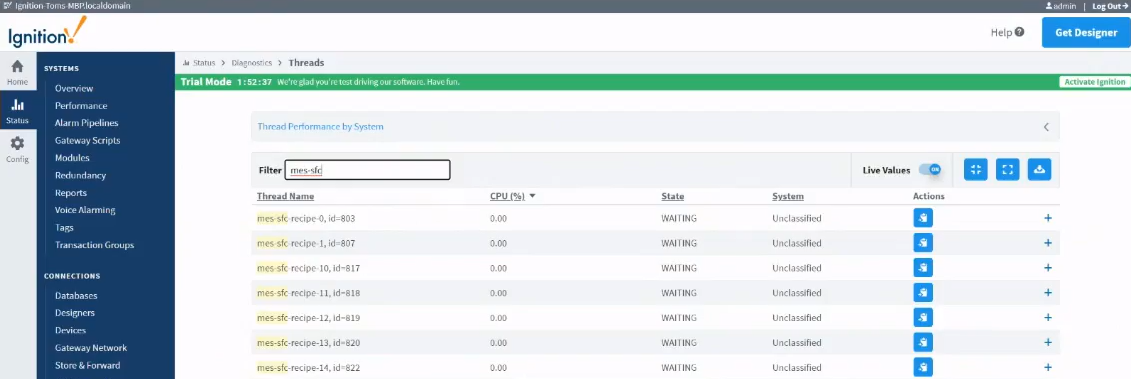
Version Specific

|
In Stable Version 3.81.7 up to current version. |
| Thread Name |
|---|
mes sfc recipe <number increments> <batchID>
Includes the batch ID and then increments a number starting at 1 for the number of threads during execution. |
Adjust the thread-pool sizes for batch execution in the Ignition.conf file.
See settings for the following below:
| - | Logic Thread-Pool Size | Used to execute batch recipes |
| - | Manual Thread-Pool Size | Used to manually execute steps |
| - | Action Thread-Pool Size | Used with phase actions that use a shared scheduled thread |
Logic Thread Pool Size
Python |
com.sepasoft.batch.logic-thread-pool-size |
Controls the thread pool size used to execute batch recipes including:
- transitions,
- evaluating conditional branches,
- maintaining parallel executions, and
- controlling the activation of steps.
The maximum is 2000, the minimum is 25, and the default is 250 threads.
A thread can support multiple logic items (procedure, unit procedure, and operation). Over 2000 active batches supported,
Manual Thread Pool Size
Python |
com.sepasoft.batch.manual-execute-thread-pool-size |
Controls the thread pool size used to manually execute steps.
- when users initiate manual steps or
- the system.mes.batch.queue.executeStep() script function is used.
The maximum is 200, the minimum is 5, and the default is 25 threads.
Setting this to 200 means that you can manually initiate executing 200 steps concurrently across all running batches.
You can also, separate the manual executor thread pool from the logic executor to keep the performance of the logic high when executing steps manually.
Action Thread Pool Size
Python |
batches.com.sepasoft.batch.action-thread-pool-size |
This services phase actions that use a shared scheduled thread.
A maximum of 25, minimum of 5, and the default of 10 threads for a single logic item (procedure, unit procedure, or operation).
Setting this to 25 means 100s of phases that use a shared thread can be serviced.
Batch Phases that use a shared thread:
- No Action,
- E-Signature,
- Document,
- Script,
- Set Parameter,
- Start,
- Terminator,
- User Message
The remaining phase types use dedicated threads.
Example Ignition.conf entries to adjust the default values:
Python |
wrapper.java.additional.5=-Dcom.sepasoft.batch.logic-thread-pool-size=100 wrapper.java.additional.6=-Dcom.sepasoft.batch.manual-execute-thread-pool-size=10 wrapper.java.additional.7=-Dcom.sepasoft.batch.action-thread-pool-size=15 |