Scripting Guide: Overriding Inherited Custom Properties
In many enterprise systems, objects can inherit custom properties from parent objects in their hierarchy, such as a production line inheriting a default setting from its parent site. This inheritance mechanism is powerful for establishing default values across the system. However, a common challenge arises when developers need to programmatically override an inherited value for a specific object.

|
Summary of Key Points: To successfully override an inherited custom property via scripting, it is essential to remember the following key points.
|
 | Simply using a standard function like setPropertyValue() will fail, as it is designed to modify existing local properties, not inherited ones. This article provides a clear, step-by-step procedure for correctly overriding inherited custom properties through scripting. |
The Core Principle: Local Property Precedence
Understanding the system's property hierarchy is essential for effective scripting. The system is designed with a clear rule of precedence: properties defined directly on an object take priority over properties inherited from its parents.
To override an inherited value, you cannot modify the inherited property itself. Instead, you must create a new, local custom property on the target object that has the exact same name as the inherited property. When resolving a property's value, the system's hierarchy rule dictates that it immediately returns the value of any local property, halting its search before it ever reaches the inherited version. This local property acts as the override. The following sections detail the precise scripting method to implement this principle correctly.
Step-by-Step Procedure for Overriding
This section provides a clear, sequential method for correctly overriding an inherited property via scripting. Following these steps ensures that the local override is created properly before the new value is assigned.
Verify Inheritance Before attempting an override, your script must first confirm that the property is indeed inherited. This is done by programmatically checking two conditions: that the property name exists in the object's list of inherited properties (getInheritedProperties()) and that it does not exist in the object's list of local custom properties (getCustomProperties()). This check prevents accidental creation of duplicate properties or errors.
Create the Local Override Property This is the most critical step and relies on a method that is not immediately obvious—in fact, it was identified by exploring the application's source code. Once inheritance is confirmed, you must create the local property to act as the override. To create the local override, you must use the specific method call: object.addCustomProperty(inheritedProps.get(propName), True). This command uses the definition of the inherited property to create an identical local copy on the object. Using this precise method is crucial for successfully establishing the local override.
- Set Value and Save With the local property now in place, you can assign the new value. Use the standard setPropertyValue(propName, 'New Value') method on the object. Because the local property now exists, this call will succeed. Finally, commit the change to the system by calling object.save().
These steps will be demonstrated in the complete script example in the following section.
Code Example
Python |
#Base line, custom property doesn't exist ent = system.mes.loadMESObjectByEquipmentPath('Enterprise') line1 = system.mes.loadMESObjectByEquipmentPath('Enterprise\Enterprise Site\Area\New Line - 0') line2 = system.mes.loadMESObjectByEquipmentPath('Enterprise\Enterprise Site\Area\New Line - 1') propName = 'NewInheritedCustomPropTest' print ent.getPropertyValue(propName) print line1.getPropertyValue(propName) print line2.getPropertyValue(propName) print '-' * 10 # Add to the Enterprise ent.addCustomProperty(propName, 'String') ent.setPropertyValue(propName, 'Enterprise Value') ent.save() # Reload after saving ent = system.mes.loadMESObjectByEquipmentPath('Enterprise') line1 = system.mes.loadMESObjectByEquipmentPath('Enterprise\Enterprise Site\Area\New Line - 0') line2 = system.mes.loadMESObjectByEquipmentPath('Enterprise\Enterprise Site\Area\New Line - 1') print ent.getPropertyValue(propName) print line1.getPropertyValue(propName) print line2.getPropertyValue(propName) print '-' * 10 # Override the value for line 1 customProps = line1.getCustomProperties() inheritedProps = line1.getInheritedProperties() # If it does not exist on the object, create # it so the value can be different from the inherited value if not customProps.containsKey(propName) and inheritedProps.containsKey(propName): line1.addCustomProperty(inheritedProps.get(propName), True) line1.setPropertyValue(propName, 'Line Value') line1.save() #Reload after saving ent = system.mes.loadMESObjectByEquipmentPath('Enterprise') line1 = system.mes.loadMESObjectByEquipmentPath('Enterprise\Enterprise Site\Area\New Line - 0') line2 = system.mes.loadMESObjectByEquipmentPath('Enterprise\Enterprise Site\Area\New Line - 1') print ent.getPropertyValue(propName) print line1.getPropertyValue(propName) print line2.getPropertyValue(propName) print '-' * 10 |
Script Deconstruction
Phase 1: Baseline & Inheritance Setup
This initial block establishes a baseline by confirming the property NewInheritedCustomPropTest does not exist on any object.
It then adds this property to the top-level Enterprise object, sets its value to Enterprise Value, and saves the change.
Phase 2: The Override Logic
This block implements the core verification check: if not customProps.containsKey(propName) and inheritedProps.containsKey(propName):.
Upon confirming inheritance, it executes the critical override command line1.addCustomProperty(inheritedProps.get(propName), True) to create the local property on line1.
It uses setPropertyValue to assign the new 'Line Value' and save() to commit the change specifically for line1.
Phase 3: Verification
- The multiple print statements after each phase are used to demonstrate the state of the properties and confirm the successful override.
The output from this script provides clear proof of each stage of the process, as analyzed in the next section.
Verification and Expected Output
This section presents the console output generated by the example script. Each block of output corresponds to a phase in the script, clearly demonstrating the state of the custom properties at each step.
Python |
None None None ---------- True Enterprise Value Enterprise Value Enterprise Value ---------- True Enterprise Value Line Value Enterprise Value ---------- |
Output Analysis
Initial State The first block, showing None for all three objects, confirms the baseline state. The property NewInheritedCustomPropTest does not exist anywhere in the hierarchy before the script begins its main work.
After Inheritance The second block demonstrates successful inheritance. After the property is added to Enterprise, the output confirms that both line1 and line2 now report the inherited value of Enterprise Value. The True value is a system confirmation that the property was successfully set on the parent object before the subsequent values are printed.
After Override The final block of output is the ultimate proof of success. It shows that line1 now has the specific value of Line Value, while the parent Enterprise object and the sibling line2 object both retain the original Enterprise Value. This confirms that the override was applied correctly and was isolated to the intended target object. The initial True value in this block confirms the successful save operation on line1.
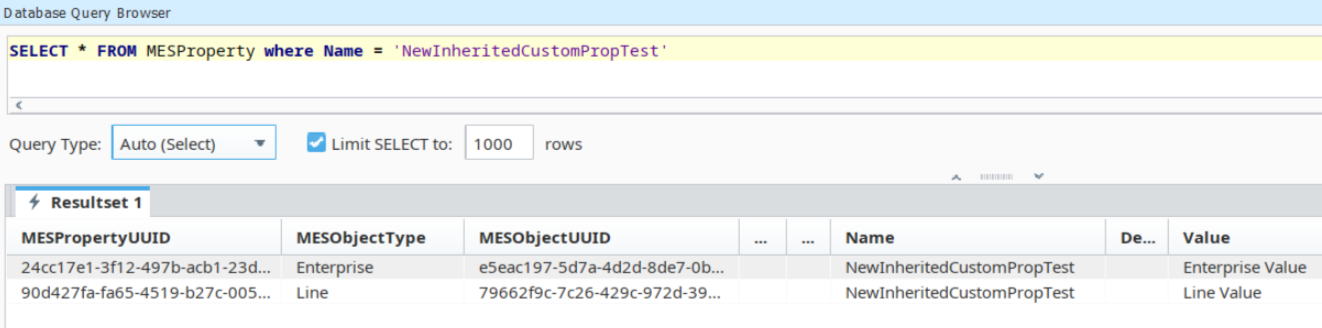
MES Database