Sepasoft MES Module Suite
File Monitor Controller
An invisible component that handles detecting, reading and parsing functions to provide reading data in files. The term invisible component means that this component appears during design time, but is not visible during runtime.

|
Not intended for very large files. Parsed Files are loaded into memory. |
Component Palette
Example 1
File monitor component can be used to move a file to a specific location. For this, first give the current location of the file in the File Path property of the component. Now specify the destination location in Move To Directory Path property.
| Property Name | Value |
|---|---|
| File Path | C:\Users\Sarah\Downloads\aaa.txt |
| Move To Directory Path | C:\Users\Sarah\Desktop\ |
| File Processing Priority | 0 |
| After Processing Handling | 1 |
Example 2
File monitor component can be used to parse a file.
For this, right click on the component and hit scripting. Select the OnAfterParse event handler and click on the Script Editor tab. Copy the following script so that the contents inside the parsed text file is rendered with the label component.
Code |
|
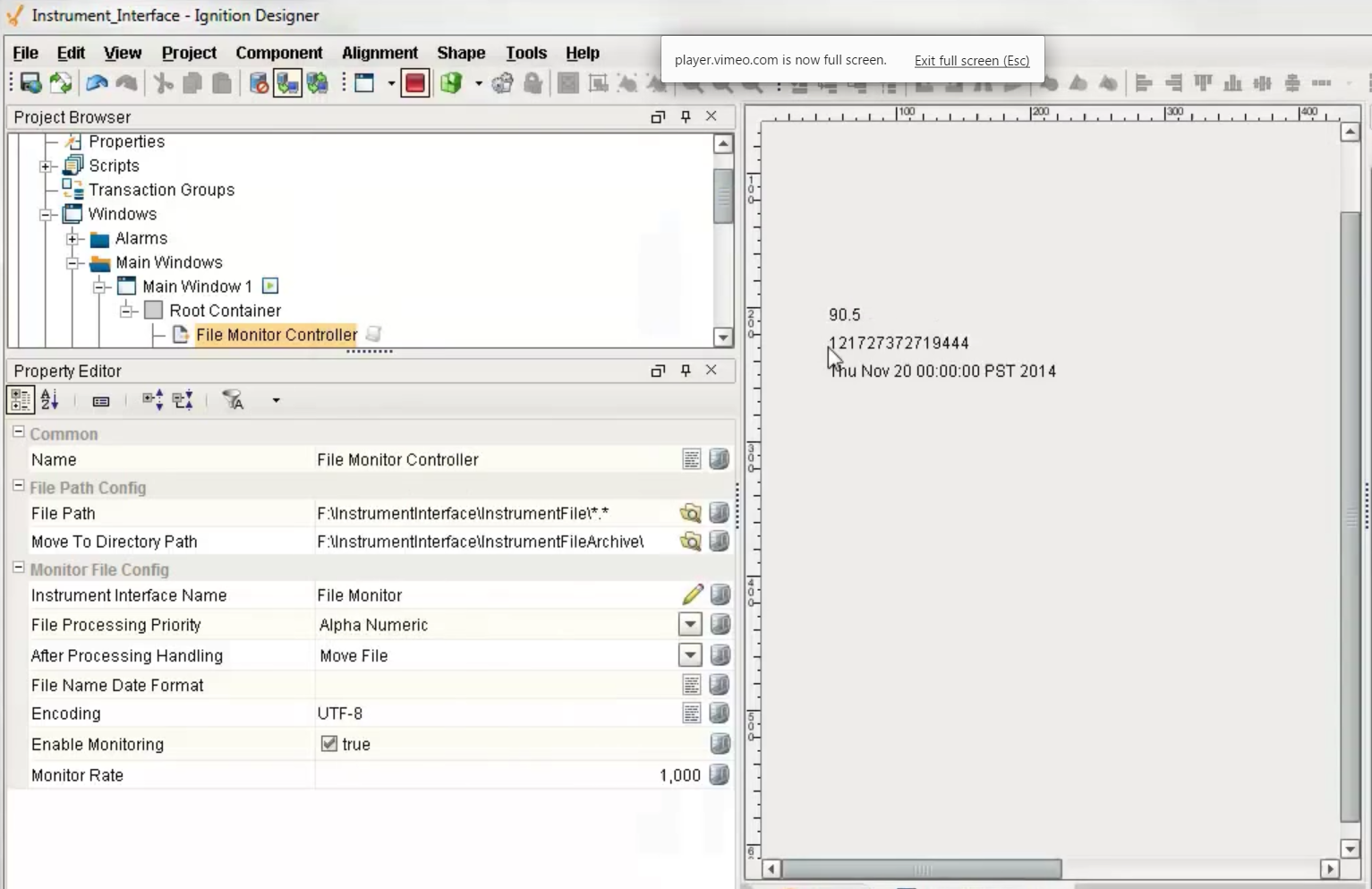
In the preview mode, the Ignition designer appears as the following.
Features
In design time, the last raw data read from a file can be sent to the selected template defined by the Instrument Interface Name by right clicking on the component in the Ignition designer and selecting the Send to Template menu item. This will also select and display the template and replace the existing textual data with the last raw data read.
If the Enable Monitoring property is selected and the designer is preview mode or client has the window open that contains a file monitor component, this component will actively look for files to process. The files that it will process are specified by the File Path property and can contain wildcard characters.
Component Properties
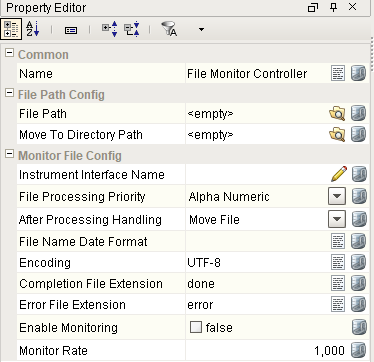
Properties are provided that can be set to affect the operation and look of the component. They can be set through the Property Editor in the Designer or through scripting.
Example
Code |
|
Info

|
In design time, the last raw data read from a file can be sent to the selected template defined by the Instrument Interface Name by right clicking on the component in the Ignition designer and selecting the Send to Template menu item. This will also select and display the template and replace the existing textual data with the last raw data read. If the Enable Monitoring property is selected and the designer is preview mode or client has the window open that contains a file monitor component, this component will actively look for files to process. The files that it will process are specified by the File Path property and can contain wildcard characters. This component will perform a test lock on the file prior to processing to insure that writing to the file is complete. This prevents processing a file before it is ready. This is an important feature, if processing of a file starts and data is still being written to the file it will wither cause errors or incomplete data will be processed. |
File Path Config
| Name | Scripting | Property Type | Description |
|---|---|---|---|
| File Path | filePath | String | File path or directory path of file(s) to process. |
| Move To Directory Path | moveToDirectoryPath | String | If After Processing Handling is set to Move File, the directory to move processed file to. |
Monitor File Config
| Name | Scripting | Property Type | Description |
|---|---|---|---|
| Instrument Interface Name | instrumentInterfaceName | String | Name of the instrument interface configuration name to use. |
| File Name Date Format | fileNameDateFormat | String | Date format used when determining the order to process files. |
| Encoding | encoding | String | Character encoding. |
| Enable Monitoring | enableMonitoring | Boolean | If true, presents of files will be monitored. |
| Monitor Rate | monitorRate | int | Interval in milliseconds to monitor file existence. |
Status
| Name | Scripting | Property Type | Description |
|---|---|---|---|
| Last File Read At | lastFileReadAt | DateTime | Date and time the last file was read at. |
| Last File Processed | lastFileProcessed | String | Name and path of the last file processed. |
| Error Message | errorMessage | String | Error message. |
Event Handlers
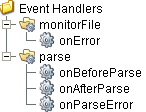
Event handlers provide the ability to add custom script when a user interacts with a component.
monitorFile
onError
Is fired when an error occurs during reading file contents. The errorMessage property can be read to get the error message.
| Property | Description |
|---|---|
| .source | The component that fired this event. |
| .errorMessage | Is fired when an error occurs on the the serial communication port. The errorMessage property can be read to get the error message. |
parse
onBeforeParse
Is fired before raw data is sent to the parsing engine to be parsed. This provides a method for the raw data to be modified before being parsed. It can be useful to remove unwanted characters or merging more data into the raw data before parsing.
| Property | Description |
|---|---|
| .source | The component that fired this event. |
| .data | Modified data to send to the parsing engine. |
onAfterParse
Is fired after the raw data has been parsed.
| Property | Description |
|---|---|
| .source | The component that fired this event. |
| .parseResults | Object containing all the values that were parsed from the raw data. |
| .data | Parsed data. |
Code Snippets
Code |
|
Extension Functions
This component does not have extension functions associated with it.
Custom Methods
Custom methods allow you to add your own component functions to a component that can be called through scripting. This is a useful and clean method of re-using script that is specific to the component (say you want to update a visual aspect of the component in the same way whether a user clicks on the component or a window property value changes).
Customizers
This component does not have any custom properties.
Component Functions
This component provide the following functions that can be called on it. If this component has been dropped onto the windows root container, the path and an example call would be event.source.parent.getComponent('File Monitor Controller').read().
read()
- Description
Check existence of and process one files. If multiple files exist only one file is processed because the ParseResults are returned.
- Parameters
None
- Return
ParseResults - Returns a ParseResults object containing all the values that were parsed from the raw data.
- Scope
Client
read(fileName)
- Description
Check existence of and process one files. If multiple files exist only one file is processed because the ParseResults are returned.
- Parameters
String fileName - File path to file to process if it exists.
- Return
ParseResults - Returns a ParseResults object containing all the values that were parsed from the raw data.
- Scope
Client
parseText(template, text)
- Description
- Parameters
String templateName - The template to use for parsing the text.
String text - The text to be parsed.
- Return
ParseResults object
- Scope
Client
Sepasoft MES Module Suite