Sepasoft MES Module Suite
ISA95 Summary and Sepasoft Compliance
The ISA95 standard provides a consistent operational model and terminology that is a foundation for providing a communication flow between ERP, MES and SCADA systems.
See Sepasoft ISA-95 Compliance Statement.

|
ISA originally stood for Instrument Society of America and as a group, they have set many standards used for automation. Today, ISA have evolved into more than just instruments and beyond America, and as a result changed their acronym to stand for International Society of Automation. |
Plant floor control systems are designed to control processes and machines, but are not well suited to handle much production data. They can make control decisions in the 5ms to 200ms range, but have limited historical storage and database capabilities. ERP systems tend to be more transactional based and are well suited to process financial, inventory, receivables, etc. They handle customer orders, checking if additional raw material should be ordered, paying vendors, financial reporting, that can be updated anytime during a day, week, month, quarter or even year.
Between the plant floor control systems and the ERP sits the Manufacturing Execution System (MES) also known as the Manufacturing Operations Management (MOM).
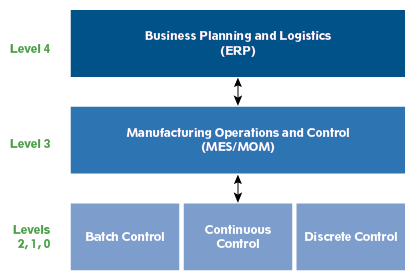
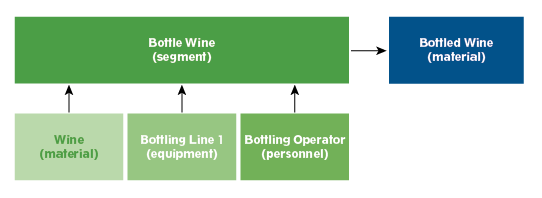
Production Tasks And Segments within ISA-95 Standard
ISA-95 provides the concept of segments to define any task that is done during manufacturing. Tasks all require input resources in terms of material , equipment and personnel . The image shows a basic task (segment) for Bottling Wine that has three input resources, Wine, Bottling Line 1 and a Bottling Operator, and one output product Bottled Wine.
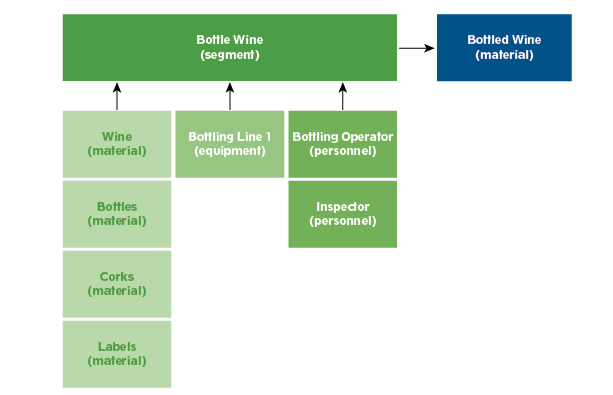
Adding Trace-ability and Production Control to Task Segments
If more detail is desired for lot trace-ability and/or production control, then more input resources can be added to the Bottle Wine segment. Bottles, Corks and Labels, all of which are material, have been added to the segment. Also, an Inspector has been added as personnel. There is no limit to the number of input resources that can be added to a segment.
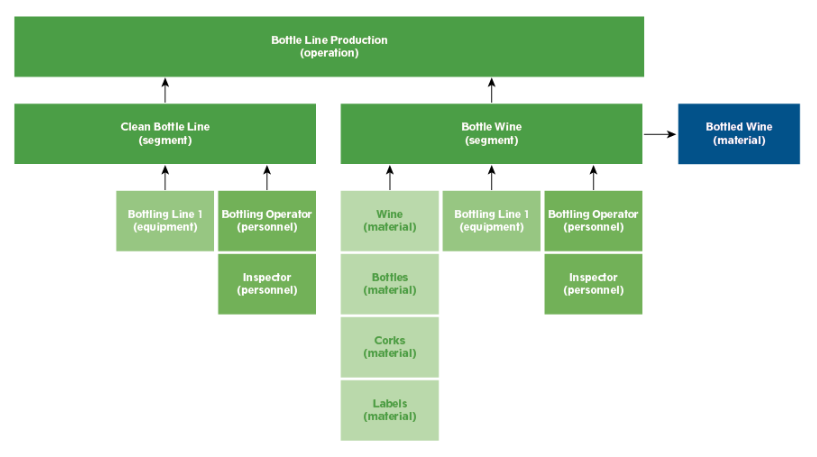
Segmenting Production
Production may involve more than just one task/segment. This is accomplished by including multiple segments into an operation. You can track and schedule segments within operations.
Sepasoft Software Framework for Production
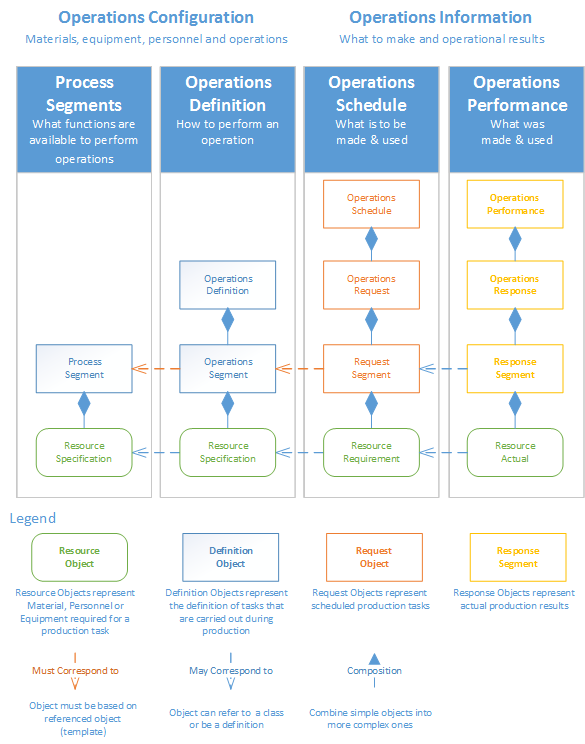
Operation Configuration consists of:
- Process Segments: Process Segments provide functions/tasks used in Operations Segments
- Operation Definitions: Operation Definitions (Definition Objects) define how to perform the Operations Segments.
Production Run consists of:
- Resource Object: represents the input resources
- Definition Object: defines the tasks/segments within production
- Request Object: represent scheduled production tasks/segments
- Response Segment: represents actually production-run results.
Equipment Resources within ISA-95 Standard
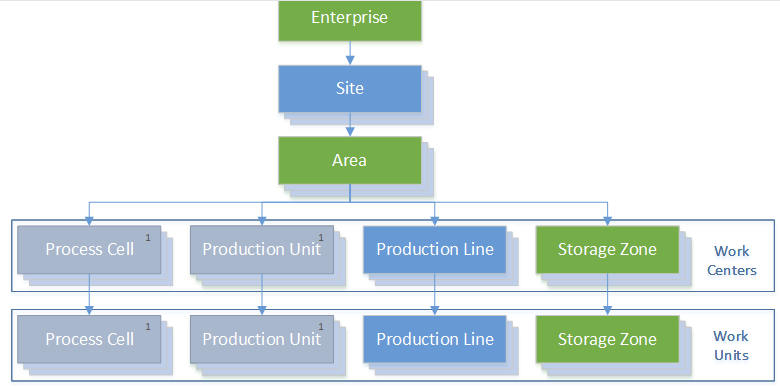
Any automated production or processing that is done requires equipment. Manual production or processing is done at a location such as unloading at a dock. The dock is the location where the production or processing is taking place. It can also be manually adding an antenna at a work cell. In the Sepasoft MES system, there are two types of equipment, fixed equipment (process machines) and supplemental equipment (tooling or mobile).
Fixed equipment is defined in the production model using in the Ignition designer and is organized into a hierarchy that starts at the top and works down to the equipment. This model is used to define equipment that is relatively permanent. This means equipment that tags are used to read information from and send control information down to during production. Because tags are involved, this type of equipment is defined in the Ignition Designer. Other rolling or tooling equipment that do not use tags can either be configured in the Ignition Designer, MES object editor or from the built-in scripting language.
Supplemental equipment, such as tooling and rolling equipment, can be defined either in the Ignition Designer or in the Ignition client.
Defining production tasks for each specific piece of equipment is very tedious. A better method would be to organize the equipment into categories, or classes, using ISA-95 terms. An example will make this clearer with fewer words. Consider five packaging lines in a packaging area where three of them can package mixed nuts and the remaining two cannot. Creating a mixed nuts equipment class with the three lines within it allows a single task to be defined specifying that a mixed nuts equipment resource is required.
Material Resources within ISA-95 Standard
Any production or processing that is done tends to involve materials such as the raw materials that go into finished goods. It may also be considered a consumable or by-product that is not directly related to the finished goods. Material definitions are used to define these materials. Consider the following case: if we are assembling an electronic product, then we will have electronic components, including a circuit board, that will each have material definitions. The components will be soldered to the circuit board and will have a material definition for the sub assembly. Next, the circuit board will be added to the housing which will have a material definition that represents it. This will continue until the finished goods are complete. It may even include accessories that are sold with the finished product. Each will have a material definition. Think of this way, in order to know which lots of components were used to make a batch of circuit boards, then material definitions are needed.
Defining production tasks for each specific material is very tedious. A better method would be to organize the material into categories, or class using ISA-95 terms. An example will make this clearer with fewer words. Consider unloading electronic components at a receiving dock. Defining a task to receive each type of component would be a management nightmare. Instead all of the components can be added to an Electronic Component class and when the operator does the receive components task at the dock, it prompts them for the specific component that belongs to the Electronic Components class. Only one Receive Components task has to be defined, which is much easier to manage.
Personnel Resources within ISA-95 Standard
Any production or processing that is done may involves people. Personnel can be tracked and production control over who can start an operation is supported. The person can be automatically selected based on their Ignition login or it can be selected by other means.
MES Person objects are automatically generated from the Ignition users that have first and last names defined. This prevents the default "admin" user from being created in the MES system and showing up in selection lists. When the Sepasoft MES modules first start, the MES Person objects are synchronized and then will be synchronized on a hourly basis thereafter. They can also be synchronized on demand using a script function.
Defining production tasks for each specific person is very tedious. A better method would be to organize the people into categories, or classes in ISA-95 terms. An example will make this clear with fewer words. Consider unloading vinegar at an unloading pump station. If there are ten operators who are qualified to unload vinegar, then creating a Vinegar Unload Operator class containing the ten qualified operators will require just one unload vinegar task definition. Adding an eleventh operator is as simple as adding that person to the Vinegar Unload Operator class.
Sepasoft MES Module Suite