Sepasoft MES Module Suite
MES Document Viewer | Vision
A component that is used to view and interact with HTML documents in the manufacturing environment.
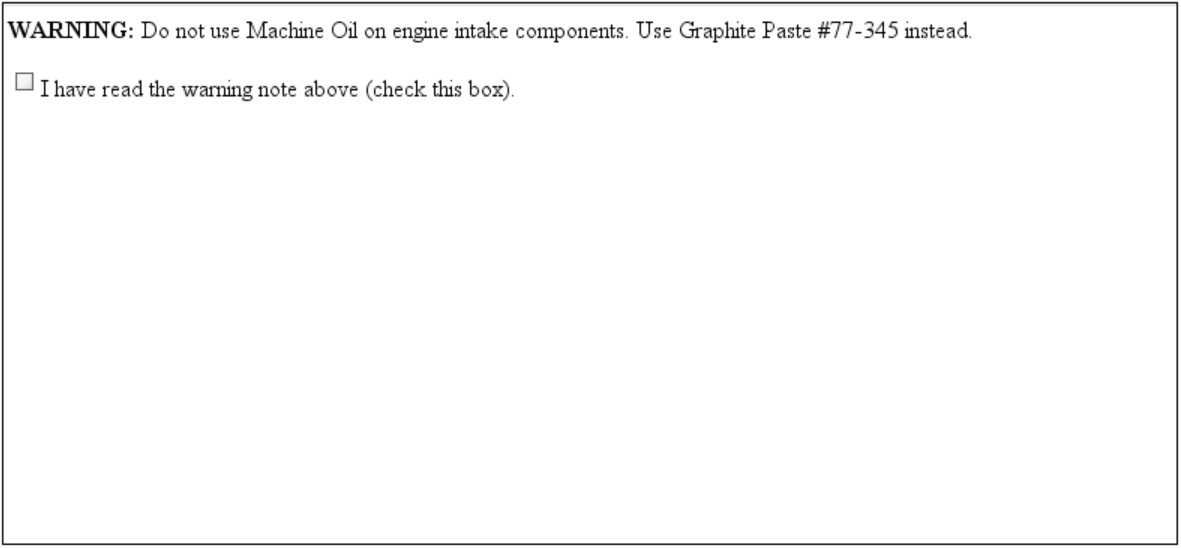
onSaveEntries Extension Function
The onSaveEntries extension function exposes user inputs in the Viewer component for use in other parts of the application, error checking, or to trigger other tasks based on user responses. After the user executes the component's .save() function (usually placed in an Ignition Button near the MES Document Viewer component), the onsaveEntries extension function provides a Python dictionary of all input values selected or entered in the Viewer, which can be parsed for completeness, accuracy or gathering sample data.
If the user must correct or re-do the entries, the script can optionally display an appropriate message and then return a value of False, to force the user to make changes to the selections or data entries. If the script determines that the user entries are acceptable, then it can return True, which causes a save of the document, with all current selections and data entries, either by overwriting any previously-saved data (document's versioned property = False), or by creating a copy as a new version, with the current date and time (versioned = True).
Component Properties
Properties are provided that can be set to affect the operation and look of the component. They can be set through the Property Editor in the Designer or through scripting.
Python |
event.source.parent.getComponent('MES Document Viewer').visible = True |
Data
| Name | Scripting | Property Type | Description |
|---|---|---|---|
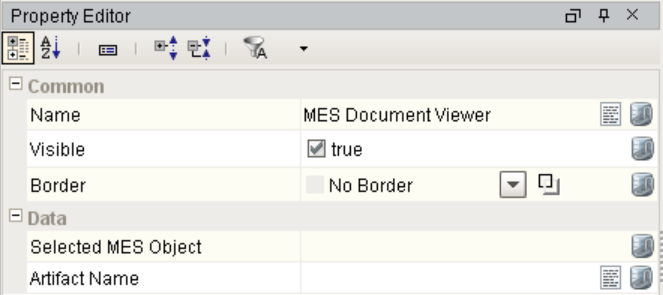
| Selected MES Object | selectedMESObject | MESObjectLink | MES Object to load document from and store document to. |
| Artifact Name | artifactName | String | The name of the artifact to load document from and store document to. |
Event Handlers
Event handlers provide the ability to add custom script when a user interacts with a component and a component property changes.
propertyChange
propertyChange
Fires whenever a bindable property of the source component changes. This works for standard and custom (dynamic) properties.
| Property | Description |
|---|---|
| .source | The component that fired this event. |
| .newValue | The new value that this property changed to. |
| .oldValue | The value that this property was before it changed. Note that not all components include an accurate oldValue in their events. |
| .propertyName | The name of the property that changed. NOTE: Remember to always filter out these events for the property that you are looking for! Components often have many properties that change. |
Extension Functions
onSaveEntries
- Description
Called when save() function is executed on the MES Document Viewer Component. It provides a Python dictionary of all input values selected or entered in the Viewer, which can be parsed for completeness, accuracy or gathering sample data.
- Parameters
PyDictionary inputValues - A Python dictionary of input values entered by the operator.
- Returns
Nothing
- Scope
Client
Example
Code |
#Read in all user-entered values from the document on save() reworkText = inputValues['rework'] radio = inputValues['radiogroup'] torqueString = inputValues['TorqueSetting'] if torqueString == '': torqueString = '0' torque = float(torqueString) step1 = inputValues['cb1'] step2 = inputValues['cb2'] step3 = inputValues['cb3'] step4 = inputValues['cb4'] #Fail if no radio button has been selected if radio == '': msg = "Must choose New or Rework" system.gui.messageBox(msg, "CHOOSE NEW OR REWORK") return False #Fail if Rework radio button is selected but message < 5 chars elif radio == 'rb2' and len(reworkText) < 5: msg = "Enter a defect description" system.gui.messageBox(msg, "ENTER DEFECT DESCRIPTION") return False #Fail if all the instruction steps aren't checked off elif (step1 and step2 and step3 and step4) == False: msg = "Not all steps are marked as complete" system.gui.messageBox(msg, "MARK ALL STEPS AS COMPLETE") return False #Fail if the torque value isn't within tolerance elif ((torque < 30) or (torque > 35)): msg = "Torque must be between 30-35 ft-lbs" system.gui.messageBox(msg, "RETORQUE BOLTS") return False #Pass the 'doc submit' (operator completed the form correctly) else: msg = "ENGINE INTAKE ASSEMBLY COMPLETED" system.gui.messageBox(msg, "ENGINE INTAKE ASSEMBLY COMPLETED") return True |

Custom Methods
Custom methods allow you to add your own component functions to a component that can be called through scripting. This is a useful and clean method of re-using script that is specific to the component (say you want to update a visual aspect of the component in the same way whether a user clicks on the component or a window property value changes). See Component Custom Methods in the Ignition Help Manual for more information.
Customizers
The custom properties can be used to add user defined properties.
Component Functions
This component does not have functions associated with it.

|
Note: After the two-hour Ignition trial period has expired, the contents in the viewing pane of the MES Document Viewer will no longer be visible when in Preview mode. |
Sepasoft MES Module Suite