Sepasoft MES Module Suite
Events on MES Objects
Events provide the ability to add custom scripting in your application based on certain events. Most MES Objects have specific events that are fired during the life cycle of the object, such as object creation New. The New event fires every time a new instance of an object is created.
Events can be viewed and edited from Project Browser in Ignition Designer > MES Scripts > MES Object Events. Whenever an event is fired, an MESScriptEvent object is passed to the event. You can use this object to get information about the event and the object.
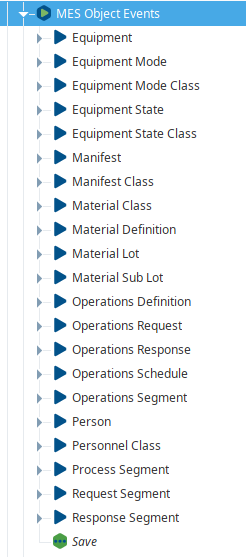

|
MES 3.81.6 SP5 and later You may need to know when an object is saved so that you can trigger another action such as a menu system in the project can be updated. With the Save event, you can evaluate the object saved and take action accordingly. The Save event triggers after the save occurs. Target use for performance: WARNING: Running scripts on a Save event can negatively affect performance. |
Event Types
There are two types of MES Object events:
- System Events: provided by default and cannot be deleted.
- Custom Events: can be created and scripts can be added for both system and custom events in the MES Scripts > MES Object Events section of the Project Browser of the Ignition Designer to alter what happens when these events are triggered.
Adding Scripts to System Events
Scripts can be added to change the standard behavior of system events and add functionality when custom events are triggered. This is done in the MES Scripts > MES Object Events section of the Project Browser of the Ignition Designer. Click on the event and add the script in the Script window.
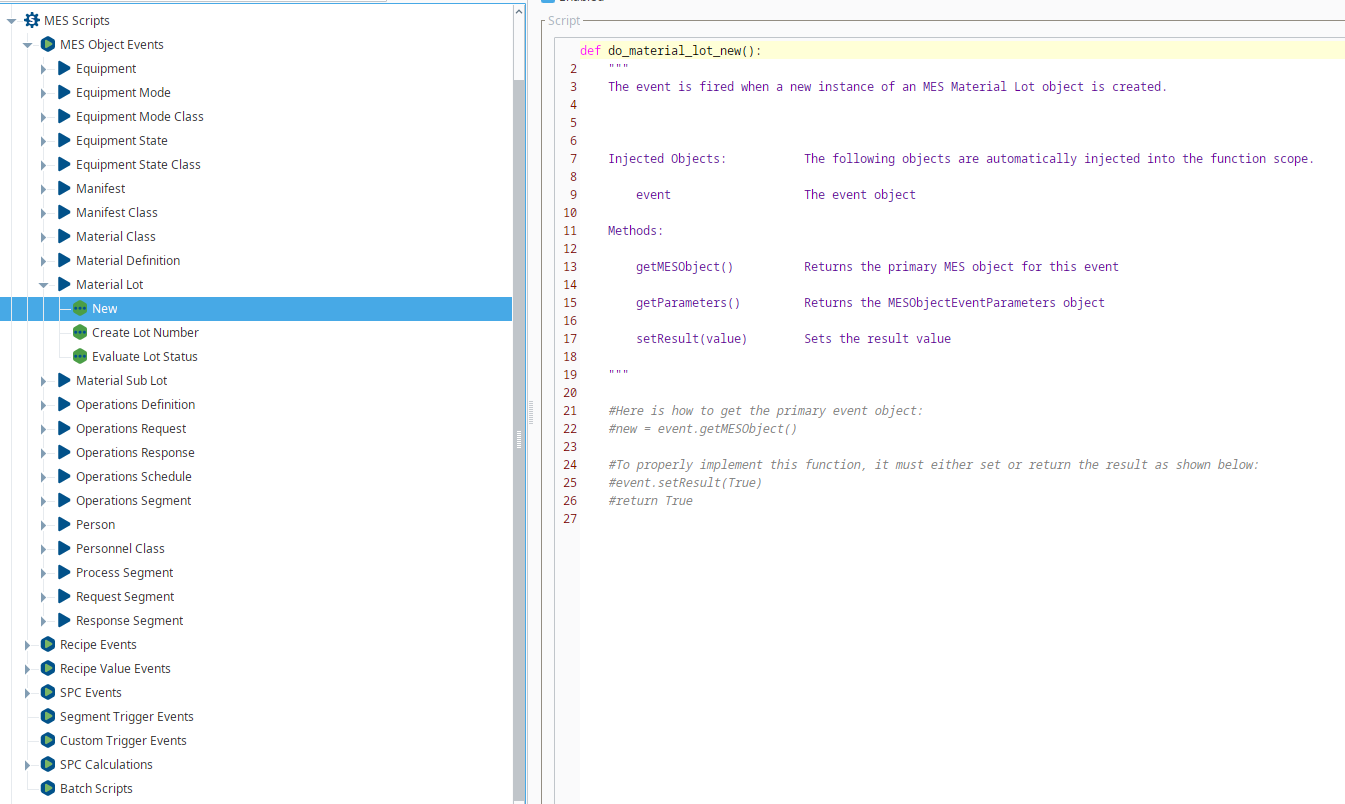
| |
System events have default behavior that occurs whenever the event fires. When you add a custom script to an event, the custom script fires overriding the default behavior. If you also want the default behavior to occur, add event.runDefaultHandler() to the custom script. |
Creating New Custom Trigger Event Script
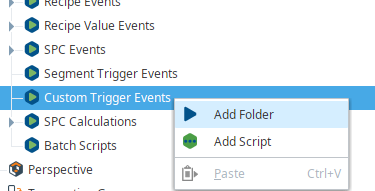
Custom events can be created by right-clicking on Custom Trigger Events in the MES Scripts > Custom Trigger Events section of the Project Browser and selecting Add Script. These events fire whenever they are called using the system.mes.executeMESEvent scripting function.
Code Examples
Add Custom Property to New MES Object
Python |
#Create a new parameter collection instance. params = system.mes.object.parameters.create() #Add parameters to it. params.put('Kind', 'Dressing') params.put('Priority', 'High') #Print the parameter values. print params.size() |
MESScriptEvent Object
Whenever an event occurs, an MESScriptEvent object is passed to the script window. The following object functions are provided to allow you to access the MES Object itself as well as execute any default behavior.
runDefaultHandler()
Description
Executes the built-in logic for the event. This allows pre or post logic to be executed around the built-in logic or completely replace the built-in logic. Note that user events will not have a default handler and no logic will be executed if this function is called.
Syntax
runDefaultHandler()
- Parameters
None
- Returns
Nothing
getMESObject()
Description
Returns the MES object that the event is being executed for.
Syntax
getMESObject()
- Parameters
None
- Returns
AbstractMESObject - The MES object associated with the event.
getParameters()
Description
Return the MESObjectEventParameters object that contains any parameter values
Syntax
getParameters()
- Parameters
None
- Returns
MESObjectEventParameters object
setResult(value)
Description
Set the return result. When a MES events requires a result value, this helper function can be used in place of using the script event.getParameters().put('Result', value)
Syntax
setResult(value)
- Parameters
boolean Value of the result to return. False will cause the Recipe Event to 'fail out' and abort the intended action (selecting or cancelling a recipe).
- Returns
Nothing
- Scope
All
MESObjectEventParameters Object
This object is used with the MESScriptEvent object to pass parameters to the MES object event and holds name value pairs where the name is a string and value is any value type of object. This object is typically used when executing user MES object events to allow passing values to the event script. The system.mes.object.parameters.create() script function can also be used to create a new instance of this object. The following object functions are available:
get()
Description
Get the value of a parameter by name.
Syntax
get(parameterName)
- Parameters
String parameterName - The name of the parameter to return the value for.
- Returns
Object - The type return matches the type when the parameter was added to the collection using the put() function. If the parameter name does not exist in the collection, None is returned.
- Scope
All
Code Snippet
Python |
#Create a new parameter collection instance. params = system.mes.object.parameters.create() #Add parameters to it. params.put('Kind', 'Dressing') params.put('Priority', 'High') #Print the parameter values. print params.size() |
Output
Python |
|
put()
Description
Add a name value pair to the parameters collection.
Syntax
put(parameterName, value)
- Parameters
String parameterName - The name of the parameter to add to the parameters collection.
String value - The value of the parameter.
- Returns
Nothing
- Scope
All
Code Examples
Code Snippet
Code |
|
size()
Description
Get the number of parameters in the parameter collection.
Syntax
size()
- Parameters
None
- Returns
Integer - description
- Scope
All
Code Examples
Code Snippet
Code |
|
Output
Code |
2 |
Sepasoft MES Module Suite