Sepasoft MES Module Suite
MES Schedule Entry
This object holds information about scheduled and actual start and end times, and provides links for the associated Operations Schedule, Operations Request, Request Segment and Operations Response objects.

|
This object is one of the few objects that is not derived from the Abstract MES Object and therefore does not inherit its functions or properties. |
Object Creation
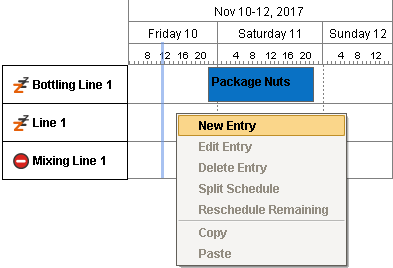
This object is created whenever an MES Work Order table entry is dropped onto the MES Schedule View component or a schedule entry is created by right-clicking on the MES Schedule View component.
This object is passed by the userMenuItemClicked event handler for MES Schedule View component. The following scripting functions also return this type of object as part of the MESObjectList:
Object Functions
- getActualEndDate()
- getActualStartDate()
- getCategory()
- getDefaultToolTipText()
- getLabel()
- getMESOperationsRequestLink()
- getMESOperationsResponseLink()
- getMESOperationsScheduleLink()
- getOriginalEndDate()
- getOriginalStartDate()
- getOriginalState()
- getProgressPercent()
- getScheduledEndDate()
- getScheduledStartDate()
- getState()
- getStateAsString()
- getUserScheduledEndDate()
- getUserScheduledStartDate()
- getWorkOrderLink()
- hasMESOperationsRequestLink()
- hasMESOperationsResponseLink()
- hasMESOperationsScheduleLink()
- hasState()
getActualEndDate()
Returns the DateTime that the operation actually ended. This property will read back as "None" until the operation actually ends.
getActualEndDate()
- Parameters
None
- Returns
Date actualEndDate - The DateTime that the operation actually ended. "None" until the operation has actually ended.
- Scope
All
getActualStartDate()
Returns the DateTime that the operation actually began. This property will read back as "None" until the operation actually begins.
getActualStartDate()
- Parameters
None
- Returns
Date actualStartDate - The DateTime that the operation actually began. "None" until the operation has actually begun.
- Scope
All
getCategory()
Gets the category of this schedule entry.
getCategory()
- Parameters
None
- Returns
String category - The category of this schedule entry. Active and Actual are reserved for currently active and completed respectively. Custom categories are also acceptable.
- Scope
All
getDefaultToolTipText()
Returns the tool tip text with details of schedule start, end and progress.
getDefaultToolTipText()
- Parameters
None
- Returns
The tool tip text for this schedule entry.
- Scope
All
getLabel()
Gets the label for this schedule.
getLabel()
- Parameters
None
- Returns
String label - The label corresponding to this schedule entry.
- Scope
All
getMESOperationsRequestLink()
Returns the link to this operations request object.
getMESOperationsRequestLink()
- Parameters
None
- Returns
MESObjectLink mesOperationsRequestLink - The link to the operations request object.
- Scope
All
getMESOperationsResponseLink()
Returns the MES link to the operations response object.
getMESOperationsResponseLink()
- Parameters
None
- Returns
MESObjectLink mesOperationsResponseLink - The link corresponding to operations response object.
- Scope
All
getMESOperationsScheduleLink()
Returns the MES object link to the operations schedule object.
getMESOperationsScheduleLink()
- Parameters
None
- Returns
MESObjectLink - The link to the operations schedule object.
- Scope
All
getOriginalEndDate()
Returns the DateTime that the operation was originally scheduled to end. This does not change, regardless of later changes to the operation's schedule or when it actually ended.
getOriginalEndDate()
- Parameters
None
- Returns
Date originalEndDate - The DateTime that the operation was originally scheduled to end. Retains the same DateTime value, regardless of scheduling changes to the operation prior or during the run.
- Scope
All
getOriginalStartDate()
Returns the DateTime that the operation was originally scheduled to begin (start). This does not change, regardless of later changes to the operation's schedule or when it actually began (started).
getOriginalStartDate()
- Parameters
None
- Returns
Date originalStartDate - The DateTime that the operation was originally scheduled to begin (start). Retains the same DateTime value, regardless of scheduling changes to the operation prior or during the run.
- Scope
All
getOriginalState()
Returns the original state of this schedule entry.
getOriginalState()
- Parameters
None
- Returns
Integer originalState - The state at which the schedule started.
- Scope
All
getProgressPercent()
Gets the progress of work done in percentage for this schedule.
getProgressPercent()
- Parameters
None
- Returns
double progressPercent - The percentage of work done for this schedule entry.
- Scope
All
getScheduledEndDate()
Returns the currently-scheduled end DateTime, taking into account automatic delays by the system. This DateTime changes minute by minute if the current time causes the schedule to be pushed out.
getScheduledEndDate()
- Parameters
None
- Returns
Date scheduledEndDate - The currently-scheduled end DateTime, taking into account automatic delays by the system.
- Scope
All
getScheduledStartDate()
Returns the currently-scheduled begin (start) DateTime, taking into account automatic delays by the system. This DateTime changes minute by minute if the current time causes the schedule to be pushed out.
getScheduledStartDate()
- Parameters
None
- Returns
Date scheduledStartDate - The currently-scheduled begin (start) DateTime, taking into account automatic delays by the system.
- Scope
All
getState()
Gets the integer corresponding to state of this schedule entry. The corresponding integer values for each state are as follows:
|
State
|
State Name
|
Description
|
|---|---|---|
| 0 | Selected | The schedule entry has been selected (clicked on) by the user and is being edited. |
| 1 | Auto - Incomplete | The schedule entry is in Auto mode (set to start automatically) but has not yet started. |
| 2 | Auto - Active | The schedule entry is in Auto mode (set to start automatically) and is currently running. |
| 3 | Auto - Complete | The schedule entry is in Auto mode (set to start automatically) and has completed. |
| 4 | Manual - Incomplete | The schedule entry is in Manual mode but has not yet started |
| 5 | Manual - Active | The schedule entry is in Manual mode and is currently running. |
| 6 | Manual - Complete | The schedule entry is in Manual mode and has completed. |
| 7 | Faulted | The schedule entry is faulted. |
getState()
- Parameters
None
- Returns
Integer state - The state of this schedule entry.
- Scope
All
getStateAsString()
getStateAsString()
- Parameters
None
- Returns
String state - The state of this schedule entry.
- Scope
All
getUserScheduledEndDate()
Returns the end DateTime most recently scheduled by the user. This is the latest schedule the user has set for the operation via script or by dragging in the Schedule View component. This DateTime does not change when the system pushes the schedule out automatically.
getUserScheduledEndDate()
- Parameters
None
- Returns
Date userScheduledEndDate - The end DateTime most recently scheduled by the user via script or by dragging in the Schedule View component. Doesn't change when system automatically pushes schedule out.
- Scope
All
getUserScheduledStartDate()
Returns the begin (start) DateTime most recently scheduled by the user. This is the latest schedule the user has set for the operation via script or by dragging in the Schedule View component. This DateTime does not change when the system pushes the schedule out automatically.
getUserScheduledStartDate()
- Parameters
None
- Returns
Date userScheduledStartDate - The begin (start) DateTime most recently scheduled by the user via script or by dragging in the Schedule View component. Doesn't change when system automatically pushes schedule out.
- Scope
All
getWorkOrderLink()
Get the reference to MES Work Order object.
getWorkOrderLink()
- Parameters
None
- Returns
MESObjectLink workOrderLink - The object link that represents the MES Work Order object.
- Scope
All
hasMESOperationsRequestLink()
Checks the existence of an MES link to the OperationsRequest object.
hasMESOperationsRequestLink()
- Parameters
None
- Returns
boolean mesOperationsRequestLink - True, if there is any link corresponding to OperationsRequest object and False otherwise.
- Scope
All
hasMESOperationsResponseLink()
Checks the existence of an MES link to the operations response object.
hasMESOperationsResponseLink()
- Parameters
None
- Returns
boolean mesOperationsResponseLink - True, if there is any link corresponding to operations response object and False otherwise.
- Scope
All
Sepasoft MES Module Suite