Sepasoft MES Module Suite
Operations Definitions
This object is used to define processes at the highest level. An Operations Definition holds one or more Operations Segments (basic tasks) to form a single process with multiple steps.
ISA95 Object Model Inter-Relationships:
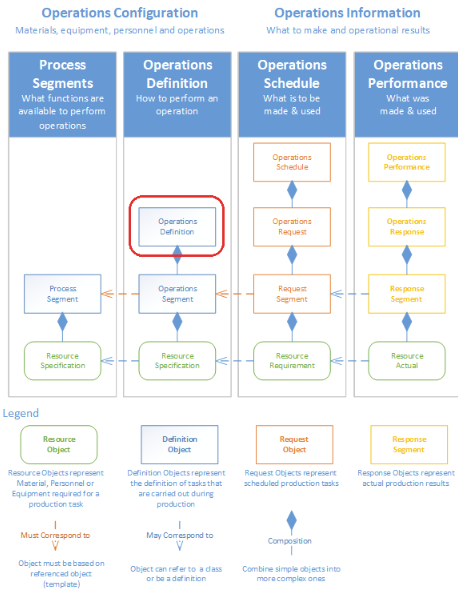
Commonly, there will be a one-to-one relationship of an Operations Definition (i.e. Unload Material) to a single Operations Segment (Unload Material). Operations Segments, the individual tasks under a process, are themselves derived from a Process Segment (Unload Material), which is the base definition of a production task. In an application, an operation is selected, the segment within the operation is selected and response objects are created from the segment objects. The Operations Response object holds the actual production results (or a link to the Response Segments) for a given operation. Response Segment objects are created that hold the actual production results under the Operations Response.
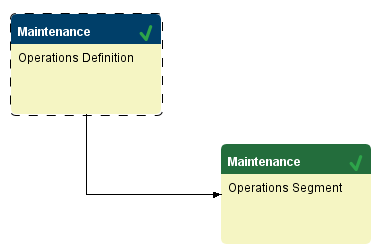
The Operations Definition object is derived from the MESAbstractObject and inherits all of its exposed properties, functions, and events.
Linking Operation Segments within an Operations Definition
Information about Operations Segments that are dependents of an Operations Definition is stored by the Segment Dependency Property object of the Operations Definition object.
The
MES Object Editor can be used to add and remove Operations Segments of an Operations Definition. This can also be done through scripting.
Linking Operations Definitions through Routes
Routes can be created by linking multiple Operations Definitions together through the use of triggers and can be used to maintain scheduling dependencies between operations or for creating a Bill of Process. The MES Object Editor can be used to create the triggers for you or through scripting by adding a Trigger Operation Begin complex property to the Operations Definition object.

Object Creation
The Operations Definition object is primarily created using the MES Object Editor component. When a Process Segment is created, the editor will automatically create the corresponding Operations Definition object for you. We recommend using the MES Object Editor to create these objects so that the needed object properties are setup correctly. However it is also possible to create an Operations Definition through scripting. The following scripting functions can be used to create this object.
Although an Operations Definition object can be created by itself, it generally would be created and linked with one or more operations segments. The code example shows how to derive an operation segment from a process segment that is then added to the newly created Operations Definition object.
|
psName = 'Unload Nuts'
ps = system.mes.loadMESObject(psName, 'ProcessSegment')
os = system.mes.deriveMESObject(ps, 'OperationsSegment', True)
os.setPropertyValue('DerivedFromRefType', 'ProcessSegment')
os.setPropertyValue('DerivedFromRefUUID', ps.getUUID())
os.setPropertyValue('Name', psName)
od = system.mes.createMESObject('OperationsDefinition')
od.setPropertyValue('Name', psName)
depProp = od.createComplexProperty('SegmentDependency', ps.getName())
depProp.setSegmentRefType('OperationsSegment')
depProp.setSegmentRefUUID(os.getUUID())
begTrig = os.createComplexProperty('TriggerSegBegin', 'DefaultBeginTrigger')
begTrig.setPrecedingRefType('OperationsDefinition')
begTrig.setPrecedingRefUUID(od.getUUID())
begTrig.setMode('At Operation Begin')
begTrig.setDefault(True)
objList = system.mes.object.list.createList()
objList.add(od)
objList.add(os)
system.mes.saveMESObjects(objList)
|
Use
The following scripting functions use this object.
Object Properties
These properties are accessible through the MES Object Editor and with the provided object functions, but not directly as obj.properties. Property values can be accessed and changed for an object by using the getPropertyValue() and setPropertyValue() method.
| EnableUpdateEvent | Write | When this setting is set to true, the UpdateProgress event for response segments associated with this operations definition will be executed at the interval rate set in the Update Event Interval. The UpdateProgress event is defined in the Ignition Designer in the MES Events section. |
| UpdateEventInterval | Read/Write | Interval in seconds to run the update event while the operation is active. |
| TrackProgressBy | Read/Write | Production can be tracked by two factors namely, time and material in each segment. The default is to track by time and the option to track by material will only show if in the associated process segment material has been defined and a rate has been specified. |
| ProductionVisible | Read/Write | If true, display operation in the MES Operations selector and MES Schedule View components. |
Complex Properties
The Operations Definition object has two complex properties
Functions
getTrackProgressBy()
Gets the track progress by property.
getTrackProgressBy()
None
String value - The value set for track progress by property.
All
getUpdateEventInterval()
Gets the value for update event interval property.
getUpdateEventInterval()
None
String value - The value set for update event interval property.
All
isEnableUpdateEvent()
Checks whether the update event property is enabled and returns the corresponding boolean.
isEnableUpdateEvent()
None
Boolean True if update event is enabled and False otherwise.
All
isProductionVisible()
Checks whether the operation is visible during production and returns the corresponding booloean. If true, displays operation in the MES Operations selector and MES Schedule View components.
isProductionVisible()
None
Boolean visible - True if the object is visible during production and False otherwise.
All
setEnableUpdateEvent(value)
Sets the value for enable update event interval property.
setEnableUpdateEvent(value)
Boolean value - The value set for enable update event interval property.
Nothing
All
setProductionVisible(value)
Sets the value for production visible property. If set to true, displays operation in the MES Operations selector and MES Schedule View components.
setProductionVisible(value)
Boolean value - The value set for the production visible property.
Nothing
All
setTrackProgressBy(value)
Sets the value for track progress by property.
setTrackProgressBy(value)
String value - The value set for track progress by property.
Options -
Use Time - Update scheduled progress by time elapsed when using fixed time.
Material Out - Update scheduled progress by production count when using count.
Nothing
All
setUpdateEventInterval(value)
Sets the value for update event interval property.
setUpdateEventInterval(value)
String value - The value to set for update event interval property.
Nothing
All
Sepasoft MES Module Suite