Sepasoft MES Module Suite
Serial Controller
The serial controller ihandles serial communications and parsing functions to provide instrument device communications. The component is invisible in runtime meaning that this component appears during design time only. The serial component helps to send and receive information from RS-232 devices.
In design time, the last raw data received from the communication port can be sent to the selected template defined by the Instrument Interface Name by right clicking on the component in the Ignition designer and selecting the Send to Template menu item. This will also select and display the template and replace the existing textual data with the last raw data received.
In runtime, if the Instrument Interface Name property is set, raw data received from the serial communications port will be sent to the parsing engine on the gateway to be parsed. The template used to parse the raw data is named the same as the value of the Instrument Interface Name property.
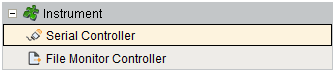
Component Palette
Component Properties
Properties are provided that can be set to affect the operation and look of the component. They can be set through the Property Editor in the Designer or through scripting.
Example
Python |
results = event.getParseResults() if results != None and results.isRequiredValid(): reading = results.getValue("reading") event.source.parent.getComponent('Numeric Text Field').doubleValue = reading.getValue() event.source.parent.getComponent('Sample Entry').populateMeasurement("Viscosity", reading.getValue(), 1) else: system.gui.messageBox("Error reading value from instrument.") |
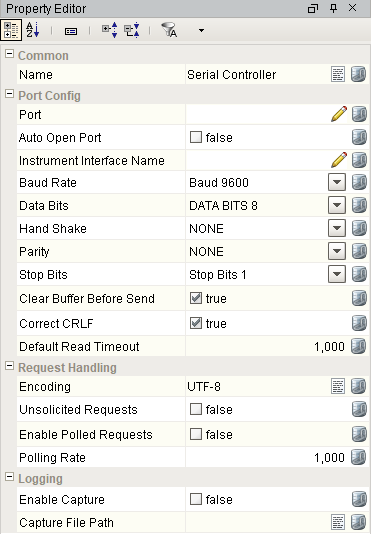
Port Config
| Name | Scripting | Property Type | Description |
|---|---|---|---|
| Port | portName | String | Name of the system serial port to use. |
| Baud Rate | baudRate | int | Serial communication baud rate. |
| Auto Open Port | autoOpen | boolean | If true, automatically open the serial port. |
| Instrument Interface Name | instrumentInterfaceName | String | Name of the instrument interface configuration name to use. |
| Clear Buffer Before Send | clearBufferBeforeSend | boolean | Clear the receive buffer before sending data. |
| Correct CRLF | correctCRLF | boolean | Correct any combination of end of line characters to carriage return (CR) and line feed (LF). |
| Default Read Timeout | defaultReadTimeout | int | Default number of milliseconds to wait while reading. |
Request Handling
| Name | Scripting | Property Type | Description |
|---|---|---|---|
| Encoding | encoding | String | Character encoding. |
| Unsolicited Requests | unsolicitedRequests | boolean | If true, accept unsolicited requests from the device. |
| Enable Polled Requests | enablePolledRequests | boolean | If true, requests are made at a fixed timed interval. |
| Polling Rate | pollingRate | int | Interval in milliseconds to issue poll request. |
Logging
| Name | Scripting | Property Type | Description |
|---|---|---|---|
| Enable Capture | enableCapture | boolean | If true, write all received and sent data to a capture file. |
| Capture File Path | captureFilePath | String | File path on the local computer to create the capture file. |
Port Status
| Name | Scripting | Property Type | Description |
|---|---|---|---|
| Serial Module Loaded | serialModuleLoaded | boolean | If true, the serial module has been installed and is loaded. |
| Serial Port Open | serialPortOpen | boolean | If true, the serial port is open. |
| Last Data Sent At | lastDataSentAt | DateTime | Date and time of last data transmission. |
| Last Data Received At | lastDataReceivedAt | DateTime | Date and time of last data received. |
| Error Message | errorMessage | String | Error message. |
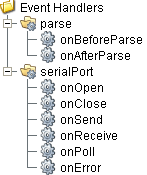
Event Handlers
Event handlers provide the ability to add custom script when a user interacts with a component.
parse
onBeforeParse
Is fired before raw data is sent to the parsing engine to be parsed. This provides a method for the raw data to be modified before being parsed. It can be useful to remove unwanted characters or merging more data into the raw data before parsing.
| Property | Description |
|---|---|
| .source | The component that fired this event. |
| .data | Modified data to send to the parsing engine. |
onAfterParse
Is fired after the raw data has been parsed.
| Property | Description |
|---|---|
| .source | The component that fired this event. |
| .parseResults | Object containing all the values that were parsed from the raw data. |
| .data | Parsed data. |
Code Snippet
Python |
results = event.getParseResults() if results != None and results.isRequiredValid(): reading = results.getValue("reading") event.source.parent.getComponent('Numeric Text Field').doubleValue = reading.getValue() event.source.parent.getComponent('Sample Entry').populateMeasurement("Viscosity", reading.getValue(), 1) else: system.gui.messageBox("Error reading value from instrument.") |
serialPort
onOpen
Is fired when the serial communication port is opened.
| Property | Description |
|---|---|
| .source | The component that fired this event. |
| .errorMessage | Is fired when an error occurs on the the serial communication port. The errorMessage property can be read to get the error message. |
| .stringData | The string data read from the port. |
| .byteData | The byte data read from the port. |
onClose
Is fired when the serial communication port is closed.
| Property | Description |
|---|---|
| .source | The component that fired this event. |
| .errorMessage | Is fired when an error occurs on the the serial communication port. The errorMessage property can be read to get the error message. |
| .stringData | The string data read from the port. |
| .byteData | The byte data read from the port. |
Is fired when data has been sent to the port.
| Property | Description |
|---|---|
| .source | The component that fired this event. |
| .errorMessage | Is fired when an error occurs on the the serial communication port. The errorMessage property can be read to get the error message. |
| .stringData | The string data read from the port. |
| .byteData | The string data read from the port. |
onReceive
Is fired when data has been received from the serial communication port.
| Property | Description |
|---|---|
| .source | The component that fired this event. |
| .errorMessage | Is fired when an error occurs on the the serial communication port. The errorMessage property can be read to get the error message. |
| .stringData | The string data read from the port. |
| .byteData | The byte data read from the port. |
onPoll
Is fired when the serial communications port has been polled for data.
| Property | Description |
|---|---|
| .source | The component that fired this event. |
| .errorMessage | Is fired when an error occurs on the the serial communication port. The errorMessage property can be read to get the error message. |
| .stringData | The string data read from the port. |
| .byteData | The byte data read from the port. |
onError
Is fired when an error occurs on the the serial communication port. The errorMessage property can be read to get the error message.
| Property | Description |
|---|---|
| .source | The component that fired this event. |
| .errorMessage | Is fired when an error occurs on the the serial communication port. The errorMessage property can be read to get the error message. |
| .stringData | The string data read from the port. |
| .byteData | The byte data read from the port. |
Extension Functions
This component does not have extension functions associated with it.
Custom Methods
Custom methods allow you to add your own component functions to a component that can be called through scripting. This is a useful and clean method of re-using script that is specific to the component (say you want to update a visual aspect of the component in the same way whether a user clicks on the component or a window property value changes). See Component Custom Methods in the Ignition Help Manual for more information.
Customizers
This component does not have any custom properties.
Component Functions
This component provide the following functions that can be called on it. If this component has been dropped onto the windows root container, the path and an example call would be event.source.parent.getComponent('Serial Controller').openPort().
openPort()
- Description
Attempts to open the port. If an error occurs the errorMessage property will be set and an exception will be thrown.
- Parameters
None
- Return
Nothing
- Scope
Client
closePort()
- Description
Attempts to close the port. If an error occurs the errorMessage property will be set and an exception will be thrown.
- Parameters
None
- Return
Nothing
- Scope
Client
writeString()
- Description
Write value of the text parameter to the communication port. If an error occurs the errorMessage property will be set and an exception will be thrown.
- Parameters
String text - The text to write to the port.
- Return
Nothing
- Scope
Client
writeBytes()
- Description
Write value of the data parameter to the communication port. If an error occurs the errorMessage property will be set and an exception will be thrown.
- Parameters
byte[] - The byte array to write to the port.
- Return
Nothing
- Scope
Client
readString()
- Description
Reads and returns string data from the communication port. If an error occurs the errorMessage property will be set and an exception will be thrown. If no data is received within the default timeout setting, then an empty string will be returned.
- Parameters
None
- Return
String data - The data read from the port.
- Scope
Client
readString(timeout)
- Description
Reads and returns string data from the communication port. If an error occurs the errorMessage property will be set and an exception will be thrown. If no data is received within the value specified in the timeout parameter, then an empty string will be returned.
- Parameters
Integer timeout - The time in milliseconds to wait for a response from the port.
- Return
String data - The data read from the port.
- Scope
Client
readBytes(count)
- Description
Reads and returns byte array data from the communication port. If an error occurs the errorMessage property will be set and an exception will be thrown. If the number of characters specified by the count parameter are not received within the default timeout setting, then any characters received will be returned.
- Parameters
Integer count - The number of bytes to read from the port.
- Return
byte[ ] The data read from the port.
- Scope
Client
readBytes(count, timeout)
- Description
Reads and returns byte array data from the communication port. If an error occurs the errorMessage property will be set and an exception will be thrown. If the number of characters specified by the count parameter are not received within the value specified in the timeout parameter, then any characters received will be returned.
- Parameters
Integer count - The number of bytes to read from the port.
Integer timeout - The time in milliseconds to wait for a response from the port.
- Return
byte[ ] The data read from the port.
- Scope
Client
readUntil(delimiter, includeDelimiter)
- Description
Reads and returns string data from the communication port up until the character specified by the delimiter parameter. If an error occurs the errorMessage property will be set and an exception will be thrown. If the delimiter character is not received within the default timeout setting, then any characters received will be returned.
- Parameters
Char delimiter - The delimiter to read until.
- Return
boolean includeDelimiter - If true the delimiter will be included in the return value.
- Scope
Client
readUntil(delimiter, includeDelimiter, timeout)
- Description
Reads and returns string data from the communication port up until the character specified by the delimiter parameter. If an error occurs the errorMessage property will be set and an exception will be thrown. If the delimiter character is not received within the value specified in the timeout parameter, then any characters received will be returned.
- Parameters
Char delimiter - The delimiter to read until.
boolean includeDelimiter - If true the delimiter will be included in the return.
Integer timeout - The time in milliseconds to wait for a response from the port.
- Return
byte[ ] The data read from the port.
- Scope
Client
clearBuffer()
- Description
Clear all data existing in the communication port receive buffer. If an error occurs the errorMessage property will be set and an exception will be thrown.
- Parameters
None
- Return
Nothing
- Scope
Client
isSerialSupported()
- Description
Determines if the client serial module is loaded and available to be used with this component.
- Parameters
None
- Return
boolean True if serial support is available.
- Scope
Client
parseText(templateName, text)
- Description
Parses the given text by using the template of templateName.
- Parameters
String templateName - The template to use for parsing the text.
String text - The text to be parsed.
- Return
ParseResults - A ParseResults object (see ParseResults object for information about accessing parsed values contained in the parse results.)
- Scope
Client
Sepasoft MES Module Suite