Sepasoft MES Module Suite
Accessing Custom Properties from Lots
Data associated with manufacturing processes is sometimes most relevant to equipment, the process itself, or material lots/batches involved in the process. Often a use-case for attaching specific meta-data to a material lot or batch arises. If that data is not part of the standard set of data properties for a material lot in Track and Trace, a Custom Property may be used to extend the data model to include the custom data property.
At this point, it is important to understand the differences between the objects in the first sentence above. When discussing materials and custom data properties, we have three types of objects in view, the:
- Material Lot object (the object indicating serial number, quantity, location, and material type)
- Response Segment (think, run-time activity record) material resource
- Material Definition (think, type of material we are working with)
It is important to understand that these three objects can all accept custom properties, extending their respective data models. However all three have different implications for data retrieval and contextualization. Let's look at all three in turn.
A custom property on a Material Lot object will allow the batch or lot in question to carry said information forward with it. A common example will be a quality indicator or test id number.
A custom property on a Response Segment material resource will allow the run-time record of activity to carry said information with it. A common example will be time series data associated with the process broadly that applies to all of the materials processed during the activity in question. In addition a reason for why the run-time material was handled as it was could be associated with the run-time record for said material as seen in Example 2 below.
A custom property on a Material Definition will allow the configuration information to be extended with the custom property. A common example will be specification information or ERP reference/id type data.
Following, there are three examples of custom property data points added and accessed from these three types of objects.
Example 1, Material Lot - Custom Property
In this example, a custom property indicating a specific customer order number is added to the material lot to facilitate routing and priority processing. This type of feature could also be used to indicate custom features for the product.
Add Custom Property to Material Lot after Segment Ends
Python |
response = segment.execute() material_lot = response.getMaterialLot('Material Out') material_lot.addCustomProperty('CustomerOrderID', 'String', 'ERP Reference Order Made-To-Order Number', '', True, False) material_lot.setPropertyValue('CustomerOrderID', 'ABC123') system.mes.saveMESObject(material_lot) ##Reload the object into local memory after the save. material_lot = system.mes.loadMESObject(material_lot.getUUID()) print material_lot.getPropertyValue('CustomerOrderID') |
Though the above seems trivial, it can be quite useful when combined with a custom property value filter.
Example 2, Response Segment Material Resource Property - Custom Property
In this example, a custom property is defined in Test Segment for the Material Complex Property called rejectReason. After the operation is run in the code block below, it a Lot named "123456" is created.
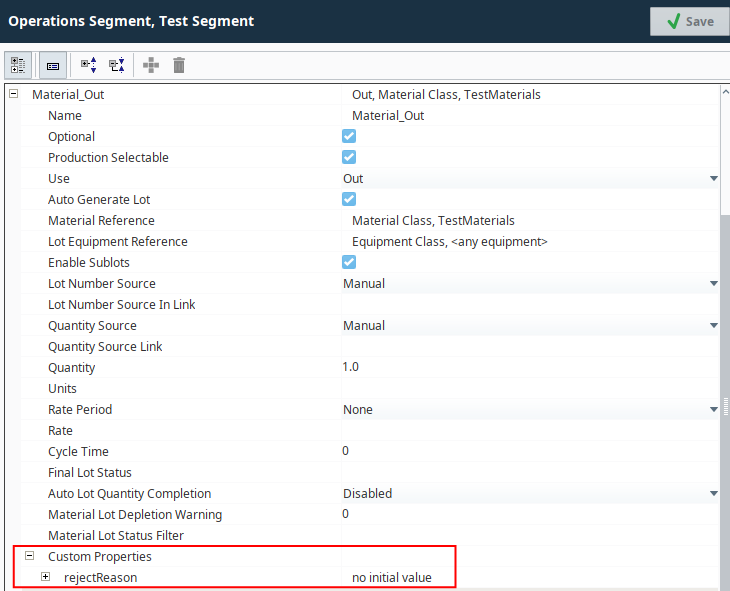
If we want to access that the Custom Property, we will need to follow the trail from the Lot object to the Response Segment to the Material Complex Property to Material_Out and finally to the custom property rejectReason.
This can be done through script, as shown:
Python |
#Fill in your lot ID #get the Response Segment UUID respUUID = system.mes.loadMaterialLot('123456', -1, True).getPropertyValue('ResponseSegmentUUID') #get the actual Response Segment object respSeg = system.mes.loadMESObject(respUUID) #you would get custom properties for the Response Segment here custProp1 = respSeg.getCustomPropertyValues() print respUUID print respSeg print custProp1 #this prints out any any Material Complex Properties that were defined print respSeg.getComplexPropertyItemNames('ResponseMaterial') #Finally, you can now get the Custom Property value for Material_Out customPropertyValues = respSeg.getComplexProperty('ResponseMaterial', 'Material_Out').getCustomPropertyValues() print customPropertyValues |
A dictionary is returned with all of the Custom Properties defined for the Material:
Code |
|
This same method applies to working with any other Custom Property (determine where that property is and check the object model to verify how to get to it).
Example 3 Material Definition - Custom Property
In this example, additional configuration data is attached to the type of material, the Material Definition.
Set MSDS Ref Number to Material Type
Python |
mat_def = system.mes.createMESObject('MaterialDef') mat_def.setPropertyValue('Name', 'Liquid Hydrogen Peroxide') mat_def.addCustomProperty('MSDS_ID', 'String', 'Material Safety Data Sheet Reference ID', '', True, False) mat_def.setPropertyValue('MSDS_ID', 'XYZ987') system.mes.saveMESObject(mat_def) |
If said material data is required in the application, it could be accessed from the Material Definition object directly.
Sepasoft MES Module Suite