Sepasoft MES Module Suite
The event is created to calculate an Anderson-Darling test. This test will determine if a data set comes from a specified distribution, in our case, the normal distribution. The test makes use of the cumulative distribution function.
Brief discussion on the variables used for AD test
The Anderson-Darling statistic AD is given by the following formula:

where n = sample size, F(X) = cumulative distribution function for the specified distribution and i = the ith sample when the data is sorted in ascending order.
The summation portion of the equation is given below, the summation term S in the Anderson-Darling equation:

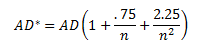
The value of AD needs to be adjusted for small sample sizes. The adjusted AD value is given by:
The p-value is defined as the probability of obtaining a result equal to or "more extreme" than what was actually observed, when the null hypothesis is true. For typical analysis, using the standard α = 0.05 cutoff, the null hypothesis is rejected when p < .05 and not rejected when p > .05. The p-value does not in itself support reasoning about the probabilities of hypotheses but is only a tool for deciding whether to reject the null hypothesis: -wikipedia
Properties
getAd()
getAdStar()
Description
Returns the AD*.
Syntax
getAdStar()
- Parameters
None
- Returns
Double adStar - The AD*.
- Scope
All
getData()
Description
Returns the SPC data.
Syntax
getData()
- Parameters
None
- Returns
AnalysisDataset data - The SPC data.
- Scope
All
getMean()
getMeasurementCount()
Description
Returns the measurement count.
Syntax
getMeasurementCount()
- Parameters
None
- Returns
int measurementCount - The measurement count.
- Scope
All
getPValue()
Description
Get the p-value for the test statistics. If the p-value is less than a chosen alpha (usually 0.05 or 0.10), then reject the null hypothesis that the data come from that distribution.
Syntax
getPValue()
- Parameters
None
- Returns
Double pValue - The p-value of the Anderson Darling Test.
- Scope
All
getS()
Description
Returns the S value in the Anderson Darling Test.
Syntax
getS()
- Parameters
None
- Returns
Double s - The s of the Anderson Darling Test.
- Scope
All
getStandardDeviation()
Description
Returns the actual standard deviation.
Syntax
getStandardDeviation()
- Parameters
None
- Returns
Double standardDeviation - The standard deviation.
- Scope
All
setAd(ad)
setAdStar(adStar)
Description
Sets the AD*.
Syntax
setAdStar(adStar)
- Parameters
Double data - The AD*.
- Returns
Nothing
- Scope
All
setMean(mean)
Description
Sets the mean.
Syntax
setMean(mean)
- Parameters
Double mean - The mean to set for.
- Returns
Nothing
- Scope
All
setPValue(pValue)
Description
Sets the p-value.
Syntax
setPValue(pValue)
- Parameters
Double pValue - The p-value to set for.
- Returns
Nothing
- Scope
All
setS(s)
setStandardDeviation(standardDeviation)
Description
Sets the actual standard deviation.
Syntax
setStandardDeviation(standardDeviation)
- Parameters
Double standardDeviation - The standard deviation.
- Returns
Nothing
- Scope
All
Sepasoft MES Module Suite