Sepasoft MES Module Suite
Chart Functions
Business Connector Blocks use the system.mes function library (these predominately work with MES objects), as well as the new chart-specific functions listed below. These chart functions are available for use in the Script Block to manipulate Chart Parameters (configured in the Start Block), or any of the available Action Values (any of the filtered mapping properties available in any of the Action Blocks in the current chart, plus any of the available B2MML properties).
chart.getParameterValue(parameterPath)
Description
Returns the value of a chart parameter element defined in the Start Block specified by parameterPath.

|
For now, B2MML parameters do not support data validation. That means that it should still throw an error if the data structure is completely different but if you are missing some required nodes it won't complain. B2MML parameters don't get initialized the same way as regular parameters. By default if no value was set, the data will just be a root with the name of the B2MML and no value or children. |
Syntax
chart.getParameterValue(parameterPath)
- Parameters
String parameterPath - The path of the chart parameter in the Start Block.
- Returns
The value of the chart parameter in the Start Block specified by parameterPath.
- Scope
All
Code Examples
If the Chart Parameter is defined as type String:
Code Snippet
Code |
|
Output
Code |
x will contain 'Refurbished Case 14' |
If the Chart Parameter is defined as type Complex, as shown:
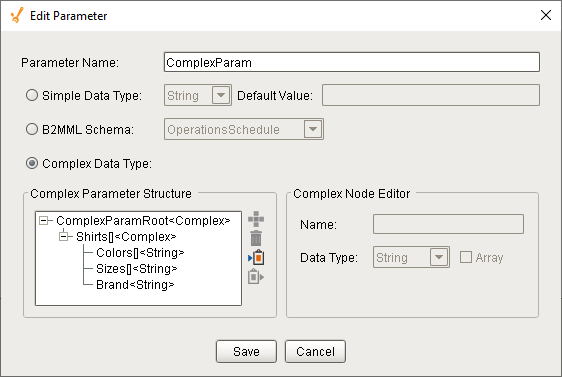
...and the current value of ComplexParam is:
{'ComplexParamRoot' :
{'Shirts' : [
{'Colors' : ['Blue', 'Red'],
'Sizes' : ['S', 'M'],
'Brand' : 'Nike'},
{'Colors' : ['Green', 'Red'],
'Sizes' : ['S', 'M', 'L'],
'Brand' : 'Adidas'}]}}
Code Snippet
Code |
|
Output
Code |
brand will contain 'Reebok' |
chart.setParameterValue(parameterPath, value)
Description
Writes a value to the chart parameter defined in the Start Block specified by parameterPath.
Syntax
chart.setParameterValue(parameterPath,value)
- Parameters
String parameterPath - The path of the chart parameter in the Start Block.
value - The value to be written to the chart parameter in the Start Block.
- Returns
None
- Scope
All
Code Examples
If the Chart Parameter is defined as type String:
Code Snippet
Code |
|
Output
Code |
Chart Parameter newMaterialClass will contain 'Refurbished Case 14' |
If the Chart Parameter is defined as type Complex, as shown:
...and the current value of ComplexParam is:
{'ComplexParamRoot' :
{'Shirts' : [
{'Colors' : ['Blue', 'Red'],
'Sizes' : ['S', 'M'],
'Brand' : 'Nike'},
{'Colors' : ['Green', 'Red'],
'Sizes' : ['S', 'M', 'L'],
'Brand' : 'Adidas'}]}}
Code Snippet
Code |
|
Output
Code |
brand will contain 'Reebok' |
chart.getActionValue(chartPath)
Description
Returns a property value available from any of the Action Blocks in the current chart (e.g. SAP BAPI, SOAP, RESTful).
Syntax
chart.getActionValue(chartPath)
- Parameters
String chartPath - The path to a property value available from any of the Action Blocks in the current chart (e.g. SAP BAPI, SOAP, RESTful).
- Returns
The value of the property specified by chartPath.
- Scope
All
Code Examples
Code Snippet - Chart
Code |
|
Code Snippet - Button
Code |
|
Output
Plastic Sheeting
chart.getUserValue(userValue)
Description
Reads the value of a local variable (chart-scoped, called a User Value) that has been previously created with the chart.setUserValue(userValue, value) function.
Syntax
chart.getUserValue(userValue)
- Parameters
String userValue - The name of the User Value.
- Returns
Object value - The Python object stored in userValue.
- Scope
Chart
Code Examples
Code Snippet
Code |
|
Output

chart.setUserValue(userValue, value)
Description
Sets the value of a local variable (chart-scoped, called a User Value). If the User Value does not exist, it will be created. Values can be any Python object.
Syntax
chart.setUserValue(userValue, value)
- Parameters
String userValue - The name of the new (can be any legal string name) or existing User Value.
Object value - The Python object to be stored in userValue.
- Returns
None
- Scope
Chart
Code Examples
Code Snippet
Code |
|
Output

Sepasoft MES Module Suite