---
title: "Creating a Batch from a Formula"
id: "creating-a-batch-from-a-formula"
project: "MES User Manual"
url: "https://docs.sepasoft.com/articles/user-manual/creating-a-batch-from-a-formula"
updated: 2026-07-31T14:56:14Z
---
# Creating a Batch from a Formula
**Sepasoft MES Module Suite**
### Creating a Batch from a Formula
|  | **Version Specific**
Available in **3.81.11 RC 1 Batch Procedure Module and later.** |
| --- | --- |
|  | The formula and recipe versions must match. If not, sync the formula to the recipe. See [Using Batch Procedure Formula Manager](/articles/user-manual/using-batch-procedure-formula-manager/a/h4_1924450034) - syncing. |
| --- | --- |
**Each formula has a version, state and recipe name. These parameters are used for core functionality of formula management, validation and syncing.**
In Batch Formula Manager, formulas are listed in alphabetical order.
* Select a formula and click the **Create a Batch** icon in the action bar.

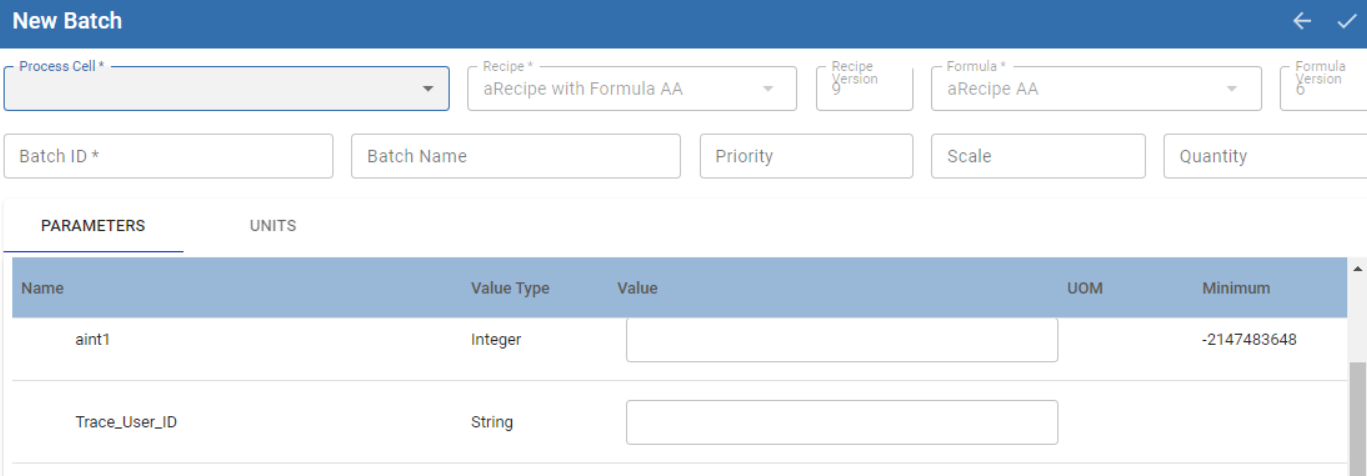
* Select a Process Cell to set where the batch should execute.
* Set the parameter values if different from formula.
* Click the checkmark in the upper right side to add the batch to the batch queue.
The batch goes into the Idle state. You can use **[Batch List](/articles/user-manual/batch-list-queued-batches)**, **[Batch Controller](/articles/user-manual/batch-controller)** and **[scripting functions](/articles/user-manual/system-mes-batch-formula)** to issue batch commands.
#### Create a Batch From Formula via Scripting
| …batch.queue.addEntry(.... Object formulaLink or masterRecipeLink) | BatchQueueEntry | Formula must be validated before it can be used. The “formula” parameter can be a formula object or an object link.
Pass a [MES Object Link for masterRecipeLink](/articles/user-manual/mes-object-link) or pass a formulaLink. Not both. If both are passed, then an exception is returned. |
| --- | --- | --- |
**Sepasoft MES Module Suite**