Sepasoft MES Module Suite
Adding Documents to Batch Procedure Recipes
Documents can be check lists, work instructions, procedures, material safety data sheet (MSDS), etc. Source documents are stored in artifacts of Batch Master Logic objects.
First released in:

|
MES 3.81.8 SP3 - Stable Release Number data-type parameters can be attached to Text input fields. |
The Document Editor component is used to create and edit the content. A visual indicator is shown on Input fields attached to Batch Parameters in the Document Viewer when a specified value is invalid for the datatype or another error is encountered while setting the parameter value.
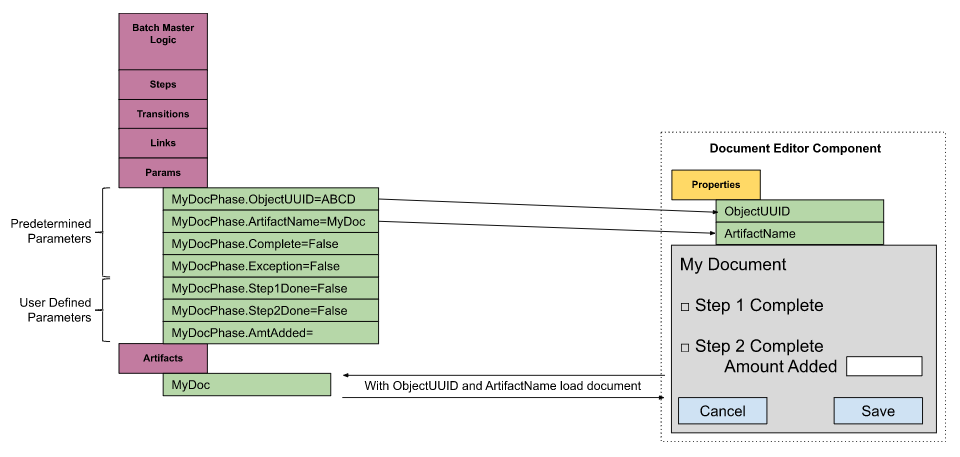
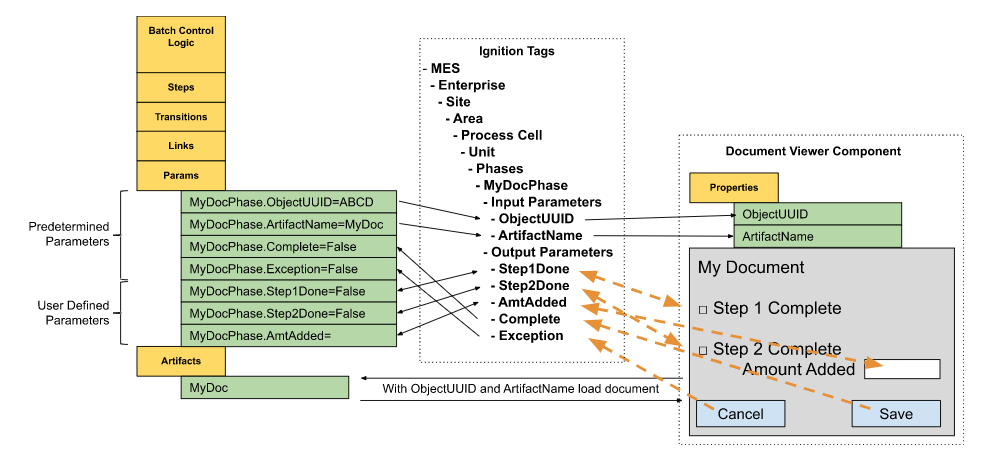
When a batch is created and the batch recipe is created, the source documents that are stored in the artifacts are copied over to the Batch Control Logic object(s).
During a batch, the operator can view documents using the Document Viewer component. Any field entries made by the operator will be saved in artifact(s) of the Batch Control Logic object(s).
Sepasoft MES Module Suite