Equipment Additional Factors
Sepasoft MES Module Suite
Equipment Additional Factors
| Data Point | Data Type | Description | Units |
|---|
<additional_factor_name>.TimeStamp
TimeStamp
| String | When a string data type tag is used to create a new, user-defined Additional Factor, one additional data point will automatically be created and maintained for each: - TimeStamp – The DateTime that this Additional Factor value was last updated (see image below).
| N/A |
<additional_factor_name>.Min
<additional_factor_name>.Max
<additional_factor_name>.Median
<additional_factor_name>.Mean
<additional_factor_name>.Standard Deviation
<additional_factor_name>.TimeStamp
Min
Max
Median
Mean
Standard Deviation
TimeStamp | Int1, Int2, Int4, Int8, Float4, Float8 | When tags of the numeric data types listed to the left are used to create a new, user-defined Additional Factor, six additional data points will automatically be created and maintained for each (calculations are performed using all of the resulting values from that analysis run): - Min – The lowest value among the results.
- Max – The highest value among the results.
- Median – The sum of all the resulting values divided by the number of results.
- Mean – The value where half of the remaining resulting values are larger and half are smaller. For even numbers of values, the mid-point between the mean two values is returned.
- Standard Deviation – (calculated as Sample Standard Deviation) The square root of the average of the squared individual differences of each resulting value from the calculated mean.
- TimeStamp – The DateTime that this Additional Factor value was last updated.
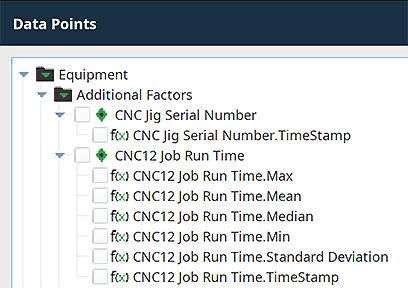 | N/A |
Sepasoft MES Module Suite