Sepasoft MES Module Suite
ERP Integration
Although the Sepasoft MES Modules can be used to create a stand-alone application, allowing you to create product codes, work orders, routes and schedules, it is also possible to integrate your MES solution with a third party ERP or scheduling system to allow for the bi-directional flow of information between ERP and MES. The following section provides a number of possible solutions based on the flow and type of data you can expect to pass between MES and other third party systems. Actual implementation will depend on the interface method employed.
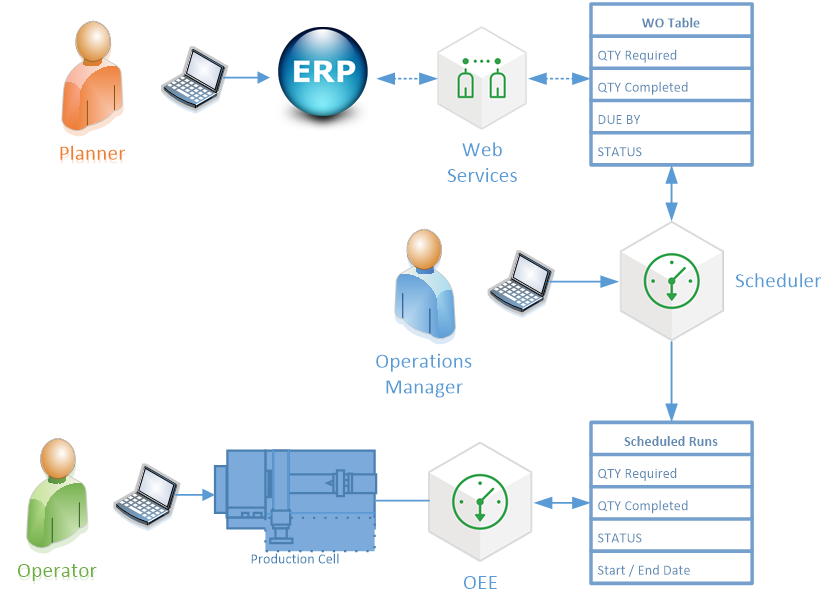
ERP Work Order Scheduling
- ERP Customer Orders or scheduled Process Orders are automatically pulled down from ERP to the MES layer using Web Services or middleware tables
- Operations Management schedules production based on Work Orders or scheduled runs are dynamically created through scripting
- Operator selects a Work Order run or starts an unscheduled production run against a Work Order. Alternatively, production line state change event triggers a production run start
- Production counts are automatically captured and available at the ERP level directly or after approval by Operations Management
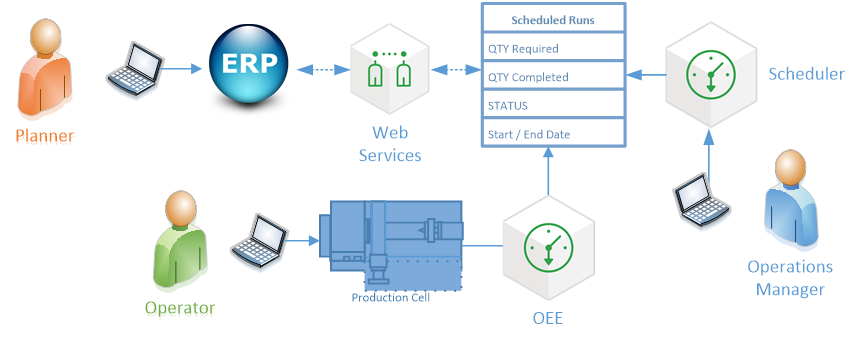
ERP Production Run Scheduling
- Customer Orders are scheduled in ERP by Planner and downloaded to MES as Scheduled Production Runs
- Operations Management can adjust schedules as necessary. Status updates can be sent back to ERP
- Operator selects a scheduled production run. Alternatively, production line status change event triggers a production run start
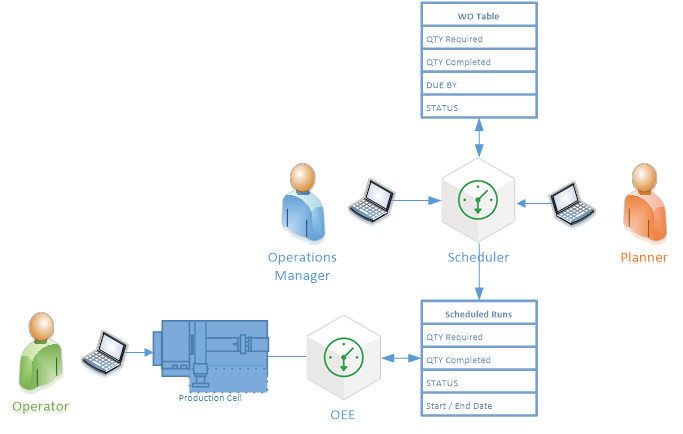
Stand-Alone Work Order Scheduling
- Planner creates Work Orders in MES Layer
- Operation Management schedules Production runs
- Operator selects a scheduled production run or starts an unscheduled production run. Alternatively, production line status change event triggers a production run start
- Production Counts are automatically captured
Sepasoft MES Module Suite