Sepasoft MES Module Suite
In this example chart, the Iteration Block, Decision Block and Aggregation Block have the ability to utilize Chart Parameters with 'Complex Array' parameter nodes created in the Start Block.
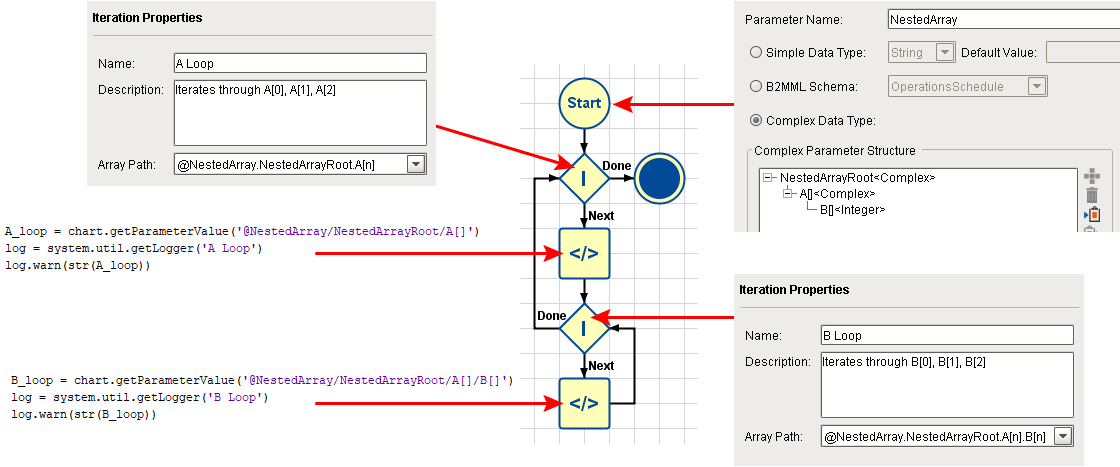
The following example showcases a typical Chart Parameter with complex array parameter nodes, named NestedArray, which is comprised of a root (NestedArrayRoot), a child element (A[ ] ) of type 'Complex Array', and an array of type 'Integer' (B[ ] ) as child of that. It is being fed a value from the calling button script. The chart iterates through each of the four A[ ] elements, and for each one, iterates through all four B[ ] elements.
Start Block
The root level of the Chart Parameter, NestedArray, is created by default. It is empty and requires one or more child elements to be useful.
Child element A[ ] is created as 'Complex Array' since the Array checkbox is checked. This creates an iterable series of empty array elements, starting at 0.
Child element B[ ] is created under A[ ] as data type 'Integer Array' (since the Array checkbox is checked) to hold data values. It is not set as type 'Complex Array' because that would make it an iterable series of empty array elements which would require at least one of its own child elements to hold data values.
Iteration Block: A Loop
This block loops through each instance of the empty complex array element node A[ ], starting with 0.
Note that there are two choices in the drop-down Array Path menu, one for each level of the array. The first is for the empty complex array element node, A[ ], and the second is for the integer array, B[ ]:

Array Path selection for "A Loop" Iteration Block
Script Block: A Loop
This script merely outputs the current value of A[ ] to the Ignition gateway Log. In this example, each instance of A[ ] contains a dictionary of that element's associated integer array, B[ ]:
A[0] → {'B' : [0, 1, 2]}
A[1] → {'B' : [10, 11, 12]}
A[2] → {'B' : [20, 21, 22]}

Log output for "A Loop" Script Block (in this example, for A[0])
Iteration Block: B Loop
This block loops through each instance of the integer array element B[ ] at the current instance of A[ ], starting with 0.
Note that there is no longer two choices in the drop-down Array Path menu. The empty complex array element node, A[ ], has already been claimed by the first Iteration Block, leaving only one remaining choice (the integer array, B[ ]).

Array Path selection for "B Loop" Iteration Block
Script Block: B Loop
This script merely outputs the current integer value of B[ ] at the current instance of A[ ], to the Ignition gateway Log. In this example, each instance of B[ ] contains a series of integers previously assigned by the button script:
A[0] / B[0] → 0
A[0] / B[1] → 1
A[0] / B[2] → 2
A[1] / B[0] → 10
A[1] / B[1] → 11
A[1] / B[2] → 12
A[2] / B[0] → 20
A[2] / B[1] → 21
A[2] / B[2] → 22
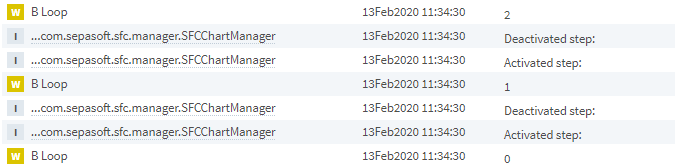
Log output for "B Loop" Script Block (in this example, for A[0])
Button Script
A window with a single Ignition Button component is used to:
- Name the chart to be executed (Nested Iteration).
- Assign integer values to each instance of integer array B[ ] in Chart Parameter NestedArray.
- Pass in NestedArray and execute the chart Nested Iteration.
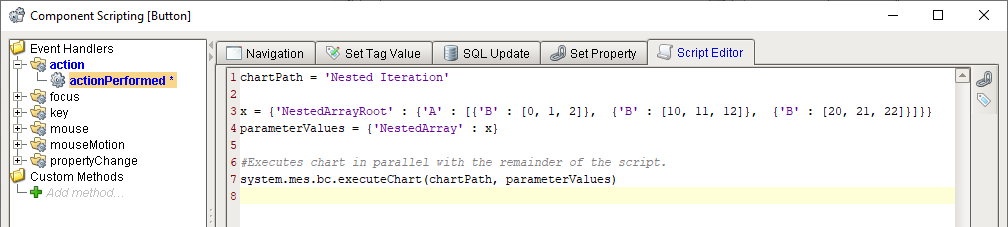
Ignition Button script on window
Log Output
The Ignition gateway Log records the output from the two Script Blocks that use logger commands to write out the current values of A[ ] and B[ ] per the nested chart execution sequence (remember: read from bottom upwards).

Sepasoft MES Module Suite