---
title: "Example - Iteratively Create Material Definitions"
id: "example-iteratively-create-material-definitions"
project: "MES User Manual"
url: "https://docs.sepasoft.com/articles/user-manual/example-iteratively-create-material-definitions"
updated: 2026-07-31T14:56:53Z
---
# Example \- Iteratively Create Material Definitions
**Sepasoft MES Module Suite**
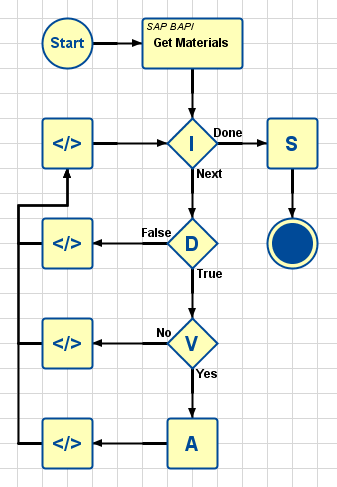
This example chart collects a list of Material Definitions from an SAP database and creates an MES Material Definition object for each.
* * *
### Start Block
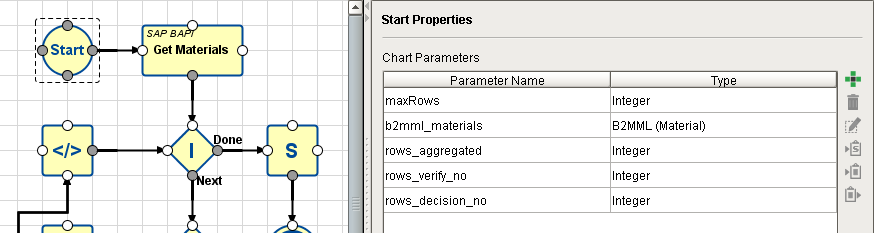
A Chart Parameter called **maxRows** is used to limit the number of SAP entries to fetch from the SAP database. The number will be input into the chart during the chart execution function [executeChart(chartPath, chartParameters, returnChartParameters)](/docs/display/BC/system.mes.bc.executeChart).
| Sample Setting | Description |
| --- | --- |
| maxRows | Integer. Used to pass in to the chart the number of rows to fetch from the database. |
| b2mml\_materials | B2MML array. Used to hold the entries aggregated by the Aggregation Block (one row per loop). |
| rows\_aggregated | Integer. Used to return the count of how many rows were aggregated by the Aggregation Block. |
| rows\_verify\_no | Integer. Used to return the count of how many rows failed the Verify MES Object Block (row data was not a proper MES Object). |
| rows\_decision\_no | Integer. Used to return the count of how many rows failed the Decision Block (equation was False, so decision is "No"). |
* * *
### SAP BAPI Action Block - Properties
This block fetches the Material Definitions from the specified SAP database. It is configured as follows:
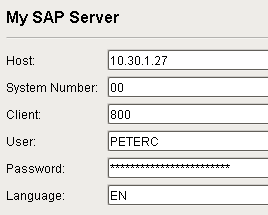
A Destination called **My SAP Server** was previously configured in the **Interface for SAP ERP** section of the Global area in Designer:
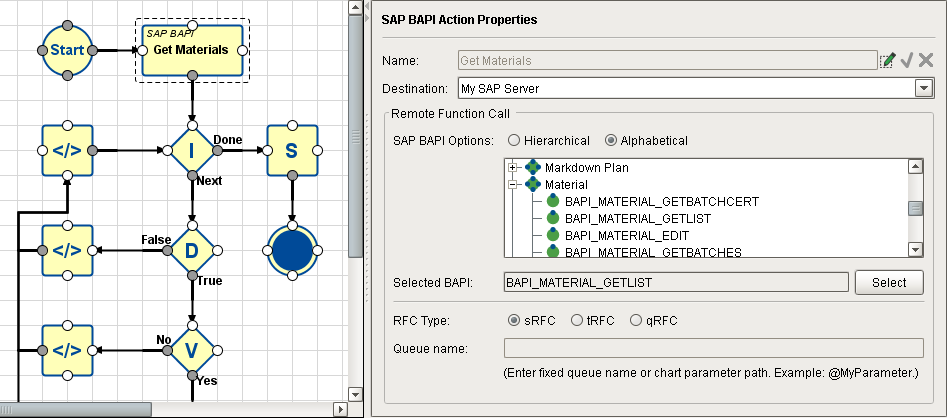
The **Remote Function Call** section is configured to filter down to just the **BAPI\_MATERIAL\_GETLIST** module where the Material Definitions are stored:
| Property | Sample Setting | Description |
| --- | --- | --- |
| Name | Get Materials | Name of the Block (available, if needed, for local use within the chart by other Blocks). |
| Destination | My SAP Server | Selected SAP Connector Destination (created in the Interface for SAP section of the Global area in Designer). |
| SAP BAPI Options
(Hierarchical/Alphabetical)
(tree of available BAPI options) | Alphabetical checkbox and
Material/BAPI\_MATERIAL\_GETLIST | The two checkboxes decide how the tree of available SAP BAPI options below is sorted. Alphabetical is usually chosen if you know the name of the BAPI you want, else drill down to find it in Hierarchical mode. |
| Selected BAPI | (shows the selected BAPI) | Display only. Shows (and remembers) the selected BAPI after the **Select** button is pushed. |
| RFC Type | sRFC | Synchronous Remote Function Call (expects an immediate answer from the receiving system, else an error will be reported). |
| Queue Name | N/A | |
### SAP BAPI Action Block - Mapping
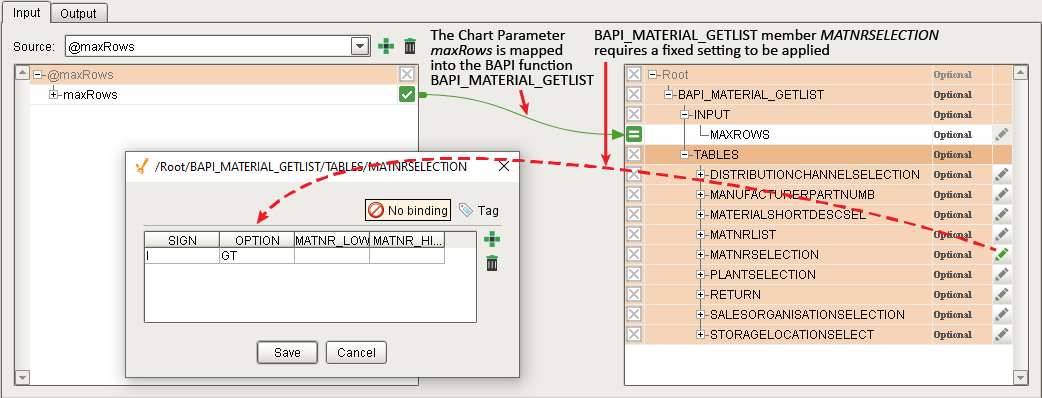
The **Input** tab of the SAP BAPI Action Block includes mapping for the Chart Parameter **maxRows** to be passed into the BAPI function call that the block makes to the SQL database (limits the number of entries fetched). There is also a requirement that **MATNRSELECTION** in **BAPI\_MATERIAL\_GETLIST** be restricted to positive integer values only.
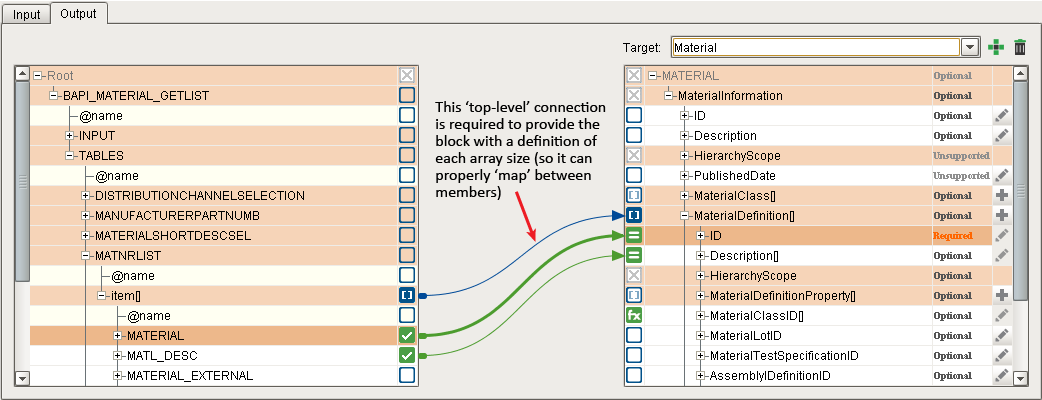
The **Output** tab of the SAP BAPI Action Block includes mapping for **MATERIAL → ID** and **MATL\_DESC → Description**. Note that it must first include a mapping connector at the parent level, to provide the block with a means of knowing the array sizes on both sides so it can map the connections properly. Each member of the **BAPI\_MATERIAL\_GETLIST** will be mapped into a B2MML array that includes Material Definition properties of **ID** and **Description**. These are collected, one at a time by the Aggregation Block in the iteration loop (into the Chart Parameter **b2mml\_materials**), and then turned into MES Material Definition objects by the SAVE MES Object Block.
* * *
### Iteration Block
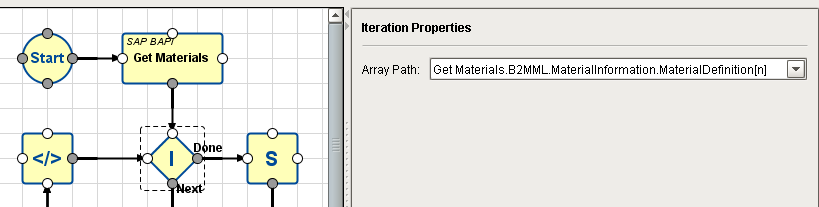
This block increments a pointer to one row of data at a time in the data array selected in the Array Path field. For each row pointed to, control passes to the Block connected to its **Next** output. It accepts a return trigger input (**Next Trigger**) to increment the pointer to the next row. When there are no more rows in the selected data array, it will pass control to the Block connected to its **Done** output.
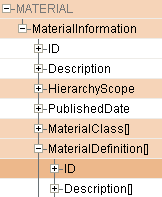
In this example, the path is to **MaterialDefinition** in the B2MML array, **MATERIAL**, which contains the **ID** and **Description** properties that the Aggregation Block will append, one row at a time, to Chart Parameter **b2mml\_materials** (which the Save MES Object Block will later use to create the MES Material Definition Objects).
On each loop through the Iteration Block, the row pointer is incremented and control passes to the Decision Block that is connected to its **Next** output Connector.
Once all rows have been iterated through, control passes to the Save MES Object Block connected to its **Done** output.
* * *
### Decision Block
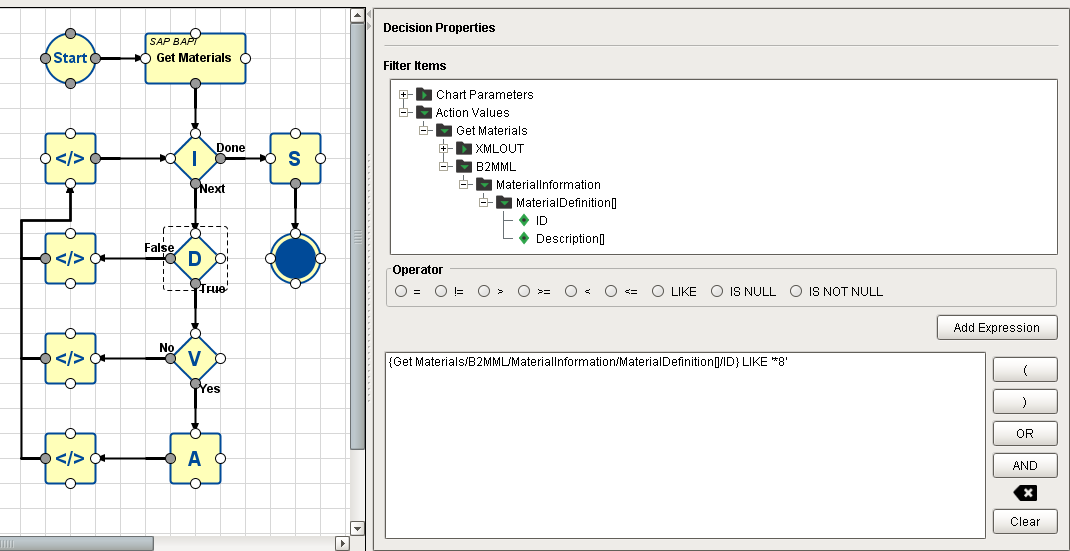
In this example, the expression used to arrive at a 'True' decision is simply whether the last character in the ID property in the row currently being pointed to (by the Iteration Block) is equal to "8" (the asterisk is a wildcard that ignores all the preceding characters). If the ID ends in "8", control passes to the Verify MES Object Block connected to its **True** output. Otherwise, control passes to the Script Block connected to its **False** output.
* * *
### Verify MES Object Block
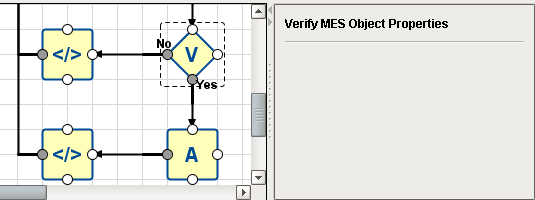
This Block is used to test whether an array of data (or a row of data pointed to by an Iteration Block) contains appropriate information to successfully create an MES Object. It does not create the object.
In this example, if the row contains appropriate information required to successfully create an MES Object, control passes to the Aggregation Block connected to its **Yes** output, to be appended to the end of the current **b2mml\_materials** array. If not, then control is passes to the Script Block connected to its **No** output.
* * *
### Aggregation Block
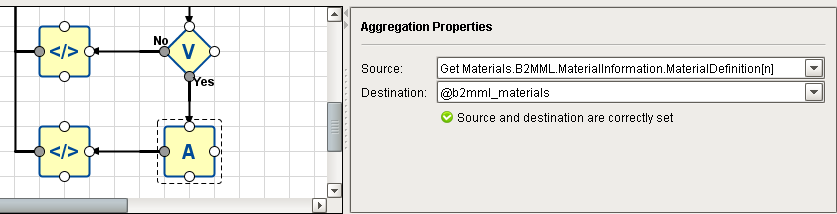
This Block appends iteratively-collected data values, one per pass, into a user-created Chart Parameter.
In this example, **b2mml\_materials** was created in the Start Block to hold the aggregated data. Chart execution control only passes into the Aggregation Block after it has successfully passed through the Decision Block (ID property ends in "8") and the Verify MES Object Block (data is determined to be sufficient to successfully create an MES Object).
After the row has been 'aggregated' (appended to the end of **b2mml\_materials**), control passes back to the Iteration Block and the loop repeats with the next row.
* * *
### Script Block - Connected to Decision Block
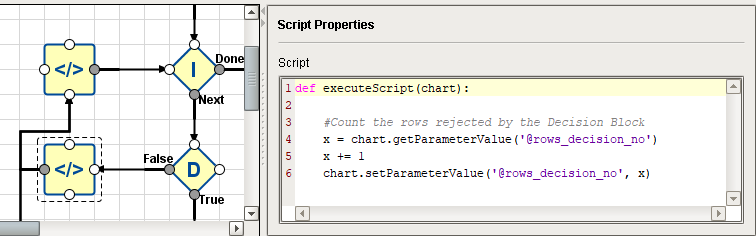
This script increments the Chart Parameter **rows\_decision\_no** any time the expression in the Decision Block resolves to **False** (which passes control to this Script Block).
* * *
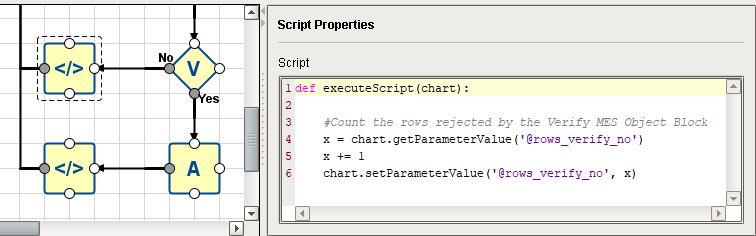
### Script Block - Connected to Verify MES Object Block
This script increments the Chart Parameter **rows\_verify\_no** any time the Verify MES Object Block resolves to **No** (which passes control to this Script Block).
* * *
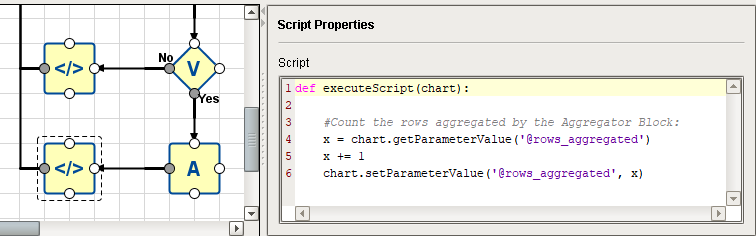
### Script Block - Connected to Aggregation Block
This script increments the Chart Parameter **rows\_aggregated** immediately after the Aggregation Block completes its task (appending a row to **b2mml\_materials**).
* * *
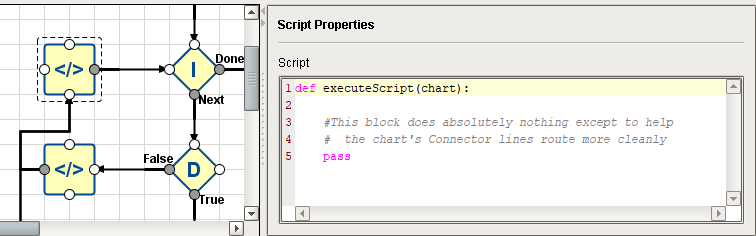
### Script Block - Connected Last in the Iteration Loop
This Block has no scripting inside except for the ***pass*** instruction (which is a non-operation), so it does absolutely ! It is placed in the chart at its current position simply to make the Connectors exiting the three other Script Blocks flow nicely. Otherwise, they end up auto-routing strangely, making the chart more difficult to understand. Feel free to sprinkle empty Script Blocks as needed to keep your 'wiring' neat and self-explanatory.
* * *
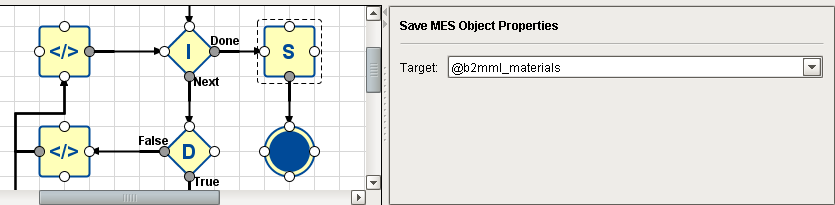
### Save MES Object Block
This block creates an MES Object for each entry in the selected RFM (the drop-down list **Target** will list all of the Action Blocks in the chart. The filtered RFM in the selected Action Block will be used to create the list of MES Objects). For this example, one MES Material Definition object will be created for each entry in the RFM selected in the "Get Materials" SAP RFM Action Block (up to the limit defined by the Chart Parameter **maxRows**).
| Property | Sample Setting | Description |
| --- | --- | --- |
| Target | Get Materials | "Get Materials" is the data source selected from the drop-down list of blocks with available data (it's the only choice in this example). |
* * *
### Executing the Chart
This example chart is being executed from a script within a Button component on an Ignition Designer window:
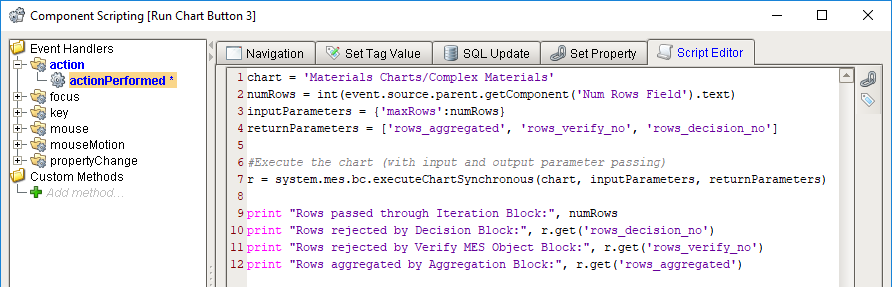
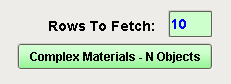
If "**10**" is entered into the **Rows to Fetch** text field, then when the Button is pressed:
* The number in the text field is loaded into **numRows**.
* The chart is executed, passing in **numRows** to the Chart Parameter **maxRows** in the Start Block, and listing three Chart parameters to include in the resulting object when chart execution concludes. Unlike the other two variants of **.executeChart**, the function wait for chart execution to conclude so it can return a Python dictionary containing the Chart Parameters specified (in this example: rows\_aggregated, rows\_verify\_no and rows\_decision\_no).
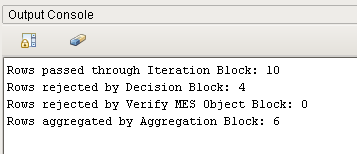
* The various counts are retrieved from the returned chart parameter object and printed to the Output Console.
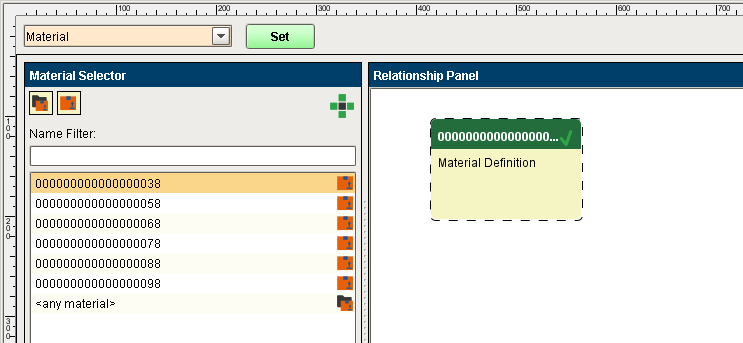
The result of the chart execution is that ten rows are fetched from **BAPI\_MATERIAL\_GETLIST** in the SAP database and six **MES Material Definition** objects are created (those that have an ID that ends with "8", per the Decision Block expression):
**Sepasoft MES Module Suite**