---
title: "MES Document Editor | Perspective"
id: "mes-document-editor-perspective"
project: "MES User Manual"
url: "https://docs.sepasoft.com/articles/user-manual/mes-document-editor-perspective"
updated: 2026-07-31T14:55:47Z
---
# MES Document Editor \| Perspective
**Sepasoft MES Module Suite**
## MES Document Editor Component
The **Document Editor** component is installed with the **MES Document Management module** .
A component that is used to edit HTML documents for use in the manufacturing environment. It functions as a text editor to create and maintain user-interactive documentation, such as instructions for assembly workers, warning notes and data-entry forms for record keeping. Documents are stored as Artifacts on MES Objects (e.g. Material Definitions, Process Segments).
Use Document Editor to:
* Create web-based documents in a rich-text editor or in HTML.
* Create web forms.
* Create procedures in the [Batch Procedure Module](/articles/user-manual/Batch-Procedure).
| Tool | Tooltip Name | Description |
| --- | --- | --- |
|  | **Code View** | You can toggle between the rich-text editor and code. Changes you make to one are reflected in the other. This is called a round-trip HTML editor. |
|  | **Create New Artifact** | Attaches an artifact to an MES Object. |
|  | **Undo** |
```
Use to undo or redo commands in the text editor.
```
|
|  | **** | Use to find and replace text.
 |
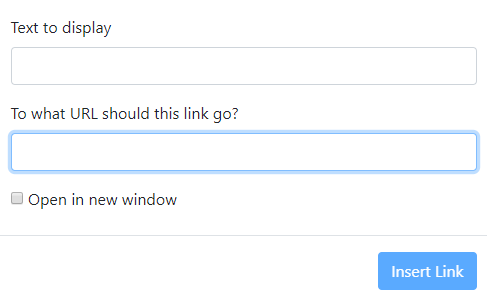
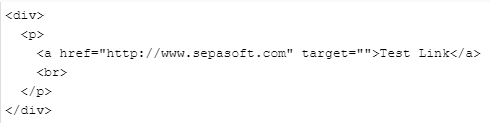
|  | **Link** | Use to link to any URL with an option to open in a new browser window.
You can control the link properties in the HTML code.
 |
| **** | Insert form fields. |
|  | **Style** | Formats text using heading styles. |
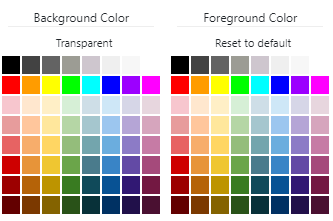
|  | **Recent Color** | Foreground and background color |
|  | **More Color** | Change the foreground and background color of selected text.
```
Remove color using the Remove Font Style Ctrl - \
```
|
| 
Common text editing tools |
**PROPS**
| Name | Property Type | Description |
| --- | --- | --- |
| showSaveButton | Boolean | When true, a Save button is displayed that can expose user inputs in the Viewer component for use in other parts of the application, error checking, or to trigger other tasks based on user responses. |
| documentText | String | Sets the text to display at runtime. |
| batchInfo | | Optional - Use when viewing batch procedures in a batch system. |
| batchID | |  |
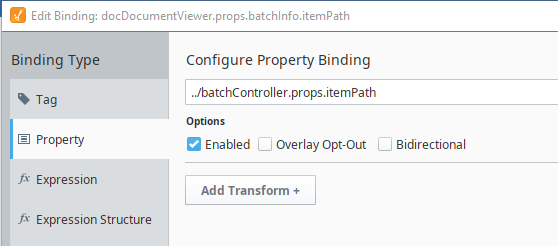
| itemPath | | The path to the document step in the Batch Recipe (/Procedure[/UnitProcedure][/Operation]:Step). This property should typically be bound to other components that output an item path, such as the Batch Controller.
 |
| selectedMESObject | MESObjectLink | MES Object to load document from and store document to. |
| disabled | Boolean | |
| mesObjectType | | The MES Object Type Name is a string parameter that is passed or returned by a number of MES objects, see [MES Object Type Name](/articles/user-manual/MES-Object-Type-Name). |
| mesObjectUUID | String | |
| name | String | The name of the artifact to load document from and store document to. |
| equipmentPath | String | |
| selectedArtifactName | String | The name of the artifact to load document from and store document to. |
**Sepasoft MES Module Suite**