Sepasoft MES Module Suite
OAuth Overview
OAuth 2.0 is an authorization framework that allows third-party applications to access user resources, such as data or APIs, without having to share the user's credentials.
Here is how OAuth 2.0 works in web services:
- The user authorizes the third-party application to access their resources. This authorization is typically done through a web browser, where the user is presented with a consent screen.
- The third-party application requests an access token from the authorization server. The access token is a credential that grants the third-party application access to the user's resources.
- The authorization server validates the request and issues an access token to the third-party application.
- The third-party application uses the access token to access the user's resources.

OAuth 2.0 has several advantages over other authorization frameworks, such as:
- It is secure: OAuth 2.0 does not require the user to share their credentials with the third-party application.
- It is scalable: OAuth 2.0 can be used to authorize large numbers of users and applications.
- It is flexible: OAuth 2.0 can be used to authorize access to a variety of resources, such as data, APIs, and files.
Adding Authorization Code in OAuth Settings
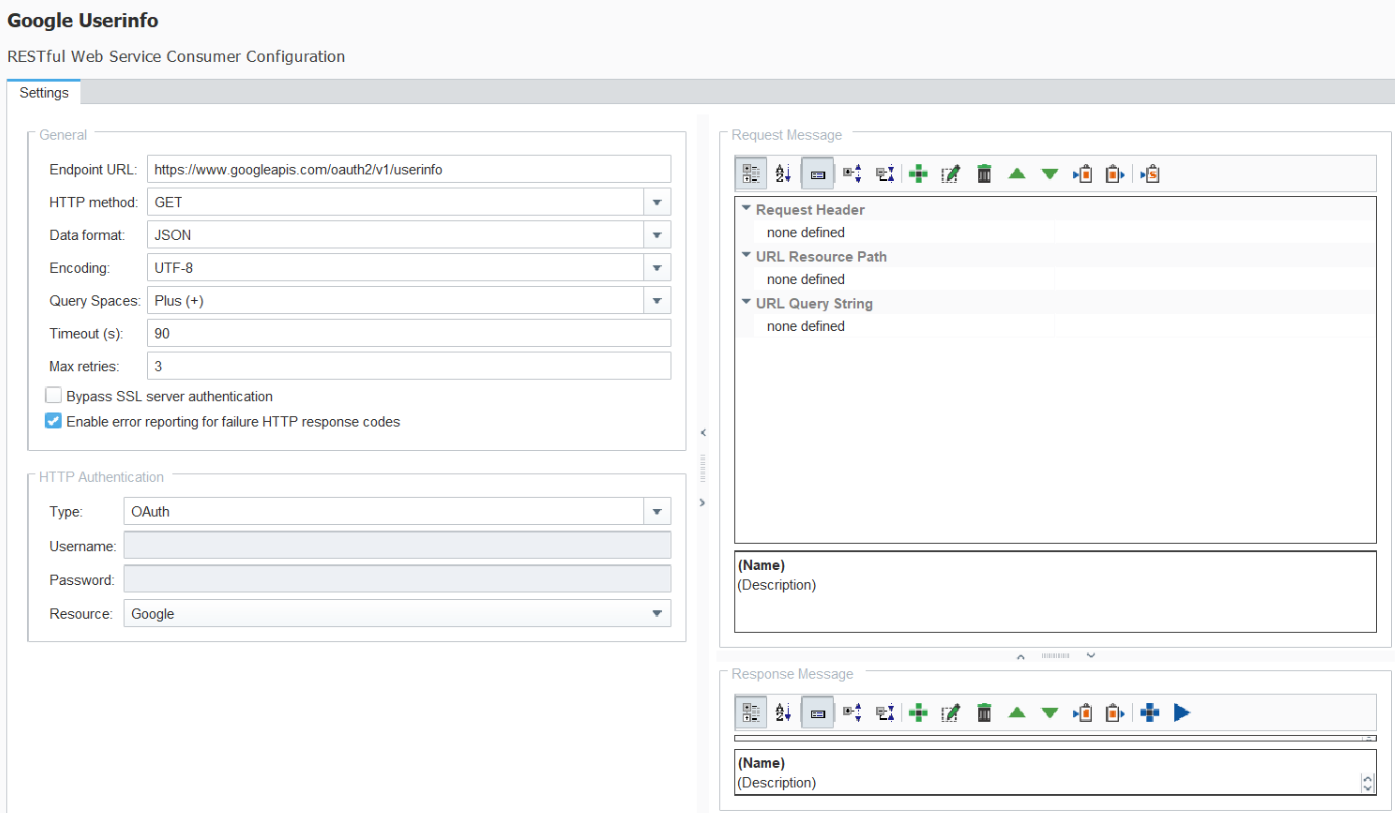
Before following these steps, be sure to set the HTTP Authentication Type: RESTful Configuration HTTP Authentication.
The Web Services node in the Project Browser is in the configuration project that you set in the gateway. It's set to the MESGateway project by default.
- In the Ignition Designer Project Browser > Web Services > OAuth, right click Authorization Code OAuth and select New OAuth.
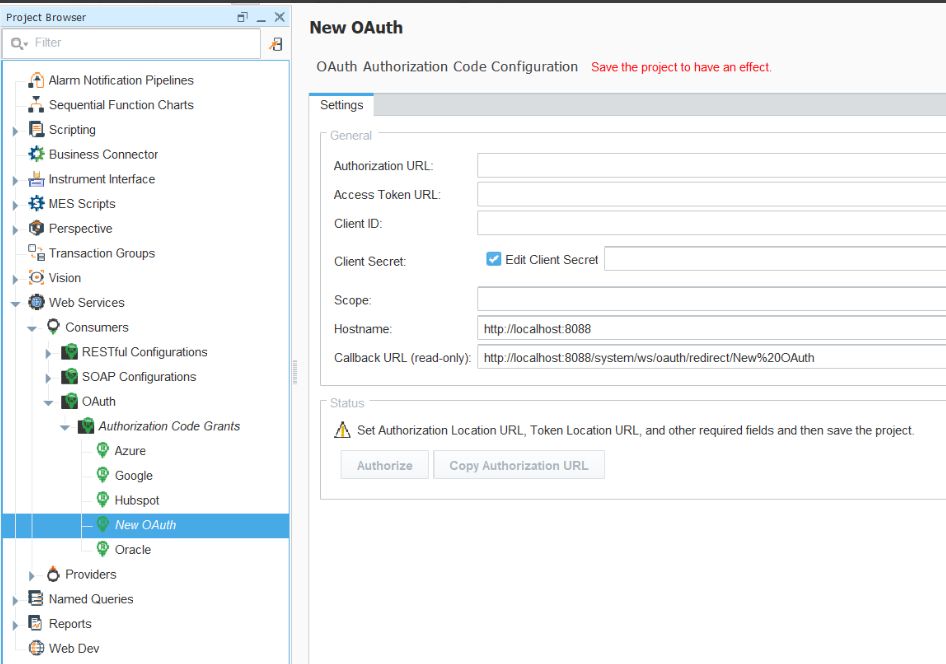
| Auth Fields | Description |
|---|---|
| Authorization URL | The endpoint for the authorization server. This is used to get the authorization code. |
| Access Token URL | The endpoint for authentication server. This is used to exchange the authroization code for an access token. |
| Client ID | The client identifier issued to the client during the Application registration process. |
| Client Secret | The client secret issued to the client during the Application registration process |
| Scope | The scope of the access requests. It may have multiple space delimited values. Some authorization servers require offline_access to refresh the authorization token. |
| Hostname | This is the gateway hostname taken from the settings used to launch the designer. |
| Callback URL (read-only) | This is the URL to register with the authorization server. This is where the authorizations server will send the token to allow access to restricted APIs. |
- Once configured save the project. Then, click Authorize URL to open a browser and sign in to allow access on your behalf from the Web Service module.
Copy Authorization URL gives you the URL that would be opened in the browser by the Authorize button.
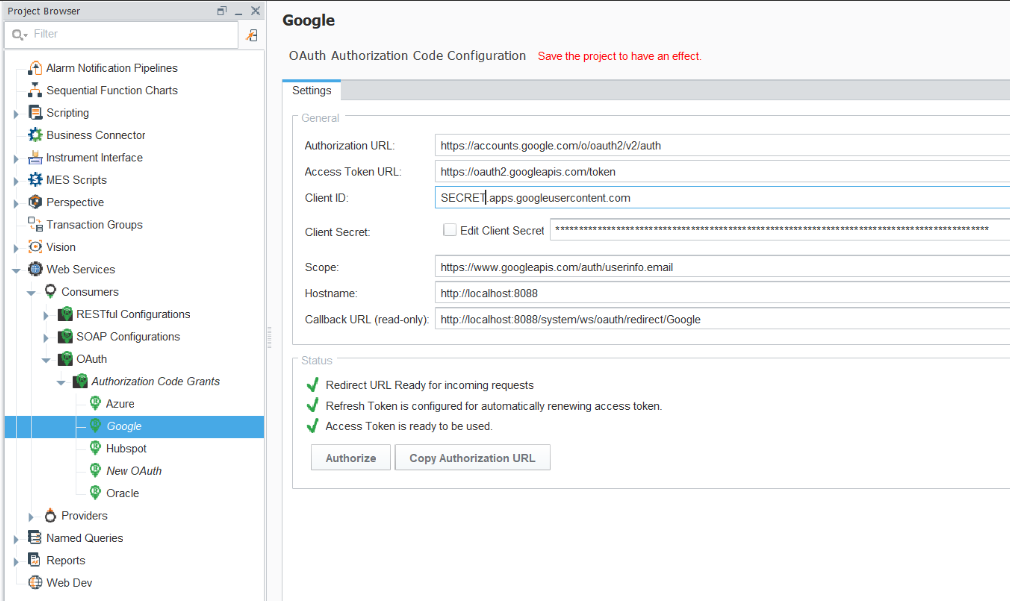
- Green status checkmarks lets you know the token is ready for use. RESTful consumers have a new HTTP Authentication type of OAuth. Once selected you can choose a preconfigured OAuth token item that sends a bearer token with each request.
Sepasoft MES Module Suite