Sepasoft MES Module Suite
Pareto Chart
The Pareto chart is used to display which nonconforming items or nonconformities are the largest issue. It does not retrieve SPC results from the SPC module so it must be used with either the SPC Selector or the SPC Controller components that do. Only SPC results with Pareto SPC Data Format specified will be displayed.
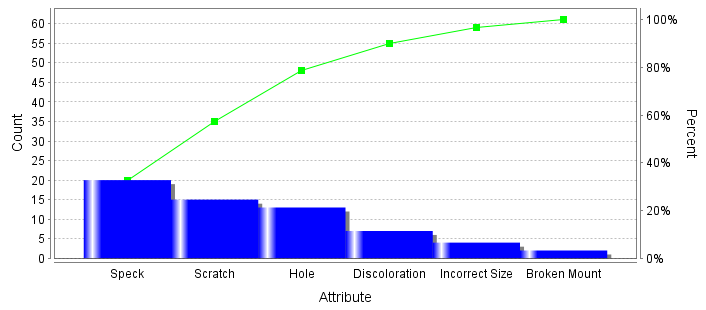 Pareto Chart
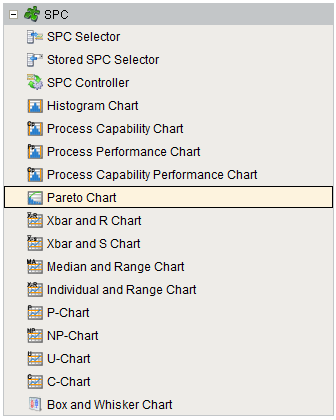
Component Palette
Component Properties
Properties are provided that can be set to affect the operation and look of the component. They can be set through the Property Editor in the Designer or through scripting.
Example
Code |
|
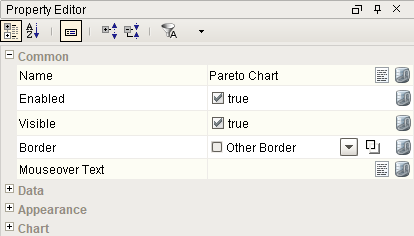
Chart
| Name | Scripting | Property Type | Description |
|---|---|---|---|
| Vertical | vertical | boolean | Orientation of the chart. |
| Chart Background Color | chartBackground | Color | Color of the chart background. |
| Bar Color | barColor | Color | Color of the bars for the chart. |
| Accumulation Line Color | accumulationLineColor | Color | Color of the accumulation line for the chart. |
| Bar Spacing | barSpacing | Float8 | Spacing between bar as a percentage of the bar width. |
| Gradient | gradient | boolean | If true, bars will be painted with a gradient 'shine'. |
| Shadows | shadow | boolean | If true, show shadows for bars. |
| Tick Label Font | tickLabelFont | Font | Font of the tick labels. |
| Tick Label Color | tickLabelColor | Color | Color of the tick labels. |
| Category Axis Title | categoryAxisTitle | String | Title to show for the category axis. |
| Frequency Axis Title | frequencyAxisTitle | String | Title to show for the frequency axis. |
| Percent Axis Title | percentAxisTitle | String | Title to show for the percentage axis. |
| Axis Title Font | axisTitleFont | Font | Font for both axis titles. |
| Axis Title Color | axisTitleColor | Color | Color to display both axis titles. |
| Horizontal Grid Line Color | horzGridLineColor | Color | Color of horizontal grid lines. |
| Show Horizontal Grid Lines | showHorzGridLines | boolean | If true, show horizontal grid lines on charts. |
| Show Accumulation Line | showAccumulationLine | boolean | If true, show the accumulation line on charts. |
| Show Weighted Values | showWeightedValues | boolean | If true, the count values will be adjusted by the atrribute weight value. |
| Maximum Bars To Show | maxBarCount | int | Limits the number of bars to display on the chart. |
| Weighted Axis Title | weightAxisTitle | String | Title to show when displaying weighed values for the frequency axis. |
Event Handlers
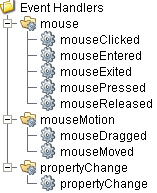
Event handlers provide the ability to add custom script when a user interacts with a component such as by clicking a mouse, selecting a menu item or when a component property changes.
mouse
mouseClicked
This event signifies a mouse click on the source component. A mouse click the combination of a mouse press and a mouse release, both of which must have occurred over the source component. Note that this event fires after the pressed and released events have fired.
| Property | Description |
|---|---|
| .source | The component that fired this event. |
| .button | The code for the button that caused this event to fire. |
| .clickCount | The number of mouse clicks associated with this event. |
| .x | The x-coordinate (with respect to the source component) of this mouse event. |
| .y | The y-coordinate (with respect to the source component) of this mouse event. |
| .popupTrigger | Returns True (1) if this mouse event is a popup trigger. What constitutes a popup trigger is operating system dependent, which is why this abstraction exists. |
| .altDown | True (1) if the Alt key was held down during this event, false (0) otherwise. |
| .controlDown | True (1) if the Ctrl key was held down during this event, false (0) otherwise. |
| .shiftDown | True (1) if the Shift key was held down during this event, false (0) otherwise. |
mouseEntered
This event fires when the mouse enters the space over the source component.
| Property | Description |
|---|---|
| .source | The component that fired this event. |
| .button | The code for the button that caused this event to fire. |
| .clickCount | The number of mouse clicks associated with this event. |
| .x | The x-coordinate (with respect to the source component) of this mouse event. |
| .y | The y-coordinate (with respect to the source component) of this mouse event. |
| .popupTrigger | Returns True (1) if this mouse event is a popup trigger. What constitutes a popup trigger is operating system dependent, which is why this abstraction exists. |
| .altDown | True (1) if the Alt key was held down during this event, false (0) otherwise. |
| .controlDown | True (1) if the Ctrl key was held down during this event, false (0) otherwise. |
| .shiftDown | True (1) if the Shift key was held down during this event, false (0) otherwise. |
mouseExited
This event fires when the mouse leaves the space over the source component.
| Property | Description |
|---|---|
| .source | The component that fired this event. |
| .button | The code for the button that caused this event to fire. |
| .clickCount | The number of mouse clicks associated with this event. |
| .x | The x-coordinate (with respect to the source component) of this mouse event. |
| .y | The y-coordinate (with respect to the source component) of this mouse event. |
| .popupTrigger | Returns True (1) if this mouse event is a popup trigger. What constitutes a popup trigger is operating system dependent, which is why this abstraction exists. |
| .altDown | True (1) if the Alt key was held down during this event, false (0) otherwise. |
| .controlDown | True (1) if the Ctrl key was held down during this event, false (0) otherwise. |
| .shiftDown | True (1) if the Shift key was held down during this event, false (0) otherwise. |
mousePressed
This event fires when a mouse button is pressed down on the source component.
| Property | Description |
|---|---|
| .source | The component that fired this event. |
| .button | The code for the button that caused this event to fire. |
| .clickCount | The number of mouse clicks associated with this event. |
| .x | The x-coordinate (with respect to the source component) of this mouse event. |
| .y | The y-coordinate (with respect to the source component) of this mouse event. |
| .popupTrigger | Returns True (1) if this mouse event is a popup trigger. What constitutes a popup trigger is operating system dependent, which is why this abstraction exists. |
| .altDown | True (1) if the Alt key was held down during this event, false (0) otherwise. |
| .controlDown | True (1) if the Ctrl key was held down during this event, false (0) otherwise. |
| .shiftDown | True (1) if the Shift key was held down during this event, false (0) otherwise. |
mouseReleased
This event fires when a mouse button is released, if that mouse button's press happened over this component.
| Property | Description |
|---|---|
| .source | The component that fired this event. |
| .button | The code for the button that caused this event to fire. |
| .clickCount | The number of mouse clicks associated with this event. |
| .x | The x-coordinate (with respect to the source component) of this mouse event. |
| .y | The y-coordinate (with respect to the source component) of this mouse event. |
| .popupTrigger | Returns True (1) if this mouse event is a popup trigger. What constitutes a popup trigger is operating system dependent, which is why this abstraction exists. |
| .altDown | True (1) if the Alt key was held down during this event, false (0) otherwise. |
| .controlDown | True (1) if the Ctrl key was held down during this event, false (0) otherwise. |
| .shiftDown | True (1) if the Shift key was held down during this event, false (0) otherwise. |
mouseMotion
mouseDragged
Fires when the mouse moves over a component after a button has been pushed.
| Property | Description |
|---|---|
| .source | The component that fired this event. |
| .button | The code for the button that caused this event to fire. |
| .clickCount | The number of mouse clicks associated with this event. |
| .x | The x-coordinate (with respect to the source component) of this mouse event. |
| .y | The y-coordinate (with respect to the source component) of this mouse event. |
| .popupTrigger | Returns True (1) if this mouse event is a popup trigger. What constitutes a popup trigger is operating system dependent, which is why this abstraction exists. |
| .altDown | True (1) if the Alt key was held down during this event, false (0) otherwise. |
| .controlDown | True (1) if the Ctrl key was held down during this event, false (0) otherwise. |
| .shiftDown | True (1) if the Shift key was held down during this event, false (0) otherwise. |
mouseMoved
Fires when the mouse moves over a component, but no buttons are pushed.
| Property | Description |
|---|---|
| .source | The component that fired this event. |
| .button | The code for the button that caused this event to fire. |
| .clickCount | The number of mouse clicks associated with this event. |
| .x | The x-coordinate (with respect to the source component) of this mouse event. |
| .y | The y-coordinate (with respect to the source component) of this mouse event. |
| .popupTrigger | Returns True (1) if this mouse event is a popup trigger. What constitutes a popup trigger is operating system dependent, which is why this abstraction exists. |
| .altDown | True (1) if the Alt key was held down during this event, false (0) otherwise. |
| .controlDown | True (1) if the Ctrl key was held down during this event, false (0) otherwise. |
| .shiftDown | True (1) if the Shift key was held down during this event, false (0) otherwise. |
propertyChange
propertyChange
Fires whenever a bindable property of the source component changes. This works for standard and custom (dynamic) properties.
| Property | Description |
|---|---|
| .source | The component that fired this event. |
| .newValue | The new value that this property changed to. |
| .oldValue | The value that this property was before it changed. Note that not all components include an accurate oldValue in their events. |
| .propertyName | The name of the property that changed. NOTE: Remember to always filter out these events for the property that you are looking for! Components often have many properties that change. |
Extension Functions
getWeightedValue
- Description
Called to update a category weighted value to use instead of the raw frequency (count). The Show Weighted Values property must be set to True for this extension function to be called.
- Parameters
self - A reference to the component that is invoking this function.
category - The name of the nonconforming or nonconformity attribute.
weight - The weight value defined in the attribute. If a weight value has not been defined for the attribute, then the default of 1.0 is used.
frequency - The frequency (count) value for the category before it is adjusted.
- Return
The weighted value (frequency * weight).
- Scope
Client
Custom Methods
Custom methods allow you to add your own component functions to a component that can be called through scripting. This is a useful and clean method of re-using script that is specific to the component (say you want to update a visual aspect of the component in the same way whether a user clicks on the component or a window property value changes). See Component Custom Methods in the Ignition Help Manual for more information.
Customizers
This component does not have any custom properties.
Component Functions
Control Chart Script Functions
Helper functions for the Vision control charts:
Export Values
Exports the control chart values.
Syntax
export(locale, csvSeparator)
- Parameters
String locale - Locale used for parsing.
String csvSeparator - The csv delimiter used.
- Returns
A XML string value representing the SPC control chart values.
- Scope
Client
Export and Filter Values
Exports the control charts values.
Syntax
export(locale, csvSeparator, filter)
- Parameters
String locale - Locale used for parsing.
String csvSeparator - The csv delimiter used.
String filter - The string value to filter results.
- Returns
A XML string value representing the SPC control chart values.
- Scope
Client
Export and Save to File
Exports and saves the results to file.
Syntax
exportWithSave(locale, csvSeparator)
- Parameters
String locale - Locale used for parsing.
String csvSeparator - The csv delimiter used.
- Returns
A XML string value representing the SPC control chart values.
- Scope
Client
Export, Filter and Save to File
Exports and saves the results to a file.
Syntax
exportWithSave(locale, csvSeparator, filter)
- Parameters
String locale - Locale used for parsing.
String csvSeparator - The csv delimiter used.
String filter - The string value to filter results.
- Returns
A XML string value representing the SPC control chart values.
- Scope
Client
Sepasoft MES Module Suite