Sepasoft MES Module Suite
Pause Command
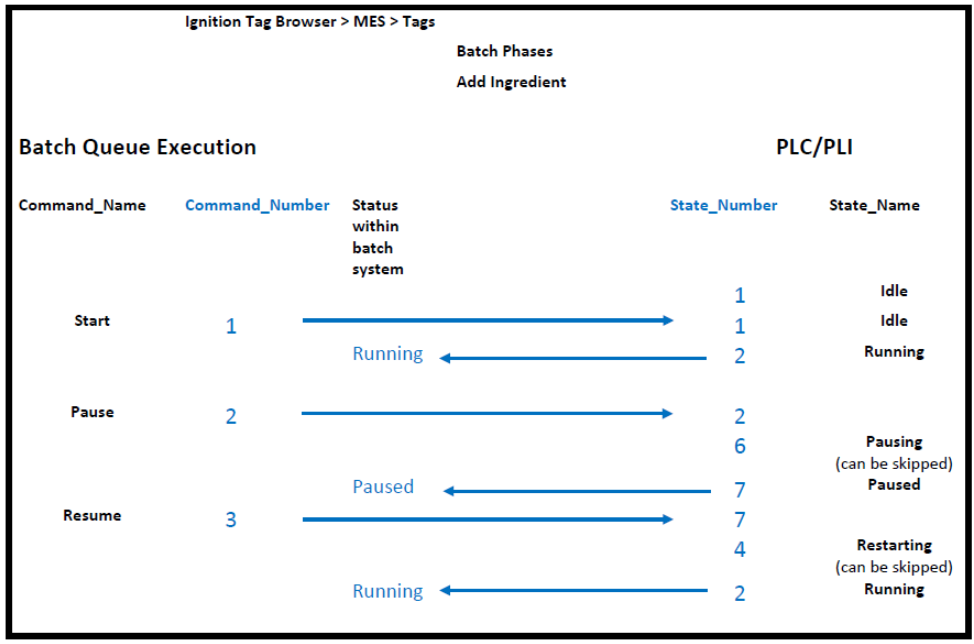
A pause command can be initiated from the Batch Controller, Batch List, or the system.mes.batch.queue.executeStepCommand script function.
In the case of a system restart, Batch-Queue Execution must receive the Paused state (7) before it can go into next state. If in the Pausing state, the system waits 60 seconds before going into the Paused state. The PLC side can send the Paused state at any time to initiate the next Command.
MES Enterprise Network

|
The root gateway server within an MES Enterprise Gateway Network can initiate batch commands on child gateway servers. For more info, see MES Enterprise Network. |
Sepasoft MES Module Suite