Sepasoft MES Module Suite
Create new RESTful Endpoint
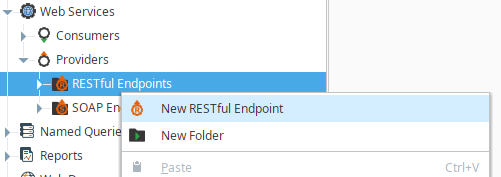
In the Project Browser of the Designer, right-click RESTful Endpoints to create a new RESTful Endpoint.
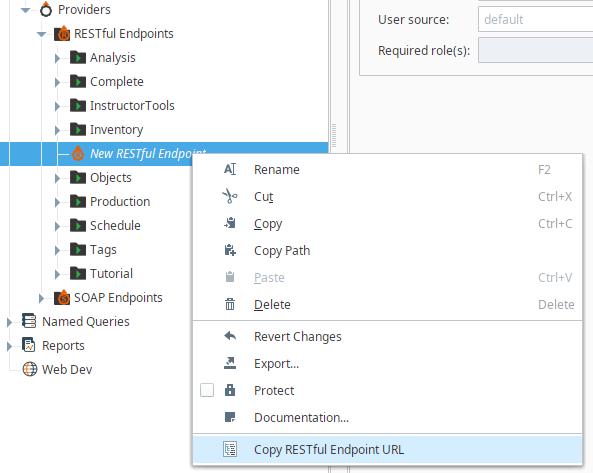
Copy RESTful Endpoint URL
In the Project Browser of the designer, right-click Copy RESTful Endpoint URL menu to copy a RESTful web service endpoint URL.
Each RESTful endpoint resource will be directly accessible over HTTP and mounted beneath the /main/system/ws/rest path. For example, if the RESTful endpoint resource is created directly beneath the 'RESTful Endpoints', it would be mounted at: http://host:port/main/system/ws/rest/resource_name.

|
RESTful endpoint resource name is part of the path. If the RESTful endpoint resource is nested inside a folder, it will be part of the path too, for example: http://host:port/main/system/ws/rest/folder_name/resource_name |
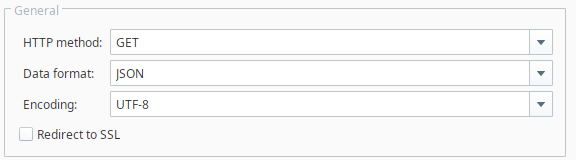
General Settings
| Name | Description |
|---|---|
HTTP method | HTTP method for the RESTful endpoint script. HTTP requests include a method, which is a keyword explaining the action that the client wants the server to perform for the material included in the request. The available HTTP methods are GET, POST, PUT, DELETE. |
Data format | Data format of HTTP response content. The available options are JSON and XML. |
Encoding | Encoding type of HTTP response content. The available encoding types are UTF_8, UTF_16, ISO_8859_1, Windows_1252, and ASCII. |
Redirect to SSL | If this is checked, then the RESTful endpoint resource will only be accessible via an SSL connection. If a non-secure HTTP transport is used, the browser will be sent a redirect to the the gateway's SSL port. |
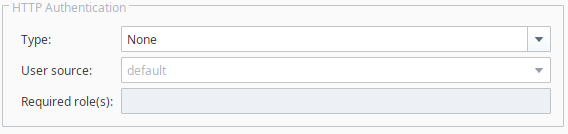
HTTP Authentication
| Name | Description |
|---|---|
Type | If "Basic" is selected, the RESTful endpoint resource will require HTTP BASIC authentication before it executes. If the credentials are missing, an HTTP 401 will be returned with the WWW-Authenticate header. If the credentials are present but incorrect, an HTTP 403 will be returned. |
User source | The username/password combination sent through the HTTP BASIC authentication headers will then be passed through the chosen ‘User Source’. User sources can be managed at the Ignition Gateway menu: ‘CONFIGURE -> [SECURITY] Users, Roles -> User Sources’. |
Required role(s) | If roles are specified, the user must have at least one of the roles. Multiple acceptable roles can be specified using a comma separated list. If blank, then all roles can access the RESTful endpoint. |
Script Editor
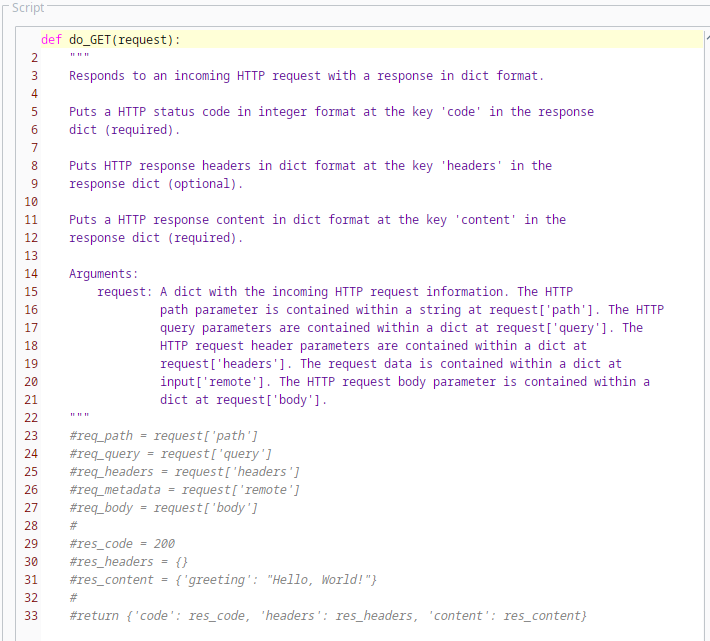
The script editor helps to write RESTful endpoint scripts for each HTTP method (GET, POST, PUT, DELETE) using in Python programming language. If a script is not defined, an HTTP 405 will be returned. If there is a syntax error in a script, an HTTP 500 will be returned.
Parameters
Each do_* function receives the 'request' parameter. The 'request' parameter is a dict with an incoming HTTP request information.
| Parameters | Description | ||
|---|---|---|---|
| request['path'] | Any path such as http://host:port/main/system/ws/rest/resource_name/user/id/123 will be contained in a string accessible via request['path']. For the given example, request['path'] = “/user/id/123” | ||
| request['query'] | Any query parameters such as http://host:port/main/system/ws/rest/resource_name?param1=value1¶m2=value2 will be contained in a Python dictionary accessible via request['query']. For the given example, request['query'] = {'param1':'value1', 'param2':'value2'} | ||
| request['body'] | This parameter is only present for the do_POST or do_PUT methods, and its value is a Python dictionary converted from the XML or JSON content of a HTTP request. | ||
| request['headers'] | The HTTP request headers will be in a Python dictionary under request['headers']. For example, request['headers']['User-Agent']. | ||
| request['remote'] | The return value also encapsulates sender information. In the example below, the dictionary entry "remote" provides the sender with the sender's address, port and requested URL:
|
Return Value
Each do_* function returns a response in dict format. HTTP status code (integer format) should be given at the key 'code' in the response dict, and will cause an HTTP 500 error if absent or a non-integer. HTTP response headers (dict format) may be specified at the key 'headers' in the response dict. Also, a HTTP content (dict format) should be specified at the key 'content' in the response dict, and will likewise cause a 500 error if not present or not a dict.
Show whitespace characters
If this is checked, then whitespace characters are shown on the script editor.
Sepasoft MES Module Suite