---
title: "Sample Definition Attributes"
id: "sample-definition-attributes"
project: "MES User Manual"
url: "https://docs.sepasoft.com/articles/user-manual/sample-definition-attributes"
updated: 2026-07-31T14:59:04Z
---
# Sample Definition Attributes
**Sepasoft MES Module Suite**
## Attributes in a Sample Definition
Some examples of attributes include pH, temperature, viscosity, weight, non-conformities, and nonconforming items. From here, the name, description, datatype, format, default value, minimum value, and maximum value can be defined.
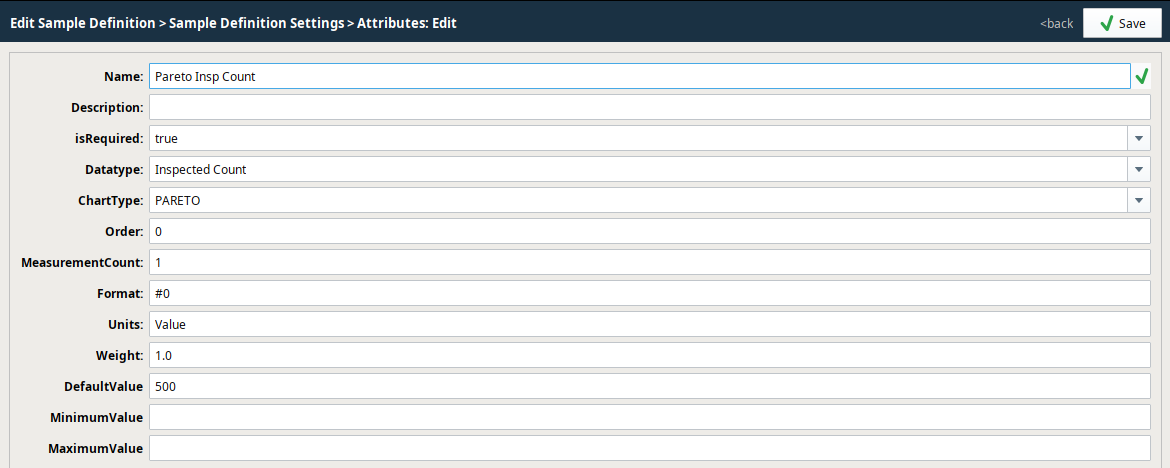
To add attributes to a Sample Definition:
* Select a definition in the **Definition List** tree.
* Under **Sample Definition Settings**, click **Attribute List**.
* Click **New**.
| Attribute Settings | Description |
| --- | --- |
| **Name** | Names can have spaces and special characters. |
| **Description** | Attribute summary description |
| **isRequired** | Use isRequired set to True, to ensure values are entered before saving.
Version Dependent
|  | **isRequired**: In **version 3.81.3 RC5 and 3.79.3 RC5 and later**. |
| --- | --- | |
| **Datatype** | - Integer
- Real
- Boolean
- Inspected Count
- Non Conforming Count: Attribute can contain a counting number (1, 2, 3, 4, …) and represents a number of nonconforming items (defective items) for a attribute samples. This attribute data type is recognized and required by the p and np control charts. Example: Dented Cans in a tray.
- Nonconformity Count: Attribute can contain a counting number (1, 2, 3, 4, …) and represents the number of nonconformities items that have (deformities) for a attribute samples. This attribute data type is recognized and required by the c and u control charts. Example: Dents on a can.
|
| **ChartType** | - None
- XBAR_R: SPC XBar Chart - Perspective
- XBAR_S: SPC XBar Chart - Perspective
- INDIVIDUAL: SPC Individual Chart - Perspective
- MEDIAN: SPC Median Chart - Perspective
- U: SPC U-Chart - Perspective
- C: SPC C-Chart - Perspective
- P: SPC P-Chart - Perspective
- NP: SPC NP-Chart - Perspective
- HISTOGRAM: SPC Histogram Chart - Perspective
- PARETO: SPC Pareto Chart - Perspective
- CP: CP Event
- PP: SPC Process Capability and Performance Chart - Perspective | SPC Process Capability Chart - Perspective | Process Performance Event
- PPM: Parts Per Million Event
- ADT: Anderson Darling Test
- BOX_AND_WHISKERS: SPC Box and Whisker Chart - Perspective
- CPPP: CPPP Event
|
| **Order** | Used is in the Sample Entry component, where it determines the order in which the attributes display. |
| **Measurement Count** | Sets the number of samples to take for the system to consider the counts as a full sample. |
| **Default Value** | Sets the default value for a measurement. |
| **Minimum Value** | Optional - Sets the minimum value of measurement data. |
| **Maximum Value** | Optional - Sets the maximum value of measurement data. |
| **Format** | Optional - The format string for this attribute's display. Used to verify formatting values on the control charts and that entered data is correctly formatted. |
| **Units** | ****Optional - Sets the measurement to a standard quantity. |
| **Weight** | Optional - Used for the Pareto chart to determine importance. For example, you have Scratched and Cracked. Cracked is a bigger deal so you would give it a higher weight here. |
**Sepasoft MES Module Suite**