Sepasoft MES Module Suite
Overview
All MES objects can have custom properties defined for them and used to store meta data about that object.Here we'll look at a specific instance where we want to store custom property values for material definitions within a Material Class.
Through scripting or the MES Object Editor, we can create a Material Class and add custom properties to it that will be inherited by all Material Definitions within that class.
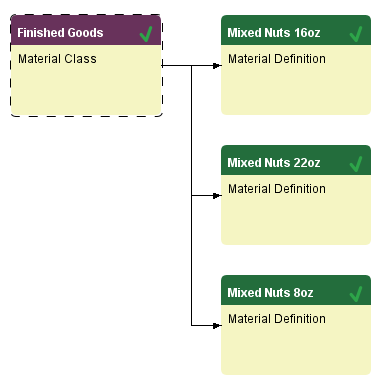
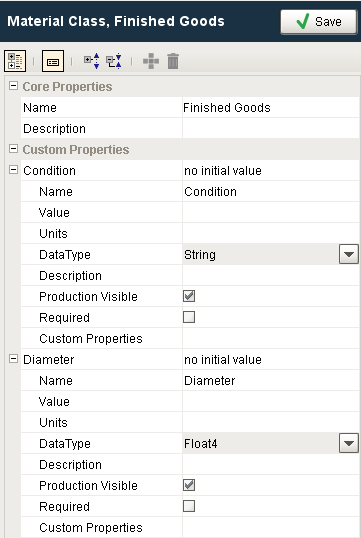
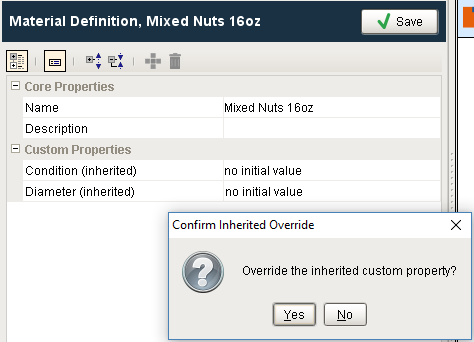
If we then want to change the value of the custom property at the Material Definition, we can do so by double-clicking the custom property in the MES Object Editor and selecting 'Override the inherited custom property?' or we can do it through scripting. By overriding the inherited value, we are creating a new custom property with the same name for the Material Definition object.
To do this through scripting:
Function
Code |
def setMaterialDefCP(matDefName, cpName, cpValue): #This function takes the name of a Material Definition, a custom property name and a value to set it. #In this implementation, we are requiring the custom property to either already exist for the Material Definition or be inherited from the Material Class for this Material Definition #but this is not a requirement of the object model print 'Calling setMaterialDefCP for %s to set %s Custom Property to %s' % (matDefName, cpName, cpValue) matDef = system.mes.loadMESObject(matDefName, 'MaterialDef') bFound = False #This will only return the custom properties that have been added to the material definition. cps = matDef.getCustomProperties() print cps for cp in cps.keySet(): if cp == cpName: #Find the one that you want to override print "Custom property - %s already exists. Setting it to %s" %(cpName, cpValue) matDef.setPropertyValue(cpName, cpValue) bFound = True system.mes.saveMESObject(matDef) #Don't forget to save #This will return custom properties that have been added to the material definition and any parents. if bFound == False: #Get all of the custom properties cpList = matDef.getAllCustomProperties() for cp in cpList: #Find the one that you want to override if cp.getName() == cpName: print "Creating Custom Property - %s for this material def and setting its value to %s" % (cpName, cpValue) #Make a clone of it newCP = cp.clone() #Add it to the material definition with the overrideInherited flag set to True matDef.addCustomProperty(newCP, True) matDef.setPropertyValue(cpName, cpValue) #Now the material definition has it's own custom property print matDef.getAllCustomProperties() system.mes.saveMESObject(matDef) #Don't forget to save |
If you save the above function as a project or gateway script, you can then call it using the script below. You may need to add the path to the function such as shared.MES.setMaterialDefCP().
Script to call function
Code |
matDefName = 'Mixed Nuts 22oz' cpName = 'Condition' cpValue = 'Broken' setMaterialDefCP(matDefName, cpName, cpValue) |
Output
The first time the function runs, it will create a clone of the custom property.
>>>
Calling setMaterialDefCP for Mixed Nuts 22oz to set Condition Custom Property to Broken
{}
Creating Custom Property - Condition for this material def and setting its value to Broken
[Condition=Broken, Diameter=null]
If you run it a second time against the same material definition, it will simply change the value of the custom property.
>>>
Calling setMaterialDefCP for Mixed Nuts 22oz to set Condition Custom Property to Broken
{Condition=Broken}
Custom property - Condition already exists. Setting it to Broken
Sepasoft MES Module Suite