Sepasoft MES Module Suite
Sepasoft MES Production Data
We are frequently asked for the layout of our database tables so that the MES production data can be analyzed at a higher level. This makes sense because companies should do high level analysis whether it is machine learning, AI, or just manual analysis to optimize their production processes. We were founded on the principle of openly sharing data and customers have complete access to the raw MES production data. However, the MES production data is not very useful in its raw form. This article describes how we store the raw production data and best practices for pulling clean useful MES production data.
When AI, data lakes, data warehouses, big data, and machine learning are mentioned, one commonly gets the idea that the first step is collecting all data that can be collected. The more the better. Then, once you have a massive amount of data, the AI engine will start producing great results. In reality, it doesn’t work like this. First of all, using millions, or even hundreds of data points for training machine learning or AI requires an extensive amount of computing power. Second, the training is against a known result (like OEE). And third, the results are only as good as the data collected. Yes, this means garbage-in equals garbage-out. There is actually a term for this “Data Swamp” when your data gets messy and unmanageable.
The Sepasoft MES data is clean and has context which is a first good start to feeding data to a system to perform higher level analysis.
Raw Production Data
The Sepasoft MES modules store production data in a raw format that typically includes the equipment UUID (Universally Unique Identifiers), timestamp, and the value. I say typically because in some cases there are additional columns; as is the case for storing the equipment state. Operators can override and split downtime reasons. These details are stored in additional columns associated with the automatically detected downtime reason.
Because we store this raw data and not calculated data such as OEE, downtime duration, etc. It is not very useful to higher level analysis. Or at a minimum, requires a significant amount of effort and computing power to derive meaningful data with context.
PDF Download

|
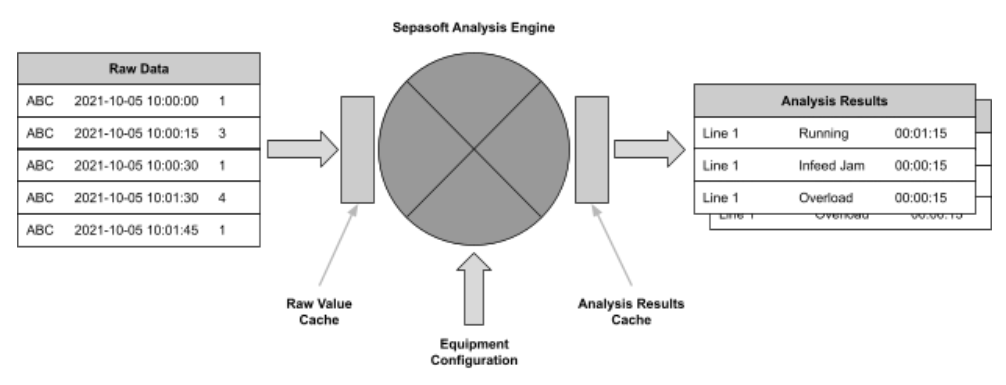
This is an example of how we store the raw data and how we use that raw data to calculate meaningful information:
| EquipmentUUID | TimeStamp | State |
|---|---|---|
| b75fa5df-3117-4016-a293-71a9339841a6 | 2021-10-0510:00:15 | 16 |
| 8dfdf1ba-9e6a-43a1-b2a0-509d36d6d9e2 | 2021-10-0510:00:15 | 1 |
| b75fa5df-3117-4016-a293-71a9339841a6 | 2021-10-0510:00:25 | 1 |
| ... |
Equipment UUIDs are used instead of the human readable name. If the equipment is renamed and if there are millions of records of history in the database containing the human readable name, then it would result in a whole bunch of updates.
Notice that the state is just an integer and is not human readable text. This is done for three reasons: 1) it uses less database space and second, 2) state names can be changed, and 3) PLCs like integers and not human readable text.
Also, notice that there is not a duration column. The duration is determined by many different factors such as the downtime detection method. For example, just because the state of a filler represents a downtime reason doesn’t mean there is a loss of production on the line. If it eventually causes a loss of production on the line, then the downtime event begins and it doesn’t necessarily match the timestamp that the filler state changed. Another vital reason for not storing the duration is to allow backfilling or modifications to the data. Calculated values such as total down time, OEE, counts, etc. are automatically adjusted. In other words, if we stored the total down time, OEE, counts, etc. in the database tables, all the rows after the adjusted row would also have to be updated. Actually, our OEE 1.0 product was this way, and was not very user friendly for our customers, and we made the shift to this approach which has worked out significantly better.
Analysis Engine
The analysis engine transforms the raw data into meaningful data that has context. It accounts for the downtime detection method, handles backfilling from MQTT store-and-forward, and much more.
Analysis can result in a high volume of database queries and number crunching. For this reason we have built-in caching of the raw production data so that the same SQL queries can feed data to multiple analysis requests. In addition, there are caches to reuse the calculated values.
Cost of Direct DB Access
It seems simple enough to just query the raw MES database tables. However, there are substantial hours to reinvent the wheel to get the same results that our analysis engine already provides.
From time-to-time we change the schema of the MES database tables to accommodate new features. When we change the schema we guarantee that the analysis engine will function properly and produce the correct results. However, we don’t guarantee the schema or format of the data stored in the MES database tables will not change. This can cause the higher level analysis to break or worse yet provide inaccurate results.
The schema of the MES database tables was organized to accommodate two goals of supporting ISA standards and performance. This includes indexes that are optimized for our internal use. This means, indexes were not created to optimize your queries. If additional indexes are added to accommodate outside queries, it will slow down our insert and update performance. Likewise, performing outside queries without correct indexes can cause table scans which also degrades the performance of the overall MES system.
Best Practices
The ideal situation is that higher level analysis has clean data in enough detail and with the correct context that efficient meaningful high level analysis can be done.
Depending on the high level analysis system, we support multiple methods to provide data to it. All of which achieve the ideal situation and result in lower TCO compared to querying your production data directly from the MES database tables.
RESTful Web Service API
If the higher level analysis system supports making RESTful API calls, then this is a great option. Optionally, data can be pushed on a periodic or event basis to the higher level analysis system.
For the scenario where the higher level analysis system makes a request for data using an API call, a minimal amount of scripting is used to collect the data from the analysis engine and include it in the response. This supports passing parameters that can be used to give the higher level analysis system control over what data is returned.
For the periodic or event driven scenario, a minimal amount of scripting is used to collect the data when a time interval has passed or an event has occurred in the Ignition system (button click, production run completed, etc.) and initiate sending it to the higher level analysis system. This method assumes that the higher level analysis system will store the data sent.
Pros:
- If changes are made to past production data (like changing an unplanned downtime reason to a planned downtime reason) the change is reflected in the results.
- Data storage at the higher level analysis system is optional.
- More secure because a database is not exposed to the Internet. The push method is even more secure because ports are not exposed at the firewall.
Cons:
- Requires some scripting when compared with the Live Analysis and SQL Bridge option.
- Not as performant as Live Analysis. However, we do support a feature that offloads the analysis to an Ignition server separate from your server(s) handling your production on the plant floor.
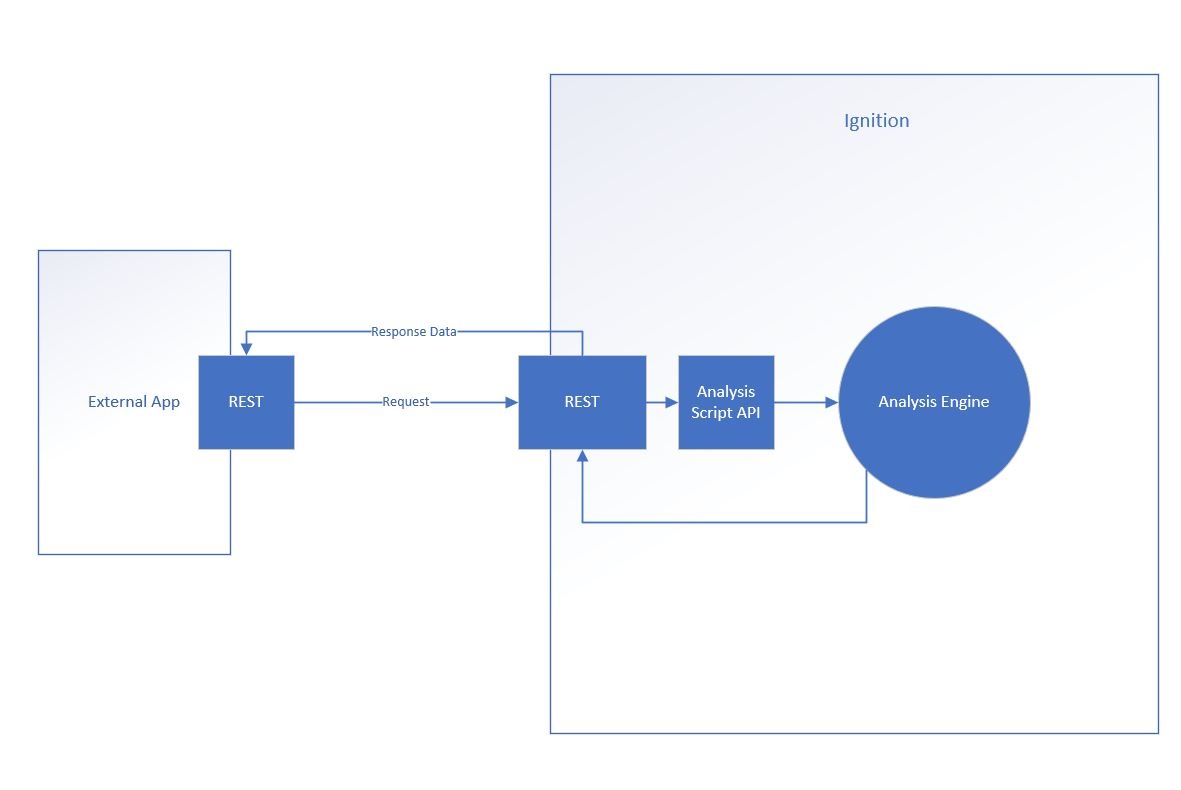
Examples provided in this KB: Serving up Analysis Data as a Web Service REST Endpoint
Live Analysis and SQL Bridge Combination
More than likely your MES implementation already utilizes Live Analysis which calculates results as production is happening.
It is based on a configurable time period and is highly optimized so that SQL queries and calculations only happen for the new data as changes in the production environment occur or every minute, whichever is less. Multiple Live Analysis can be configured with different time periods. For example, one can be configured to return the results for a shift and another can be configured to return the results for the production run.
The data values included in the Live Analysis can be selected from 100’s of data point options and can include as much detail that is desired for your use case.
The Live Analysis results are exposed into Ignition tags so the SQL Bridge module can be used to add a new row to a custom dedicated database table. The system doing the higher level analysis can read to time history of production information directly from the dedicated database table without any worry of impacting performance of the MES functions.
Pros:
- Simple quick configuration
- No scripting required
- Very performant
Cons:
- If changes are made to pass production data (like changing an unplanned downtime reason to a planned downtime reason) the results in the dedicated database table are not corrected.
Summary
There is so much hype about AI and machine learning, but I encourage you to focus on just the successful case studies.
The ultimate goal is to be able to perform higher level analysis reliably with minimal implementation hours and no degradation of performance of the MES systems. We provided multiple options to accommodate this, but if there is functionality that this article doesn’t address, please contact and educate us on your use case.
Sepasoft MES Module Suite