---
title: "SPC Controller - Perspective"
id: "spc-controller-perspective"
project: "MES User Manual"
url: "https://docs.sepasoft.com/articles/user-manual/spc-controller-perspective"
updated: 2026-07-31T14:57:34Z
---
# SPC Controller \- Perspective
**Sepasoft MES Module Suite**
### SPC Controller
Use to format and feed sample definition data (objects) for evaluation of a production process into a graph. Most frequently the dataset is fed into a control chart and analysis tools.
| The SPC Controller component is invisible at run-time. Displays as an SPC Controller icon in Ignition Designer at design-time. |  |
| --- | --- |
Perspective vs. Vision Charts
|  | Keep in mind that Vision charts require an SPC Controller to obtain data; whereas, Perspective Charts binding to an SPC Controller is optional. Charts in the Perspective provide the option to directly reference **Stored SPC Settings**. Perspective chart properties explain the toggle datasource mode under the **Property Source** for a Chart. |
| --- | --- |
|  | MES 3.81.7 RC1 and later
Installed with the **SPC Module** |
| --- | --- |
* * *
#### Component Properties
Properties are provided that can be set to affect the operation and look of the component. They can be set through the **Property Editor in the Designer** or through scripting.
```python
self.getSibling("spcController").spcChartSettings.autoRefresh = True
```
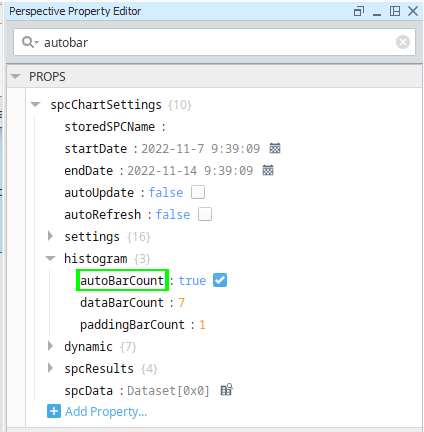
For ease of finding properties, the search results are highlighted in the list as you type in Search.
| 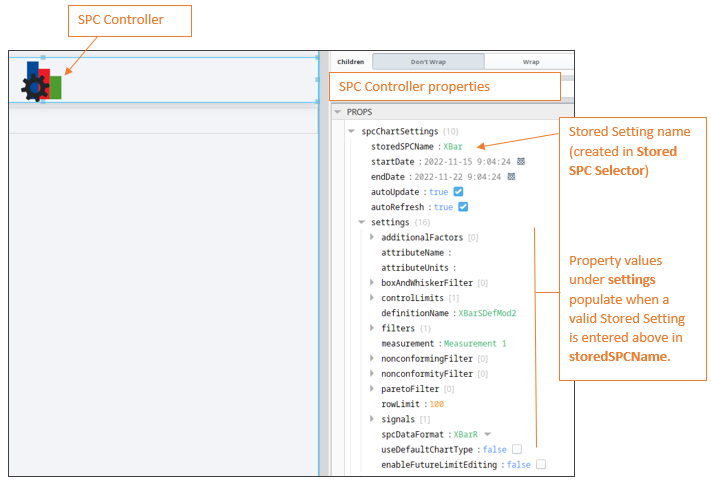 | When you add an **SPC Controller** to a View and set the **storedSPCName property** to a valid **Stored Setting,** the values under the **settings** property populate with the values from the **Sample Definition**. |
| --- | --- |
| **Name** | **Property Value Descriptions** |
| --- | --- |
| **spcChartSettings** | |
| **** | | **Scripting Name** | **Data Type** | **Information** |
| --- | --- | --- |
| **storedSPCName** | String | Sets name of the Stored SPC Setting. The name must match exactly to the name you entered in Stored SPC Selector | Vision. |
| **startDate** | Date | Sets the start date to filter SPC data on |
| **endDate** | Date | Sets the end date to filter SPC data on |
| **autoUpdate** | Boolean | True, updates data when a sample is taken. Use for real-time data. |
| **autoRefresh** | Boolean | True, refreshes data when sample or definition information changes. Use for real-time data. | |
| | **settings** | | **Property Name** | **Data Type** | **Information**
**Property Values are auto populated** |
| --- | --- | --- |
| **additionalFactors** | String | Additional factors to include in the SPC chart. |
| **attributeName** | String | Name of the sample attribute |
| **attributeUnits** | String | Adds a label for the unit of measure for the sample attribute. |
| **boxAndWhiskerFilter** | String | Box and whisker filter items to filter on. |
| **controlLimits** | String | Summarizes control limits to add to the chart |
| **definitionName** | String | Name of the sample definition. |
| **filters** | String | **location:** The Location Path defined in the Equipment Manager to filter on.
**factors:** Properties >Additional Factor
Filter on existing additional factors |
| **measurement** | String | Measure number to filter on |
| **nonconformingFilter** | String | Nonconforming items to filter on |
| **nonconformityFilter** | String | Nonconformity items to filters on |
| **paretoFilter** | String | Items to include in a Pareto chart. |
| **rowLimit** | int4 | The maximum number of samples to return in the results. |
| **signals** | String | Summarizes your signal selections in a string. |
| **spcDataFormat** | String | SPC Data |
| **useDefaultChartType** | Boolean | If true, uses the default chart type from the attribute definition. |
| **enableFutureLimitEditing** | Boolean | If true, you can set limits for future (non-existing) samples. | |
| | **histogram** | **autoBarCount** | Boolean | If true, the number of data bars that are displayed is calculated automatically. |
| | **** | **dataBarCount** | int | The number of data bars to display when **autoBarCount** is False. |
| | **** | **paddingBarCount** | int | The number of bars prior to and following the data bars to include in the histogram results. |
| | **dynamic** | **factor** | String | Additional factors that were recorded along with the sample. |
| | **** | **location** | String | The location path where the samples were collected. |
| | **** | **productCode** | String | Samples returned should have this Product Code if present. |
| | **** | **referenceNo** | String | Samples returned should have this Reference Number if present. |
| | **** | **sampleApprovedBy** | String | The username of the user that approved the samples. |
| | **** | **sampleTakenBy** | String | The username of the user that recorded the samples. |
| | **** | **shift** | String | A schedule shift during which the samples were taken. |
| | **spcResults** | **definitionUUID** | | |
| | | **calculatedValues** | **calcValueList**
**defaultChart**
**measureFormat**
**units** | SPC Results including data, measurement count and calculated value information. |
| | | **measurementCount** | |
| | | **messages** | **errormessage**
**warningMessage** |
| | **spcData** | **Dataset** | The SPC data. |
### Meta Properties in the Perspective Property Editor
| Name
Scripting Reference | Data Type | Description | Description | Description |
| --- | --- | --- | --- | --- |
| **name** | String | Name of the component. Used in scripting and component tree paths by name, such as during Property Binding. |
| **visible** | Boolean | Whether or not this component should display. |
| **tooltip** | | |
| **enable** | Boolean | Whether the tooltip on hover |
| **width** | Integer | The height of the table rows. |
| **text** | String | The scroll bar x position. |
| **style** | Boolean | Toggle to show or hide the sample data table. |
| **delay** | Boolean | Image icon to show to edit control limits. |
| **sustain** | Integer | Time, in milliseconds, to display tooltip before removing it. A value of 0 results in the tooltip displaying until the mouse exits the components. |
| **location** | Boolean | The location where the tooltip displays. |
| **tail** | Boolean | Enables a decorative triangle on the tooltip that points to the tooltip owner. Ignored when location uses a value of 'mouse'. |
Event Handlers
Event handlers provide the ability to add custom script when a user interacts with a component such as by clicking a mouse, selecting a menu item or when a component property changes.
|  | **Bug fix in 3.81.10 SP6**: Before Sample Update and After Sample are now triggered by collecting samples via tags with Every Value change and Every X Value Changes intervals. |
| --- | --- |
Events Implemented with SPC Controller:
* .beforeUpdate()
* .afterUpdate()
Event handlers provide the ability to add custom script when a user interacts with a component.
Refer to the Ignition documentation for details on using the available event handlers.
Extension Functions
* .update()
* .refreshInfo()
Custom Methods
Custom methods allow you to add your own component functions to a component that can be called through scripting. This is a useful and clean method of re-using script that is specific to the component (say you want to update a visual aspect of the component in the same way whether a user clicks on the component or a window property value changes). See Component Custom Methods in the Ignition Help Manual for more information..
**Sepasoft MES Module Suite**