Sepasoft MES Module Suite
Supplemental Equipment Resource Property
This object has the information about supplemental equipment (any equipment that is not part of the production model but could be used in the process) that may be a part of the operation and is stored as a complex property object of a process segment.

|
This object is not derived from the MESAbstractObject. Instead it derives from AbstractMESComplexProperty object and inherits all its functions and properties. |
Object Creation
This object is primarily created by using the MES Object Editor component. The following object methods can be used to create or return this type of object.
- process segment.createComplexProperty()
Click here to see script examples...
Creating the Equipment Resource Property for a Process Segment
Code Snippet
| Output
|
Use
This object is not a parameter for any scripting or object functions.
Object Properties
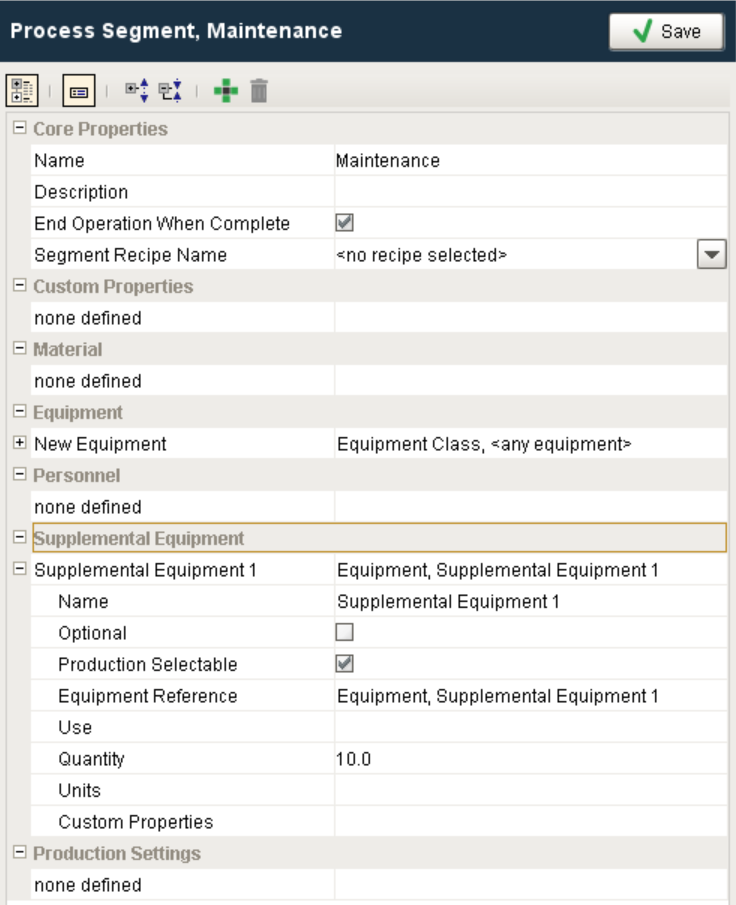
These properties are accessible through the MES Object Editor component and with the provided object functions, but not directly as obj.properties. Property values can be accessed and changed for an object by using the getPropertyValue() and setPropertyValue() method. The setting name is what appears in the MES Object Editor component and the script name is what is used to set or get the value using script. See AbstractMESComplexProperty for details about accessing values using script.
Setting Name | Type | Scripting | Description |
|---|---|---|---|
| Name | String | SupplEquip | The name of the custom property that can be used to reference this supplemental equipment in script. |
| Optional | boolean | EquipmentOptional | If the property defined here is always required, then leave this setting unchecked. If this property is optional, then select it. |
| Production Selectable | boolean | ProductionSelectable | This box is checked by default. If this setting is unchecked then this property selection will not be visible to the operator in the MES Material Selector component. |
| Equipment Reference | String | EquipmentRef | This can be set to a Equipment Class or a Equipment, Line, Line Cell, Line Cell Group or Storage Unit. By setting this to Equipment Class will cause the operator to be prompted for the specific equipment for this equipment resource. If set to a specific equipment item, then the selection will be automatically selected. |
| Use | String | EquipmentUse | Currently this is here for reference and is included to align with the ISA-95 standard. |
| Quantity | Float8 | EquipmentQuantity | Currently this is here for reference and is included to align with the ISA-95 standard. |
| Units | String | EquipmentUnits | This specifies the units for the quantity setting. |
| Custom Properties | To add new custom property, select this row and click add button on tool bar. |
Object Functions
This object provides the following functions:
Info

|
References can be set in one of two ways: Equipment
|
getEquipmentRef()
Description
Get reference to the supplemental equipment property.
Syntax
getEquipmentRef()
- Parameters
None
- Returns
MESObjectLink equipmentRef - Reference to the supplemental equipment property.
- Scope
All
getEquipmentRefProperty()
Description
Get the supplemental equipment reference property.
Syntax
getEquipmentRefProperty()
- Parameters
None
- Returns
String equipmentRefProperty - The supplemental equipment reference property.
- Scope
All
getEquipmentRefType()
Description
Get the type of supplemental equipment reference.
Syntax
getEquipmentRefType()
- Parameters
None
- Returns
String equipmentRefType - The type of supplemental equipment reference.
- Scope
All
getEquipmentRefUUID()
Description
Get the uuid that corresponds to supplemental equipment reference.
Syntax
getEquipmentRefUUID()
- Parameters
None
- Returns
String equipmentRefUUID - The unique identifier that corresponds to supplemental equipment reference.
- Scope
All
getOptional()
Description
Returns the corresponding boolean after checking whether the supplemental equipment property is optional or not.
Syntax
getOptional()
- Parameters
None
- Returns
boolean - True if this property is optional and False otherwise.
- Scope
All
getQuantity()
Description
Get the quantity of supplemental equipment. This is here in compliance with ISA-95 standard.
Syntax
getQuantity()
- Parameters
None
- Returns
double quantity - The quantity of supplemental equipment.
- Scope
All
getUnits()
Description
Get units defined for this supplemental equipment.
Syntax
getUnits()
- Parameters
None
- Returns
String units - The units for supplemental equipment.
- Scope
All
setEquipmentRef(equipmentRef)
Description
Set reference to the supplemental equipment property.
Syntax
setEquipmentRef(equipmentRef)
- Parameters
MESObjectLink equipmentRef - Reference to the supplemental equipment property.
- Returns
Nothing
- Scope
All
setEquipmentRefType(equipmentRefType)
Description
Set the type of supplemental equipment reference.
Syntax
setEquipmentRefType(equipmentRefType)
- Parameters
String equipmentRefType - The type of supplemental equipment reference.
- Returns
Nothing
- Scope
All
setEquipmentRefUUID(equipmentRefUUID)
Description
Set the uuid that corresponds to supplemental equipment reference.
Syntax
setEquipmentRefUUID(equipmentRefUUID)
- Parameters
String equipmentRefUUID - The unique identifier that corresponds to supplemental equipment reference.
- Returns
Nothing
- Scope
All
setOptional(optional)
Description
Sets the supplemental equipment property to optional or not.
Syntax
setOptional(optional)
- Parameters
boolean optional - True if this property is optional and False otherwise.
- Returns
Nothing
- Scope
All
setQuantity(quantity)
Description
Set the quantity of supplemental equipment. This is here in compliance with ISA-95 standard.
Syntax
setQuantity(quantity)
- Parameters
double quantity - The quantity of supplemental equipment.
- Returns
Nothing
- Scope
All
setUnits(units)
Description
Set units defined for this supplemental equipment.
Syntax
setUnits(units)
- Parameters
String units - The units for supplemental equipment.
- Returns
Nothing
- Scope
All
Sepasoft MES Module Suite