Sepasoft MES Module Suite
Transition Expressions
Transition Expressions can be used to determine logical flow within Batch Recipes. , e.g., to determine which branch of multiple branches the execution should follow after an Or_Begin control.
The execution engine waits for the Transition expression to evaluate to True before execution continues.
Some examples:
Waits for the step named Kettle to complete before continuing the execution.
| Use Transitions to determine which branch of multiple branches the execution should follow after an Or_Begin control. Loop back if execute_Count is less than or equal to '2'. Kettle.Execute_Count <= 2
Continue execution if Execute_Count = '3' Kettle.Execute_Count = 3
|
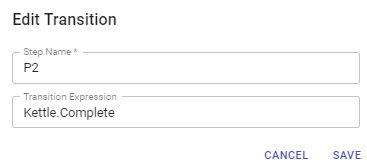

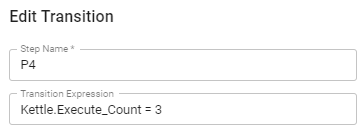
Within Batch Recipes, add Transition after these elements:
- Phase
- And_Begin
- And_End
- Or_Begin
- Or_End
For information about when a transition is required, see Batch Recipe Logic Validation.
A valid Transition Expression is one line of Python code referencing:
- Parameters: Batch Recipe (Procedure), Unit Procedure, Operation, Phase
- Ignition Tags
- Ignition Designer Project Scripts

|
Auto Completion Intellisense autocompletes the available options under and object. Navigate the autocomplete-intellisense using the keyboard: arrows and space bar. |
Valid Operands in Transition Expressions
Operands in Transition Expressions:
- operands
- fixed values
- tag path
- Recipe, Unit Procedure, Operation, Phase references up and down the batch recipe structure.
- script reference or one line of code: the return value returns and replaces the script reference before evaluating the expression.
| Valid operands | Expression including script and tag path |
|---|---|
AND OR () = != >= <= > < IS NULL IS NOT NULL NOT | To call a tag from a Batch Transition use {tagValue:TagPath} descriptor {TagValue:[Default]Tank 101/Level} >= 100.0 AND {Script:My Phase Complete} P2.Operation IS NULL |
| Expression including phase and procedure parameter | |
 | |
Expression including script reference | |
To call a Batch Script from a Batch Transition, use {script:ScriptName} descriptor. example: {script:My Phase Complete} | |
Sepasoft MES Module Suite