Sepasoft MES Module Suite
What is a Machine Recipe
In a manufacturing environment, a machine recipe defines the machine settings used by equipment on a production line to process materials consistently and produce products or sub-assemblies.
OEM equipment typically includes a built-in recipe editor for creating and selecting recipes. In contrast, simpler equipment may only allow for entering or adjusting setpoints such as temperature or speed.
During new product introductions, a process engineer sets the parameters and qualifies them as the Process Of Record (POR) for a specific product on a particular line. When preparing a production line for a specific product, these qualified settings must be configured on the equipment. Additionally, adjustments may be necessary for maintenance runs or when using out-of-spec raw materials.
The management of machine recipes aims to prevent errors by mandating the download of POR recipe setpoints from the Manufacturing Execution System (MES). This approach streamlines recipe management, enables easy selection of recipes, monitors variations in recipe values, ensures recipe security, tracks recipe modifications, and generates recipe reports.
Machine Recipes
Machine recipes are used to set up equipment to produce a given product or to place it in a specific mode. If a machine can run 20 different products and each product has unique settings, then managing recipes becomes essential.
Typically, machines are equipped with an operator interface that allows the operator to adjust settings and, in some cases, utilize a basic recipe system. While this approach may suffice for a single machine, in production lines with multiple machines, ensuring each one is configured to run the next scheduled product becomes a more challenging task. This process is time-consuming and increases the likelihood of errors during product changeovers.
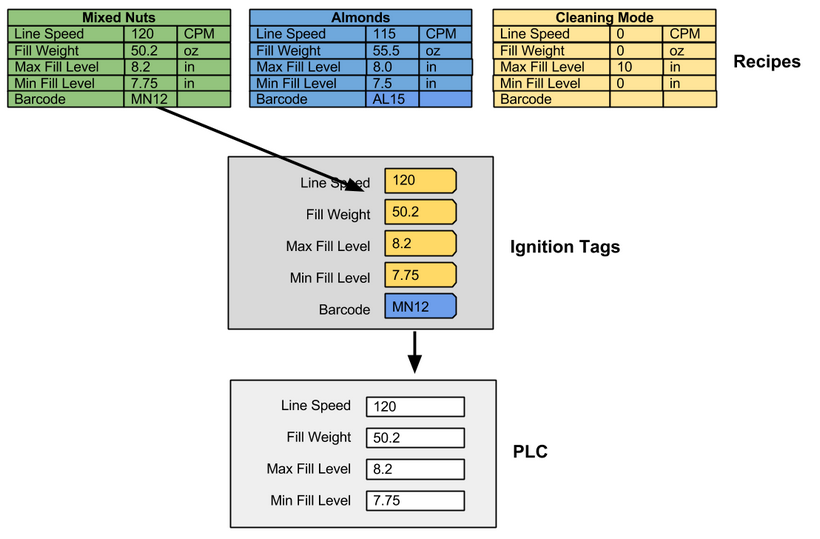
When a recipe is selected for a machine, the recipe values are written to Ignition tags which can be mapped to memory locations in a PLC.
Enable Write Permission on Ignition Tags

|
You must enable write permissions in Ignition when writing tag values to remote tag-providers. See: https://docs.inductiveautomation.com/docs/8.1/platform/security/service-security |
In the illustration, all recipe data, with the exception of Barcode, is linked to a PLC via OPC. The Barcode recipe data is specifically linked to a memory tag, allowing it to be displayed on a screen for operator verification of the barcode number, or it can be transmitted to a printer via serial or TCP/IP.
When the Almonds recipe is chosen, the recipe data is written to the tags. If these tags are associated with PLC memory locations, the data is transferred to the PLC, enabling the machine to be set up for processing almonds.
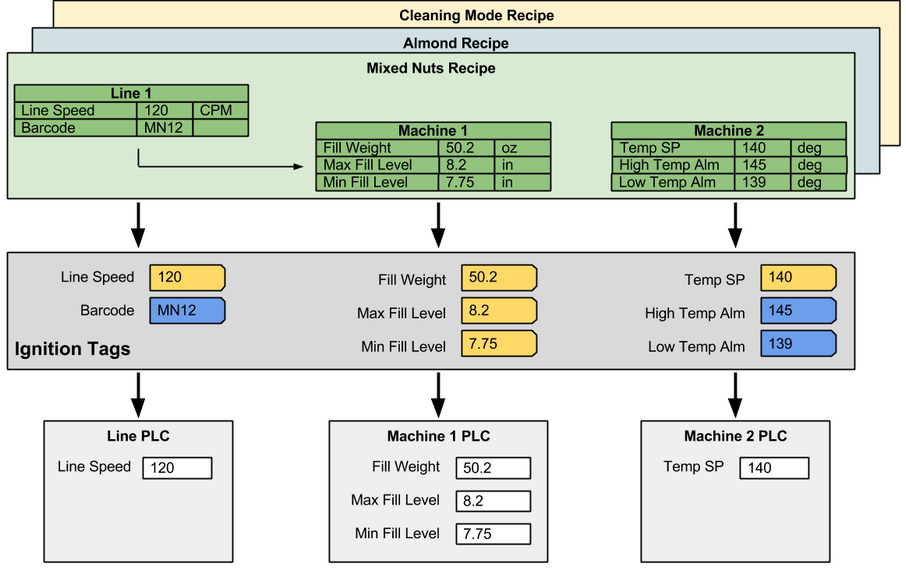
When a production line contains cells, cell groups, or locations as children, the recipes can be managed, selected, and reported on by the production line. The image depicts this, where Line 1 has two machines as children, which can be defined as cells (or locations if the Track & Trace or OEE Module is not installed).
Batch Recipes
Machine Recipes are not Batch Recipes. See Batch Procedure documentation to learn about Batch Recipes.
We often associate recipes with creating a batch of a product, like a batch of cookies where multiple ingredients are added in a specific order and mixed together. It's important to note that a batch system differs from a recipe. While batch systems do use recipes, they also involve equipment definitions and sequencing that work in conjunction with the recipe to control machinery and produce a batch of product. Batch Management Systems handle various functions, including inventory checks before starting a batch, alarm detection, machine control, and more. The Sepasoft Batch and Procedure module is a comprehensive Batch Management System that provides these functionalities and beyond.

Sepasoft MES Module Suite