Sepasoft MES Module Suite
Sepasoft MES 3.0 to MES 4.0 Upgrade for Ignition 8.3
This guide explains how to upgrade your Sepasoft modules to MES Platform 4.0 to support Ignition 8.3.
Sepasoft’s transition to Platform 4.0 is designed to be smooth with minimal changes to your existing MES configuration. For more information about the new features of MES 4.0, please see our MES 4.0 Noteworthy page.
Please read this guide carefully before upgrading a production Gateway. If you have any questions or concerns about this upgrade, please contact support@sepasoft.com.
Overview
For a summary of changes in Ignition 8.3, see Sepasoft Module Configuration in Ignition 8.3.
Upgrade Readiness
Minimum Recommended MES Version
Upgrading from MES 3.81.9 or later requires absolutely no changes to your MES databases, scripting, equipment models, or live analysis.
 | If you are on 3.81.0 through 3.81.8 release, we require upgrading to the latest 3.81 version before moving to 4.0. |
MES versions 1.0, 2.0, 3.79, and 3.80 have reached their End-of-Life and cannot be directly upgraded to MES 4.0. Contact support@sepasoft.com if you have one of these versions.
Upgrade Protection
Upgrading to Ignition 8.3 and MES 4.0 requires active support plans with both Inductive Automation and Sepasoft, respectively. Upgrade Protection for Ignition modules is managed by Inductive Automation, while Upgrade Protection for MES modules is managed by Sepasoft. With active plans in place, you can access Ignition 8.3 and MES 4.0 at no additional cost.
If your MES support/upgrade protection has lapsed, please contact sales@sepasoft.com to reinstate support for access to free MES 4.0 upgrades.
Confirm Upgrade Status
If you have Upgrade Protection on the given license, go to the Ignition Gateway and follow these steps to confirm your license has been updated and is ready for upgrade to Ignition 8.3 and MES 4.0.
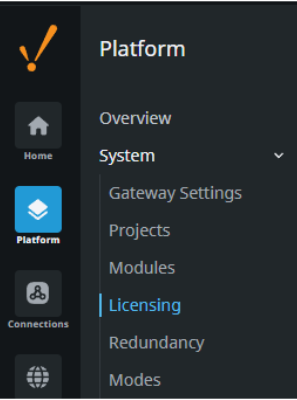
- For 6-digit license keys, perform a manual Update/Refresh from the Gateway following the instructions in the table below. 8-digit keys update automatically and require no action.
License Type | 6-Digit Key |
Legacy (issued prior to 12/31/22) Ignition and MES are bundled on a single license. | Update/Refresh the single license. Ignition and MES modules update together. |
New License Structure (issued after 12/31/22) Ignition parent is linked with an MES child license. | Update/Refresh the Ignition parent license and MES child license separately. |
If you have access to the Inductive Automation License Portal, all MES modules listed should display a Current Version of 3 and a Max Version of 4.
- If you do not have portal access, contact sales@sepasoft.com to confirm whether your license has been updated to be compatible with MES 4.0.
- If you have upgrade protection but the Max Version of your MES modules is 3, please contact sales@sepasoft.com for assistance.
Preparation & Backups
|
|
As with all production upgrades, full backups and a recovery plan are strongly recommended. |
It is highly recommended to perform a test upgrade in a safe environment. Make sure the restored Ignition system does not connect to the production database but is re-directed to the restored test database. This will confirm the backups and recovery plan work, along with getting familiar with Ignition 8.3 and MES 4.0, before upgrading in the Production environment.
Schedule a planned downtime window. Stop all MES production runs and automated processes prior to upgrading.
Download the latest MES 4.0 module files from the Sepasoft website (available 9/16/2025). Save them locally, but do not install them.
While no database or scripting changes are required for MES 4.0, backups ensure you can recover quickly in the unlikely event of a failure. Take backups of the following:
Take a full Ignition Gateway backup.
Take backups of all MES-related databases.
Export any critical project resources.
Confirm the location and availability of the Ignition and database backups.
Upgrade Process
Upgrade Ignition
Follow Inductive Automation’s Ignition 8.3 Upgrade Guide to start the Ignition 8.3 upgrade process.
During installation, you will be prompted to update or install third-party modules.
Install Sepasoft Modules (MES 4.0)
Once Ignition 8.3 is successfully running, install the MES 4.0 module files, if they were not installed during step 1.
Verify that all modules are running (not faulted, not in trial mode).
New to Ignition 8.3, a gateway restart is required after any module is installed or updated.
Apply Licenses
Check that both Ignition and Sepasoft licenses appear correctly in the Gateway.
Ensure modules are not in “emergency trial mode.”
Post-Upgrade Checks
After upgrading, it’s important to verify that everything is functioning as expected. The tips below are not comprehensive, but they can help you confirm that your system is running smoothly.
Check 1: Gateway Status: All modules should show as running. Check the Diagnostics > Overview page for general gateway health.
Check 2: Licensing: Verify licenses are correctly applied and not expired on the Platform > Licensing page.
Check 3: Configuration:
- Database connections validated on the Connections > Databases > Connections page.
- The MES database connection is configured to the correct database on the Platform > Sepasoft > MES Settings page.
- Enterprise Gateway Network connections validated (if used) on the Network > Overview page.
|
|
Ignition 8.3 Gateways can only use Enterprise Synchronization with other 8.3 or 8.1 Gateways, even if you are using proxies. To connect between 8.3 and 8.1 gateways Allow Java Serialization must be enabled. |
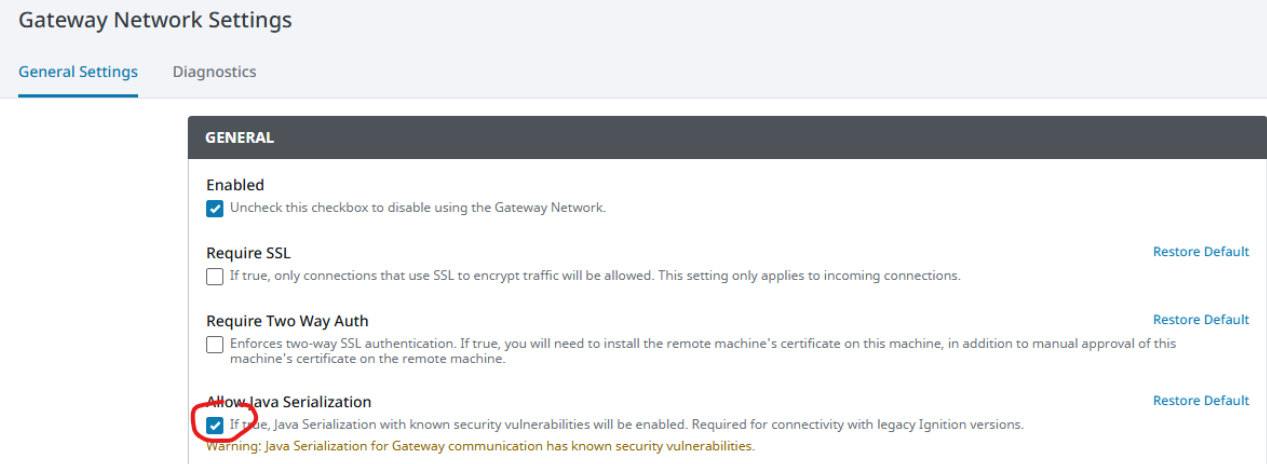
Enterprise configuration validated on the Platform > Sepasoft > Enterprise Network page (if used).
Advanced configuration items validated (if used) Platform > Sepasoft > Advanced page.
Task Routing configuration validated (if used) Platform > Sepasoft > Task Routing page.
Check your Gateway and wrapper logs for any repeated warnings or errors on the Diagnostics > Logs page.
Your project launcher must be 8.3. Project launchers from 8.1 are not forward compatible.
Check 5: MES Runtime: Start a test run to verify equipment models, live analysis, and data collection are functional.
Troubleshooting Issues
MES Modules are in Emergency Trial Mode
This occurs when MES modules are not properly licensed. Verify that your MES modules show a maximum version of 4 in the Inductive Automation License Portal, or contact support@sepasoft.com for assistance.MES Modules have Faulted
This occurs when the installed versions of Ignition and Sepasoft MES are incompatible. To resolve this issue, upgrade your MES installation to version 4.0 so it matches your Ignition 8.3 system
|
|
For questions during the upgrade process, contact support@sepasoft.com. |
Sepasoft MES Module Suite