Set Up Dependency
Setting the Ignition Gateway Service to depend on booting up of the DB service will avoid failure of production model initiation after a system reboot.
Applies To and Version Info
This feature is Ignition and Sepasoft version independent. The Service Controller command used in the solution is Windows dependent.
Problem
Sometimes the production model does not start successfully after a system reboot. This is probably due to the lack of connection between Ignition and database. The DB service must be fully available when the MES modules in Ignition requested it. When database service starts in the Windows environment some interruption might occur especially in virtual environments after a reboot.
Production model restarts and enters the running state after a manual restart of the Production Module on the Ignition Gateway. Even though this seems like a simple solution for the problem, it might be annoying if the system reboots periodically. Therefore the following alternative solution is recommended.

Solution
The Windows Service Control (SC) command can be used to create a dependency for one service on another service. The general syntax is: sc [command] [service_name] depend="[service_name]"
In this example a Windows 10 system is running Ignition with MySQL database.
Ignition Service:
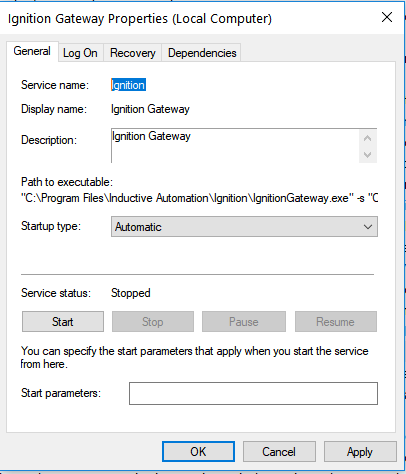
Step 1
Using the Windows Command Prompt run the following Service Controller command (Run as Administrator):
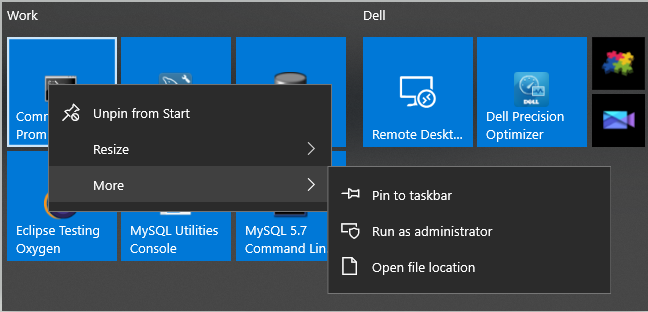
Step 2
Use the Service Controller command to change the service definition.
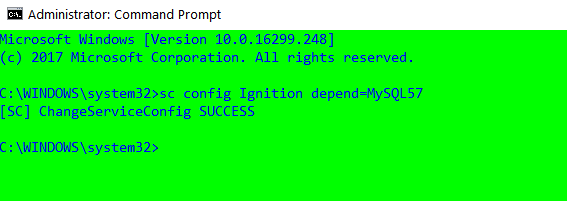
This change will make the Ignition Gateway to depend on MySQL DB service.
DB Service :
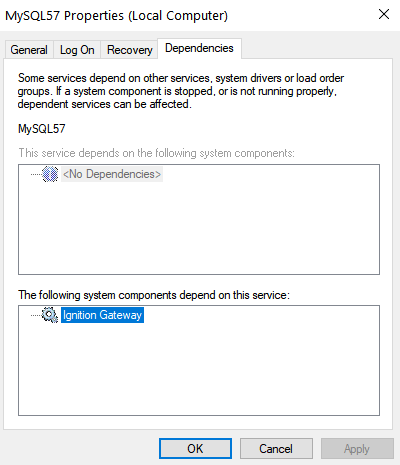
Now Ignition Service will only start if MySQL is already running.
Keywords
Ignition, DB, Window Service, delayed start, dependency