You have a requirement where Operators must add a comment (note) to every entry that was coded as a specific Mode, for example,
Maintenance or Production, for a given Line, Equipment.
Step-by-step guide
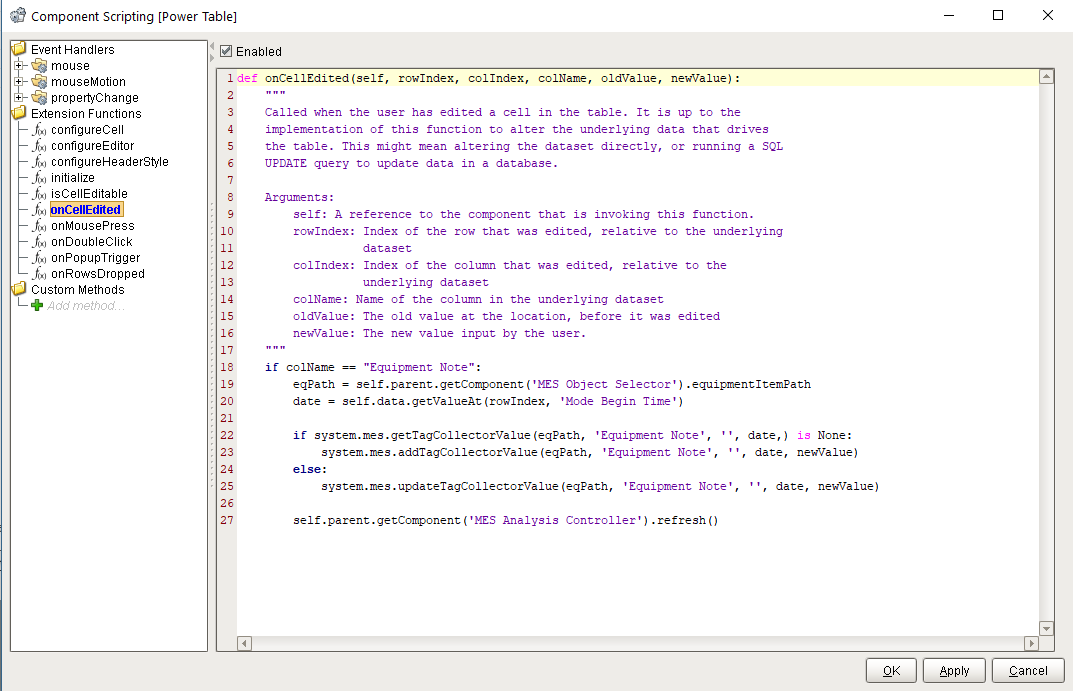
We will use an Analysis Controller to feed a Power Table which has a onCellEdited Extension Function to handle writing the Note
- Create an Analysis with the following:
Data Points: Mode Begin Time,Mode Duration,Mode End Time,Equipment Note
Filter By: Equipment Path = @eqPath AND Equipment Mode Type = 'Maintenance' (or Production or whatever Mode you wish to Filter by)
Group By: Mode Begin Time
on your Analysis Controller, add a Custom Property eqPath = string
in the Property Window, the Analysis Controller should look like this: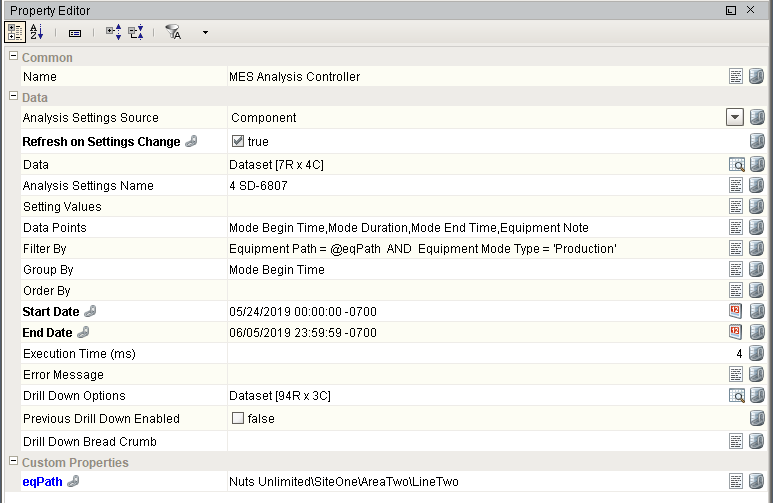
- add a Date Range and a Power Table Component
you will bind
the Analysis Controller Start/End Date to the Date Range Start/End Date
and
the Power Table Data to the Analysis Controller Data add some Scripting to the Power Table Extension Function onCellEdited
Codeif colName == "Equipment Note": # get the equipment path from the MES Object Selector eqPath = self.parent.getComponent('MES Object Selector').equipmentItemPath # get the date of the event from the Analysis dataset date = self.data.getValueAt(rowIndex, 'Mode Begin Time') # check to see if there is not already a note if system.mes.getTagCollectorValue(eqPath, 'Equipment Note', '', date,) is None: # if no note exists, add the note system.mes.addTagCollectorValue(eqPath, 'Equipment Note', '', date, newValue) else: # otherwise, update the note system.mes.updateTagCollectorValue(eqPath, 'Equipment Note', '', date, newValue) # rerun the analysis self.parent.getComponent('MES Analysis Controller').refresh()