Overview
Analysis results can be filtered by production items. When lines are sub-strings of one another and you want to include children of a particular line for the OEE analysis, these best practices would help you.
Applies To and Version Info
This feature applies to all versions of OEE 3.0 modules
Scenarios
Include children analysis setting can be used to contain the children of a production item. Below are the best practices for analysis when children should be included:
Scenario 1:
FIlter: Equipment Path = \Enterprise\Site\Area\Line 4
Settings: Include Children = True
Line 4 and all children including cell groups and cells of cell groups will be included in the analysis results.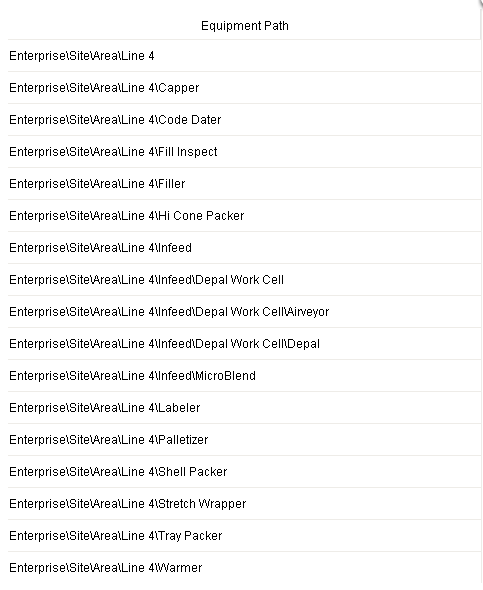
Using the Include Children is a simple method to include all cell groups without having to add multiple Equipment Path filter expressions for the line and each cell group.
Which would be:
Code |
Equipment Path = 'Enterprise\Site\Area\Line 4' OR Equipment Path LIKE 'Enterprise\Site\Area\Line 4*' OR Equipment Path LIKE 'Enterprise\Site\Area\Line 4\Infeed*' OR Equipment Path LIKE 'Enterprise\Site\Area\Line 4\Infeed\Depal Work Cell\Depal*' |
Scenario 2:
FIlter: Equipment Path LIKE \Enterprise\Site\Area\Line 4*
Settings: Include Children = True
Invalid and an exception will be returned.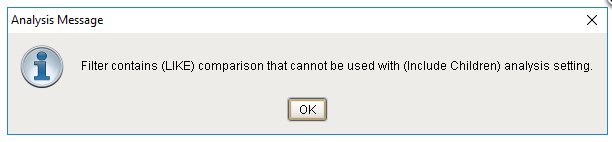
Scenario 3:
FIlter: Equipment Path = \Enterprise\Site\Area\Line 4*
Settings: Include Children = False
All direct children of Line 4 will be included in the analysis results. Cells or cell groups that are children of a direct cell group of Line 4, will not be included.
References
Keywords
OEE Analysis