Vision Only

|
Barcode Scanner is only compatible in Vision. If using Perspective, use the built-in Perspective Scanning features. |
If you are having trouble connecting your scanner to the MES Barcode Scanner module you can use the client logger to troubleshoot.
Step-By-Step Guide
- In the Client, go to Help → Diagnostics
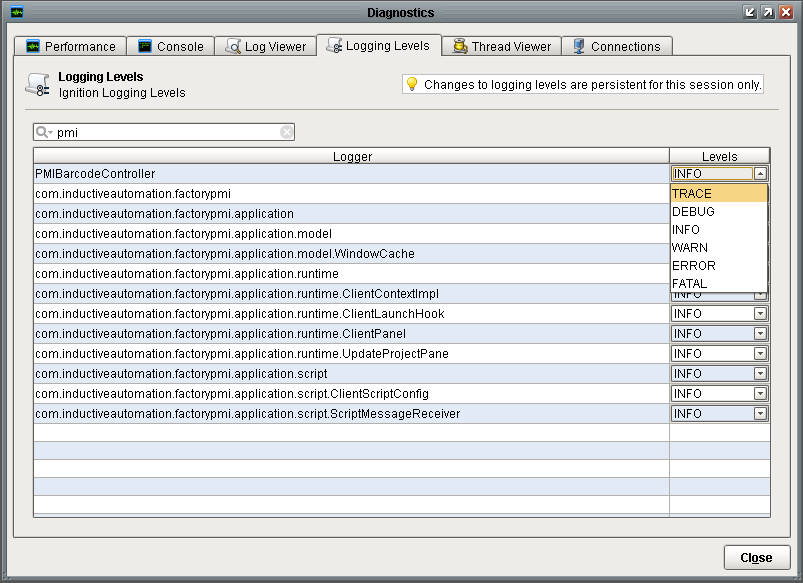
- Open the Logging Levels tab.
- Search for PMIBarcodeController.
- Select the Debug level in the Levels drop-down list.
- Click the Console tab and then scan your barcode.
The console will log all the keyboard information including characters captured from the scanner.
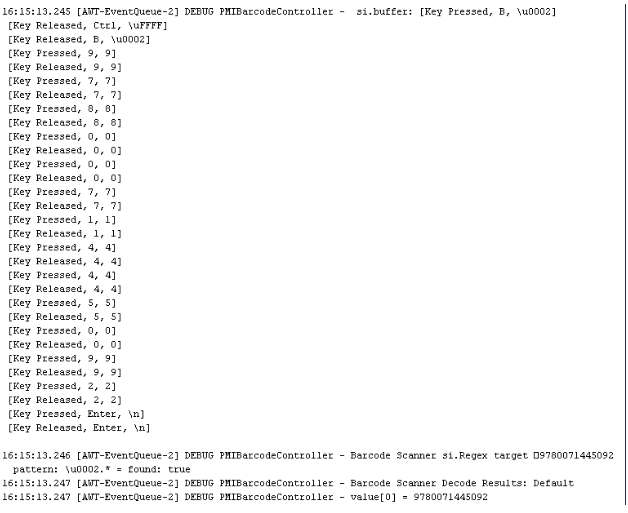
If you have a successful scan, you should see a listing of captured barcode information.


|
You may also want to use visual panels to communicate related information, tips or things users need to be aware of. |
Related articles
Related articles appear here based on the labels you select. Click to edit the macro and add or change labels.