Clean Up OEE References
If a cell or cell group is deleted after an OEE Operation has been configured, there could be null references to equipment in the production settings properties.
You might see something like this on the gateway when an OEE operation ends:
Error recording OEE ending values for equipment (a431fb00-41d2-435e-9ca0-c87ab5b6370a)
Where the UUID corresponds to deleted equipment.
This script will clean up null and deleted references:
cleanup null references
Python |
def fixOperationSettings(mat): ops = system.mes.oee.getMaterialOperationsSegments(mat,'*') #loop through production and changeover segments changed = False for op in ops: items = op.getComplexPropertyItemNames('ProductionSettings') for name in items: productionSettings = op.getComplexProperty('ProductionSettings', name) link = system.mes.getMESObjectLink(productionSettings.getEquipmentRefUUID()) print name #check if null ref if not productionSettings.getEquipmentRefUUID(): op.removeComplexProperty('ProductionSettings', 'null') changed = True print 'production settings null ref' #check if equipment link is null if not link: op.removeComplexProperty('ProductionSettings', productionSettings.getName()) changed = True print 'equipment link is null' #check if equipment was deleted elif not link.getMESObject().isEnabled(): op.removeComplexProperty('ProductionSettings', productionSettings.getName()) changed = True print 'equipment link is disabled' if changed: print 'changed',op system.mes.saveMESObject(op) return False def cleanup(mat): changed = fixOperationSettings(mat) if changed: system.mes.invalidateCache() system.mes.oee.getMaterialOperationsSegments(mat,'*') cleanup(mat) return linePath = '' mats = system.mes.oee.getEquipmentAvailableMaterial(linePath, '*') for mat in mats: cleanup(mat) |
There may be errors thrown to the logs. This could happen when there is more than one null reference per production setting and triggered by system.mes.oee.getMaterialOperationsSegments(). This is not an issue. They should stop logging once all null references are cleaned up.
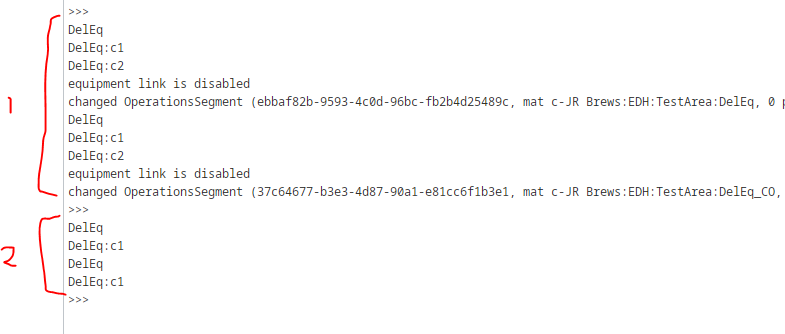
You can run it more than once to see if all references are cleaned up:
Once this is complete, restart the production module.