Snapshot Check when using Microsoft SQL Server
This information applies to customers running Microsoft SQL Server. If a fresh Database connection is set up (that does not have MES Tables in it yet), an Exception appears in the logs if the configuration setting: Read Uncommitted Snapshot is set to OFF.
See an example of this Exception in Database Configuration Best Practices.
Modules require MSSQL database connections to use Read Committed Snapshot. Fresh databases will be forced to have the setting turned on, and prevent module spin up. Upgraded gateways will only log a warning, but allow module spin up.

|
Use these instructions to fix this error: Caused by: com.sepasoft.production.common.db.exception.DBRCSException: |
See below:

|
Version Specific: MES 3.81.9 SP4 and later |
When a new MSSQL Database is created, it is likely that the isolation level it is set to is Read UnCommitted.
You must use "Read Committed Snapshot" mode.
|
|
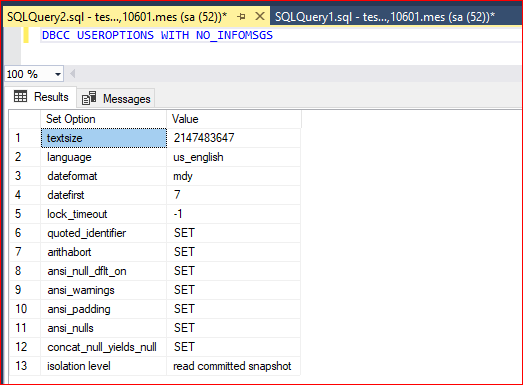
Check the database configuration's Isolation Level with the following query: DBCC USEROPTIONS WITH NO_INFOMSGS |
- One of the returned options is the "isolation level."
|
| Information about these: https://learn.microsoft.com/en-us/sql/t-sql/database-console-commands/dbcc-useroptions-transact-sql?view=sql-server-ver16 |
Fix this Error by Turning Snapshot Mode On
- Use this command to turn on snapshot mode:
ALTER DATABASE MyAnalysisDBName SET READ_COMMITTED_SNAPSHOT ON
|
|
Warning: Please make sure that no other active connections are open on this database, or else the query will not run. This includes open MSSQL Studio Manager tabs with open result sets on this database. |
- If upgrading and already running MSSQL, a warning appears, but the modules continue running.

Fix this Error by Skipping Snapshot Check
Python |
wrapper.java.additional.8=-Dcom.sepasoft.validateDatabaseRCSMode=False |
|
|
If you encounter database performance issues, we will require that you turn Snapshot On |