Driving OEE with Tags
The OEE Downtime Module supports multiple data ingestion strategies so that different manufacturing equipment and requirements can be accommodated with one module. While the default behavior utilizes the ISA-95 Operations model objects to start and stop production runs, some use-cases do not fit the constraints of that model. Therefore, the OEE Downtime module support tag driven collection for necessary OEE data requirements.
The OEE calculation requires several data points. Production counters, machine status, and meta data (e.g. Standard Rate, Line Infeed Count Equipment UUID) can be supplied via tags. With respect to the tag driven OEE approach, an engineer can implement the solution via tag collector bindings or through scripted writes to the tag collectors in the module without tag bindings in the Ignition tag server. This KB article walks through the latter approach.
The benefits of this scripted approach are:
- Maximum flexibility for data ingestion
- Coordination of time-stamps for data entry
- Custom logic determining values
The downside of this scripted approach are:
- Requires scripting
- Requires additional training/skills
- Requires documentation so engineers can understand how the system is configured
This topic includes:
- References
- Timestamped Tag Collector Data
- Example Script: Set up and execute OEE for a single operation per line
- Example of Setting Infeed and Outfeed Equipment References for a Line
- Production Run Start and Stop within the Example UDT
- Additional Factors
- Dynamic Value Change Corner Cases
- Equipment Standard Rate Change Script
- Conclusion
References
The following links are references with which the author assumes the engineer is already very familiar. If these are new concepts, please explore them prior to returning to this page for their application within this use-case.
- Parameterized Tag Paths
- Equipment Object Functions - Tag Collector
- See, docs.inductiveautomation.com > system.tag.configure
- Tag Collector Types
Timestamped Tag Collector Data
The OEE Downtime Module inserts timestamped entries for various tag collectors. These timestamps are used in the Analysis Engine and must match.
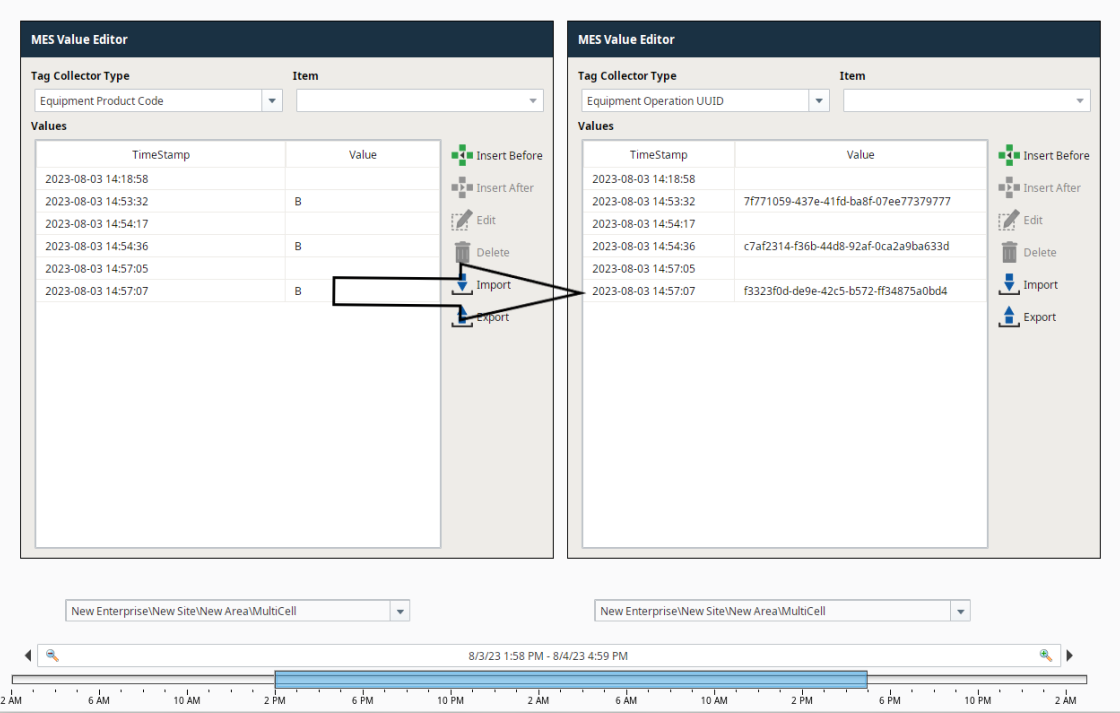
Since timestamps should match, it is recommended not to map the tag collectors to Ignition tags. There may be a case where a bulk write could have slightly differing timestamps.
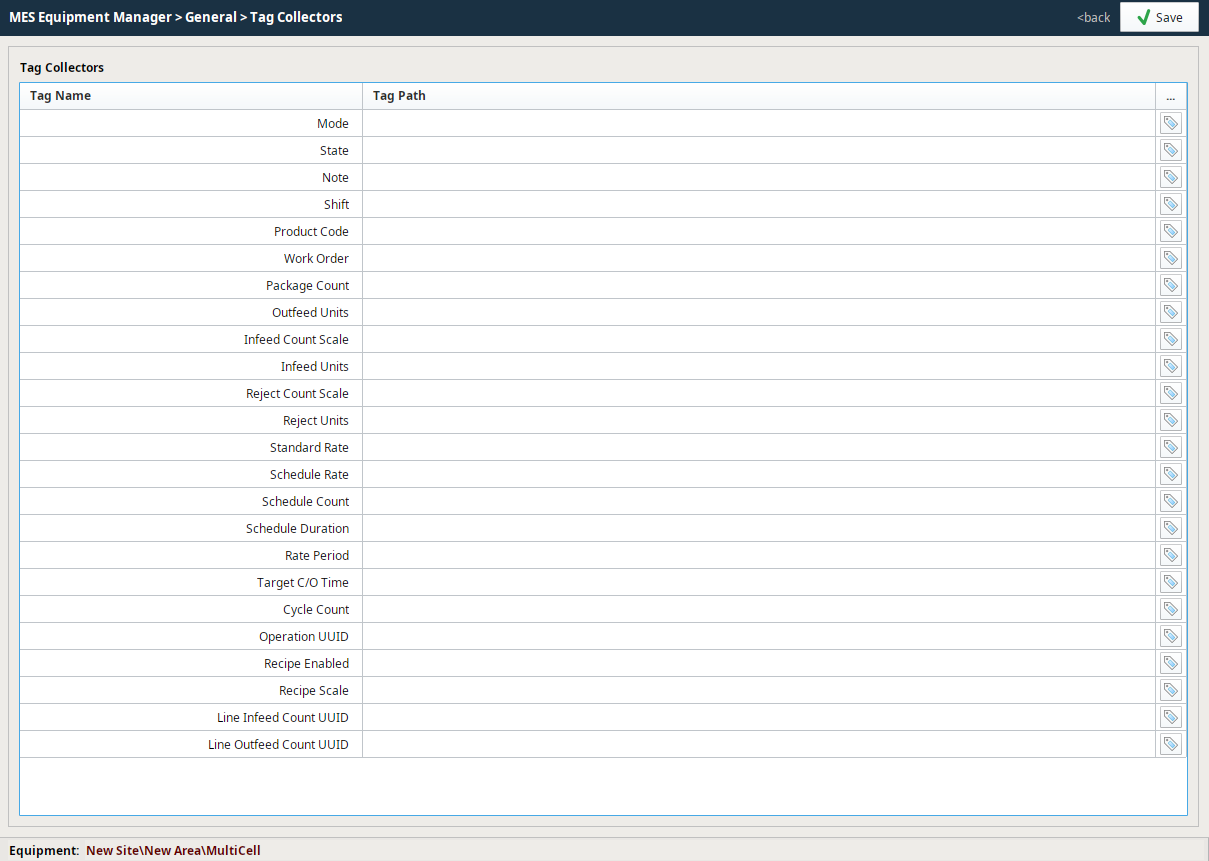
Instead, it is recommended to use the built-in script functions to write directly to the tag collectors in the MES database using the same timestamp. Tag Collector Types
When using this method, Material Definitions and Material Production Settings are not required. The tag collector values will record input during runtime.
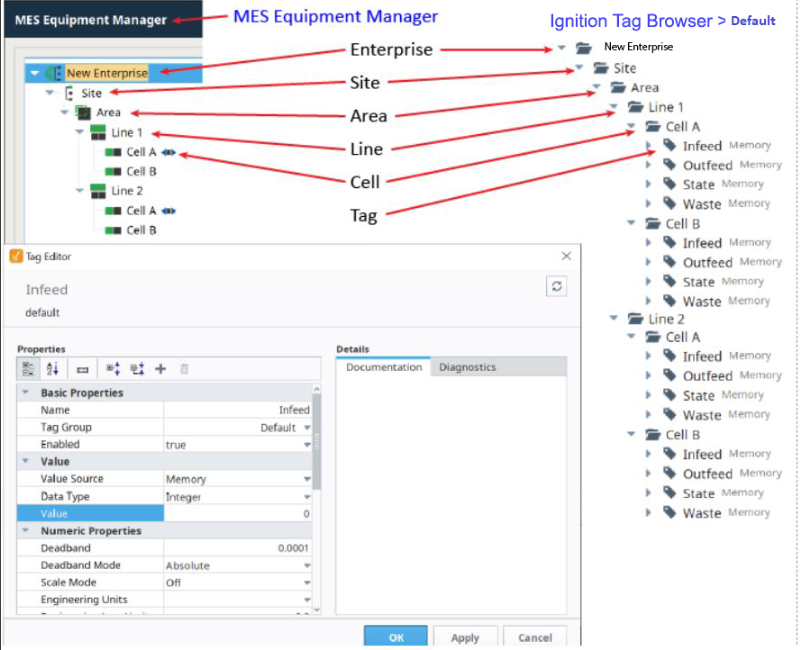
A simple way to achieve this is to first match your tag folder structure to match the equipment hierarchy. This allows us to derive the equipment path from the tag path.
Example Script: Set up and execute OEE for a single operation per line
The following resources and examples demonstrate how to set up and execute OEE for a single operation per line.
1. Import these UDTs: OEE_tags.json
2. Run the traverseEquipment() function by editing the equipment path value for passed in for the linePath parameter.
Create Tags and Set Params
Python |
def getLineTagStructure(eqPath, tagType='UdtInstance'): name = eqPath.split('\')[-1] return { 'name':'Line OEE Tags', 'typeId':'Line OEE', 'tagType':tagType } def getCellTagStructure(eqPath, tagType='UdtInstance'): name = eqPath.split('\')[-1] return { 'name':'Cell OEE', 'typeId':'Cell OEE', 'tagType':tagType } def traverseEquipment(linePath, includeCellTags=False, providerName='[default]'): def traverseEquipmentHelper(equipmentItem): eqPath = equipmentItem.getEquipmentPath() validEquipmentTypes = ['Line','LineCellGroup','LineCell'] eqType = equipmentItem.getMESObjectTypeName() if eqType in validEquipmentTypes: if eqType == 'Line': tag = getLineTagStructure(eqPath) baseTagPath = providerName + eqPath.replace('\','/') system.tag.configure(baseTagPath, [tag], 'i') #optional if cell tags should be used elif includeCellTags and eqType in ['LineCell','LineCellGroup']: tag = getCellTagStructure(eqPath) baseTagPath = providerName + eqPath.replace('\','/') system.tag.configure(baseTagPath, [tag], 'i') children = equipmentItem.getChildCollection().getList() for child in children: traverseEquipmentHelper(child.getMESObject()) root = system.mes.loadMESObjectByEquipmentPath(linePath) traverseEquipmentHelper(root) traverseEquipment('Enterprise\Site 1\Area 1\Line 1') |
Example of Setting Infeed and Outfeed Equipment References for a Line
The OEE module will need to understand where to look for equipment counters (In and Out).
There are two members of the UDT to record this information. It generally should not change for most use cases.
Line Infeed Count Equipment UUID
Line Outfeed Count Equipment UUID
The following script can be used to find the UUID of a Line or Cell where the Counters are defined:
Equipment UUID Helper Script
Python |
def getUUID(infeedEquipmentPath, outfeedEquipmentPath): infeedUUID = system.mes.loadMESObjectByEquipmentPath(infeedEquipmentPath).getUUID() outfeedUUID = system.mes.loadMESObjectByEquipmentPath(outfeedEquipmentPath).getUUID() return infeedUUID, outfeedUUID |
Production Run Start and Stop within the Example UDT
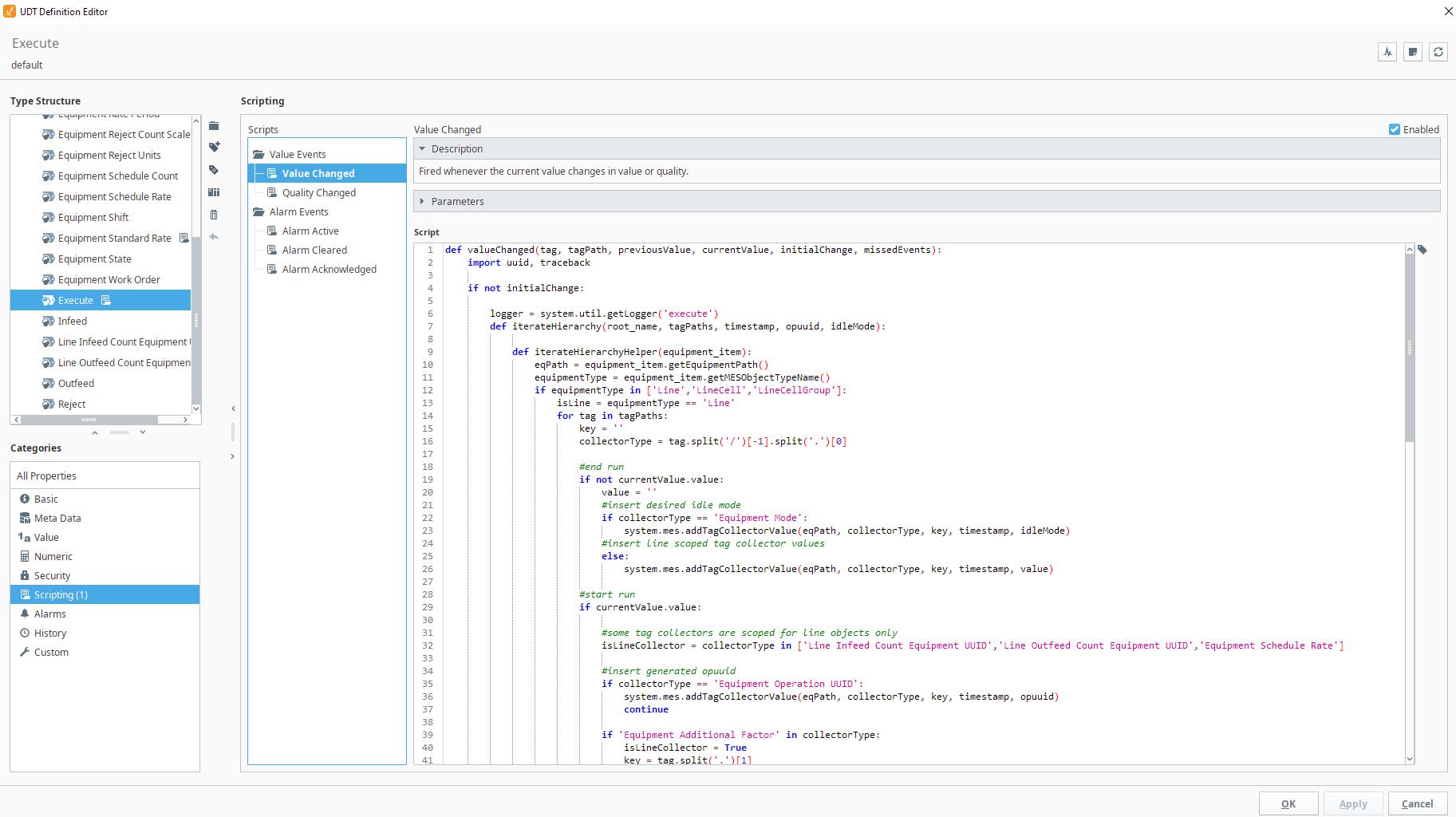
The Line OEE tag UDT has a member called Execute.
When set to True - This starts a production run
When set to False - This ends a production run
Execute
Python |
def valueChanged(tag, tagPath, previousValue, currentValue, initialChange, missedEvents): import uuid, traceback if not initialChange: logger = system.util.getLogger('execute') def iterateHierarchy(root_name, tagPaths, timestamp, opuuid, idleMode): def iterateHierarchyHelper(equipment_item): eqPath = equipment_item.getEquipmentPath() equipmentType = equipment_item.getMESObjectTypeName() if equipmentType in ['Line','LineCell','LineCellGroup']: isLine = equipmentType == 'Line' for tag in tagPaths: key = '' collectorType = tag.split('/')[-1].split('.')[0] #end run if not currentValue.value: value = '' #insert desired idle mode if collectorType == 'Equipment Mode': system.mes.addTagCollectorValue(eqPath, collectorType, key, timestamp, idleMode) #insert line scoped tag collector values else: system.mes.addTagCollectorValue(eqPath, collectorType, key, timestamp, value) #start run if currentValue.value: #some tag collectors are scoped for line objects only isLineCollector = collectorType in ['Line Infeed Count Equipment UUID','Line Outfeed Count Equipment UUID','Equipment Schedule Rate'] #insert generated opuuid if collectorType == 'Equipment Operation UUID': system.mes.addTagCollectorValue(eqPath, collectorType, key, timestamp, opuuid) continue if 'Equipment Additional Factor' in collectorType: isLineCollector = True key = tag.split('.')[1] lastValue = system.mes.getTagCollectorLastValue(eqPath, collectorType, key) tag = tag.replace('.','/') value = system.tag.readBlocking(tag.replace('.','/'))[0].value else: #if no change, do not insert value value = system.tag.readBlocking(tag)[0].value lastValue = system.mes.getTagCollectorLastValue(eqPath, collectorType, key) if lastValue == value: continue try: #insert line scoped tag collector values if isLine: system.mes.addTagCollectorValue(eqPath, collectorType, key, timestamp, value) #insert all others tag collector values elif not isLine and not isLineCollector: system.mes.addTagCollectorValue(eqPath, collectorType, key, timestamp, value) except: exception = traceback.format_exc() logger.error(str(exception)) children = equipment_item.getChildCollection().getList() for child in children: iterateHierarchyHelper(child.getMESObject()) root = system.mes.loadMESObjectByEquipmentPath(root_name) iterateHierarchyHelper(root) tagProvider = '[default]' linePath = tagPath.split(']')[1].replace('/Line OEE Tags/Execute','').replace('/','\') parentTagPath = tagProvider + linePath.replace('\','/') + '/Line OEE Tags/' """ Add additional tag collectors as needed. Items in this list will be read from the UDT and written to respective equipment tag collector Equipment Operation UUID is the exception - this is generated once and set for all equipment """ #tag collector values to change for start and stop tagsToInclude = [ 'Equipment Product Code', 'Equipment Mode', #operation UUID is generated instead of read from tag. Need to include here for iterateHierarchy() function 'Equipment Operation UUID', 'Equipment Work Order', ] #tag collector values to change for start only if currentValue.value: tagsToInclude.append('Line Infeed Count Equipment UUID') tagsToInclude.append('Line Outfeed Count Equipment UUID') tagsToInclude.append('Equipment Standard Rate') # tagsToInclude.append('Equipment Schedule Rate') # tagsToInclude.append('Equipment Rate Period') # tagsToInclude.append('Equipment Outfeed Units') # tagsToInclude.append('Equipment Infeed Units') #add new members to Equipment Additional Factor folder #separate with a . for the subsequent script to write (see example below). This currently only write additional factors defined on the line. # tagsToInclude.append('Equipment Additional Factor.Operator') tagPaths = [parentTagPath + item for item in tagsToInclude] opuuid = str(uuid.uuid4()) timestamp = system.date.now() #Your idle mode idleMode = 3 iterateHierarchy(linePath, tagPaths, timestamp, opuuid, idleMode) |
Additional Factors
Additional Factors must be created on the equipment prior to injecting values through the script. Mapping a tag in the Equipment manager is only necessary if the factor value needs recording other than when a run is started.
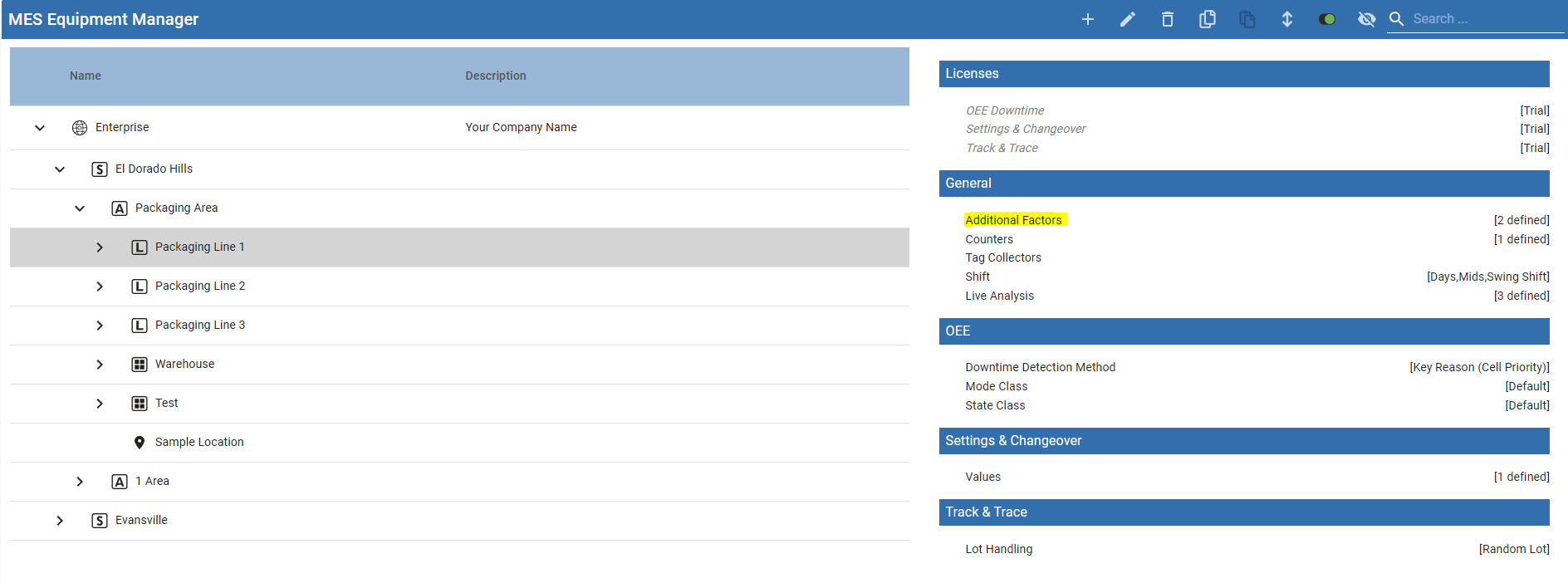
You can validate that the tag values are written correctly via the Value Editor component.
Dynamic Value Change Corner Cases
There are cases where a tag value needs to be changed "on the fly". One such example is the standard rate is calculated based on the length of material or number of machines running, etc.
In the UDT, the Equipment Standard Rate can be changed while a run is in progress. The change script will stop the run and start the run, to correctly record for the analysis engine.
If a run is not in progress, no other action is taken until the Execute flag is set to True.
Equipment Standard Rate Change Script
Python |
def valueChanged(tag, tagPath, previousValue, currentValue, initialChange, missedEvents): import time if not initialChange: parentTagPath = tagPath.rstrip('Equipment Standard Rate') executePath = parentTagPath + 'Execute' isRunning = system.tag.readBlocking([executePath])[0].value if isRunning: system.tag.writeBlocking([executePath], [False]) time.sleep(2) system.tag.writeBlocking([executePath], [True]) |
Conclusion
In summary, there are cases to use the tag-driven approach to OEE instead of using out of the box functions to start and stop production runs.
Values recorded during production run begin must have matching timestamps