Retrieve Equipment State Counts from Analysis 3.0
Problem
There is no dedicated Analysis Data Point for Equipment State Occurrence count, much like Line Downtime Occurrence Count. You may want to retrieve States that may occur prior to the line going down.
Solution
There are data points relevant to Equipment State, and with the proper grouping, we can count the occurrences and return our own Dataset.
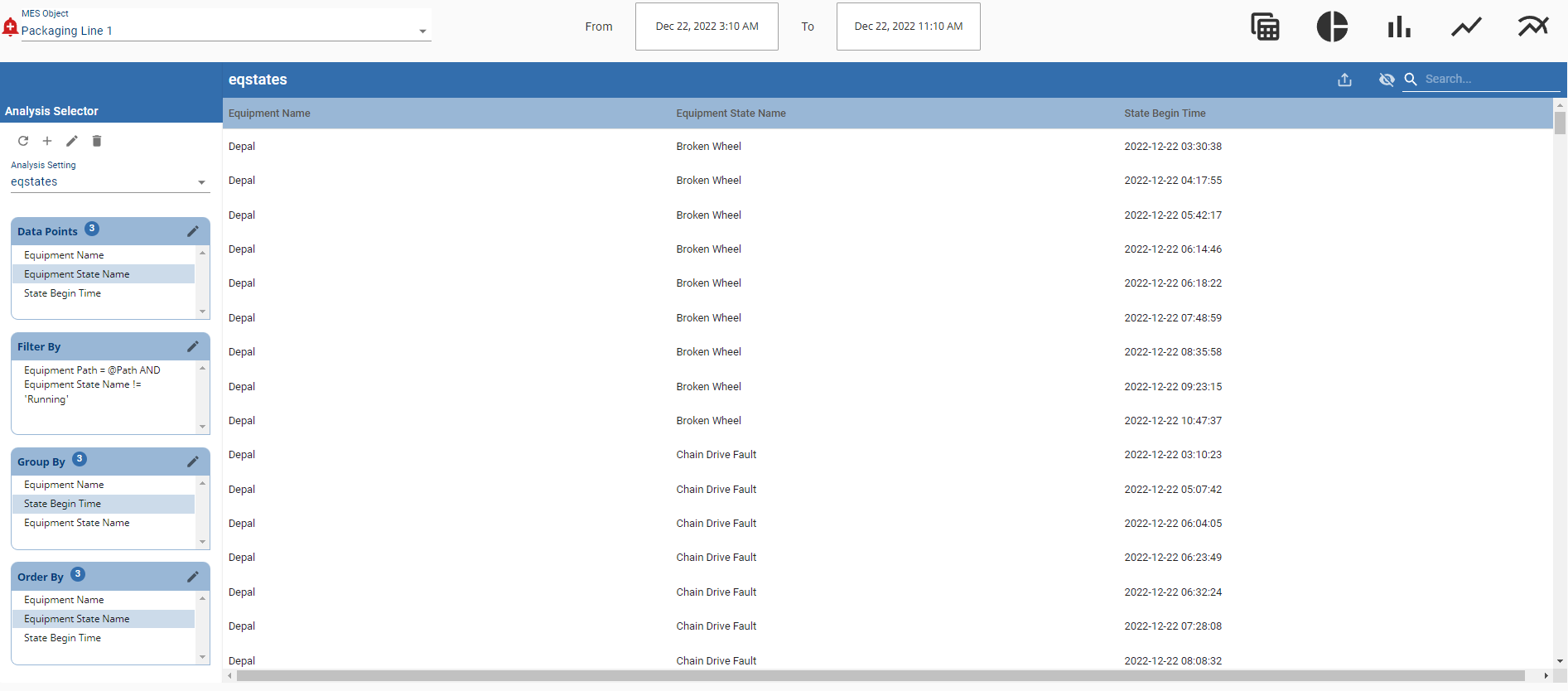
In this KB, we will create, retrieve, and transform the analysis needed to determine the Equipment State count per equipment.
The following script will create and run the Analysis necessary to count the equipment States with the following Setting:
Create Analysis
|
def createAnalysis(savedSettingsName):

	existing_analyses = system.mes.analysis.getMESAnalysisSettingsList()

	analysis = {savedSettingsName:
			{'data_points': "Equipment Name,Equipment State Name,State Begin Time",
			'filter_by': "Equipment Path = @Path AND Equipment State Name != 'Running'",
			'group_by': "Equipment Name,State Begin Time,Equipment State Name",
			'order_by': "Equipment Name,Equipment State Name,State Begin Time",
			'setting_values': "Include Children = True"}
			}

	for name, settings in analysis.iteritems():
		if name not in existing_analyses:
			analysis = system.mes.analysis.createMESAnalysisSettings(name)
			analysis.setDataPoints(settings['data_points'])
			analysis.addParameter('Path')
			analysis.setFilterExpression(settings['filter_by'])
			analysis.setGroupBy(settings['group_by'])
			analysis.setOrderBy(settings['order_by'])
			analysis.setSettingValues(settings['setting_values'])
			system.mes.analysis.saveMESAnalysisSettings(analysis)
		else:
			print 'exists'
|
Once our Analysis setting is created, we can run the Analysis, convert the MES Analysis Result to an Ignition Dataset and count rows of grouped Equipment and States.
Run Analysis
|
def runAnalysis(savedSettingsName, eqPath, startDate, endDate):

	params = {'Path':eqPath}

	results = system.mes.analysis.executeAnalysis(startDate, endDate, savedSettingsName, params)
	ds = results.getDataset()

	headers = ['Equipment', 'State Name', 'Count']
	counts = []

	if ds.getRowCount() > 0:
		lastEquipmentName = ds.getValueAt(0,'Equipment Name')
		lastStateName = ds.getValueAt(0,'Equipment State Name')
		count = 1

		for i in range(ds.getRowCount()):

			equipmentName = ds.getValueAt(i,'Equipment Name')
			stateName = ds.getValueAt(i,'Equipment State Name')

			if lastEquipmentName != equipmentName or lastStateName != stateName:
				counts.append([lastEquipmentName, lastStateName, count])
				count = 0
				lastEquipmentName = equipmentName
				lastStateName = stateName

			else:
				count += 1

	new_ds = system.dataset.toDataSet(headers,counts)
	return new_ds
|
Here is an example calling the functions, ensuring we create the Analysis first:
Execution
|
savedSettingsName = 'Machine States'
eqPath = 'Enterprise\Site 1\OEE Area\Packaging Line 1'
startDate = system.date.addDays(system.date.now(),-1)
endDate = system.date.now()

createAnalysis(savedSettingsName)
ds = runAnalysis(savedSettingsName, eqPath, startDate, endDate)
|
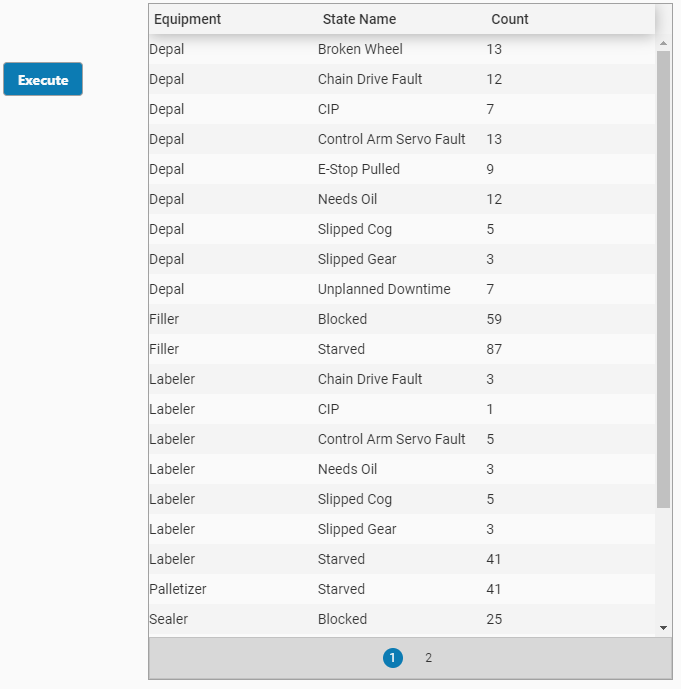
From here we can bind the eqPath to an MES Object Selector and pass in start and end dates. Chart execution can be behind a button, tag change event, etc.
The output Dataset can be put into a table, or manipulated to show on a chart.