Create TagHistoryAverage SOAP Provider

Creating a New SOAP Endpoint

Creating the SOAP Endpoint
The first step is to create the container for our web service operations.
  • In the Project Browser, navigate to Web Services → Providers → SOAP Endpoints → Tutorial.
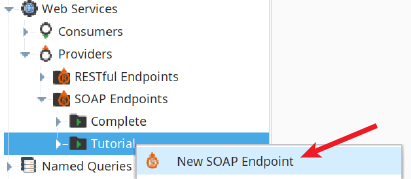
  • Right-click the Tutorial folder and select New SOAP Endpoint.
  • Name the new endpoint TagHistoryAverage.

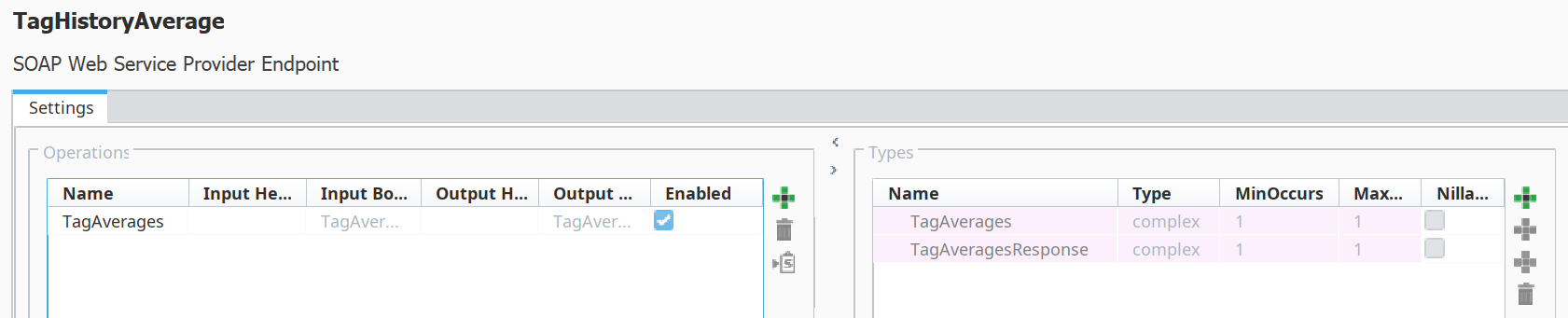
Notice that blank Types for the request and response are created for you, as shown below.
Defining Operations and Data Types

An "Operation" within a SOAP endpoint represents a specific, callable function that the web service can perform. For the service to be useful, each operation requires a "Type," which is a strict data contract defining the structure of the request (the input parameters it expects) and the response (the return values it will provide). This strong typing is a core principle of SOAP.

  • Create two more Operations, called TagMin and TagMax.
  • With the TagHistoryAverage endpoint selected, use the New Operation button to create a new operation. Name it TagAverages.
  • Repeat this process to create two additional operations: TagMin and TagMax.
  • For each operation, you must define its request and response Types. Use the New Member button to add the required data fields. For example, the TagAverages operation's request Type would need members for a startDate (DateTime), an endDate (DateTime), and several TankPath strings. Its response Type would then require members to hold the calculated float values for each tank's average.

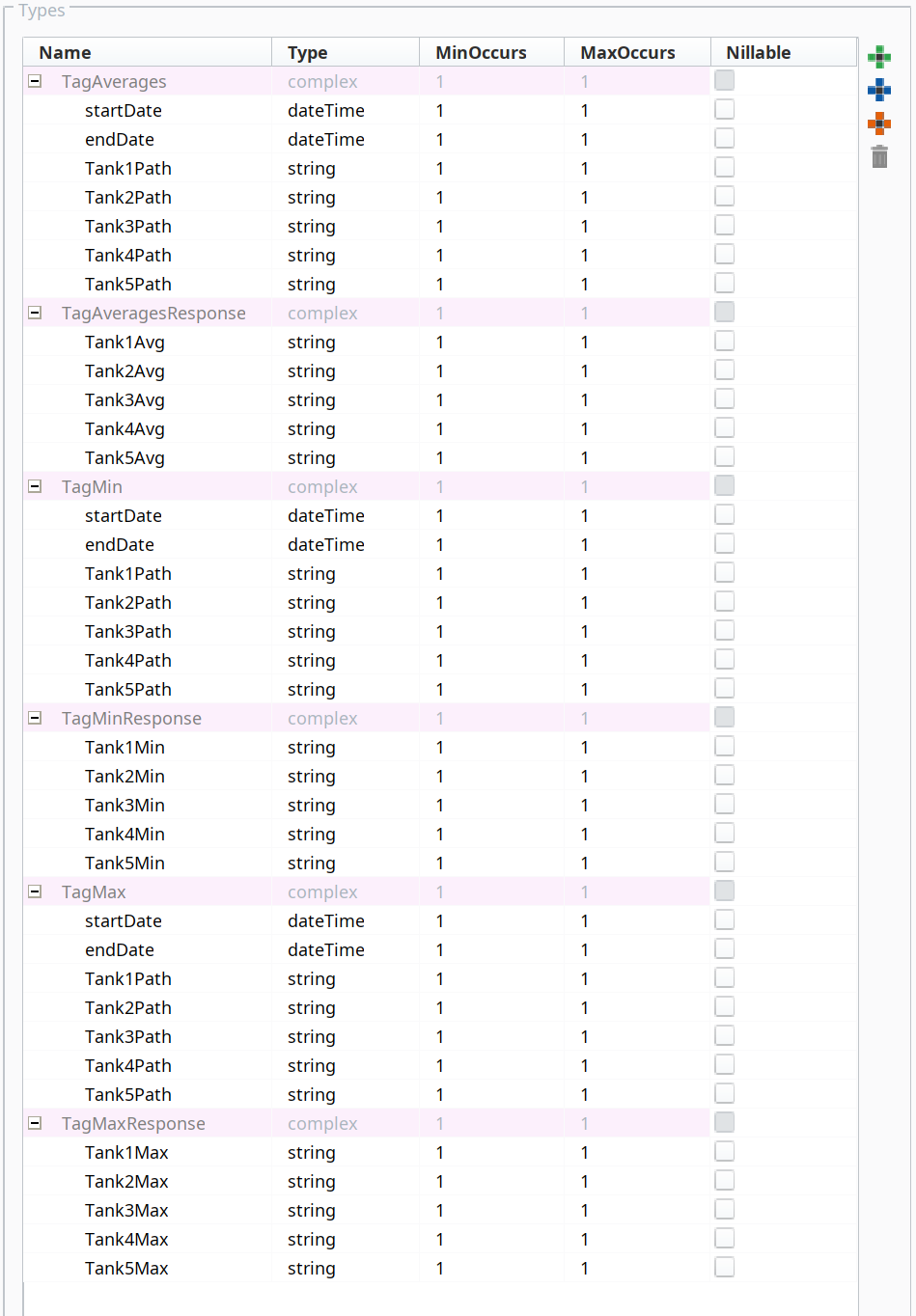
Create Request and Response Types

  • Complete the six Types, as shown to the right, using the New Member button

Implementing Operation Logic with Scripting

While the previous steps define the structure of the web service, the actual logic is implemented using Python scripting. Each operation must be configured with a script that executes when the operation is called.

  • Using the scripts listed below (TagAveragesTagMinTagMax), add one at a time.
  • In the script area for each operation, paste the corresponding script provided in the source material. These scripts will contain the logic to query tag history and perform the required calculations.
TagAverages Script
Python
    
# SOAP Input Body
input_Tank1Path = input['body']['TagMax']['Tank1Path']
input_Tank2Path = input['body']['TagMax']['Tank2Path']
input_Tank3Path = input['body']['TagMax']['Tank3Path']
input_Tank4Path = input['body']['TagMax']['Tank4Path']
input_Tank5Path = input['body']['TagMax']['Tank5Path']
input_startDate = input['body']['TagMax']['startDate']
input_endDate = input['body']['TagMax']['endDate']

t_paths = [input_Tank1Path, input_Tank2Path, input_Tank3Path, input_Tank4Path, input_Tank5Path]

# SOAP Output Header
output_header = None

#get totalized calculation over time from start - end
minutes = system.date.minutesBetween(input_startDate,input_endDate)

#https://docs.inductiveautomation.com/display/DOC81/system.tag.queryTagHistory
dataset = system.tag.queryTagHistory(paths=t_paths, startDate=input_startDate, endDate=input_endDate, aggregationMode="Maximum", returnFormat='Wide',intervalMinutes =minutes)

#SOAP Output Body
output_body = {
'TagMaxResponse': {
'Tank1Max': str(dataset.getValueAt(0,1)),
'Tank2Max': str(dataset.getValueAt(0,2)),
'Tank3Max': str(dataset.getValueAt(0,3)),
'Tank4Max': str(dataset.getValueAt(0,4)),
'Tank5Max': str(dataset.getValueAt(0,5))
}
}

# HTTP Response Headers
http_response_headers = {}

return {'header': output_header, 'body': output_body, 'http_headers': http_response_headers}

TagMin script
Python
    
# SOAP Input Body
input_Tank1Path = input['body']['TagMax']['Tank1Path']
input_Tank2Path = input['body']['TagMax']['Tank2Path']
input_Tank3Path = input['body']['TagMax']['Tank3Path']
input_Tank4Path = input['body']['TagMax']['Tank4Path']
input_Tank5Path = input['body']['TagMax']['Tank5Path']
input_startDate = input['body']['TagMax']['startDate']
input_endDate = input['body']['TagMax']['endDate']

t_paths = [input_Tank1Path, input_Tank2Path, input_Tank3Path, input_Tank4Path, input_Tank5Path]

# SOAP Output Header
output_header = None

#get totalized calculation over time from start - end
minutes = system.date.minutesBetween(input_startDate,input_endDate)

#https://docs.inductiveautomation.com/display/DOC81/system.tag.queryTagHistory
dataset = system.tag.queryTagHistory(paths=t_paths, startDate=input_startDate, endDate=input_endDate, aggregationMode="Maximum", returnFormat='Wide',intervalMinutes =minutes)

#SOAP Output Body
output_body = {
'TagMaxResponse': {
'Tank1Max': str(dataset.getValueAt(0,1)),
'Tank2Max': str(dataset.getValueAt(0,2)),
'Tank3Max': str(dataset.getValueAt(0,3)),
'Tank4Max': str(dataset.getValueAt(0,4)),
'Tank5Max': str(dataset.getValueAt(0,5))
}
}

# HTTP Response Headers
http_response_headers = {}

return {'header': output_header, 'body': output_body, 'http_headers': http_response_headers}

TagMax script
Python
    
# SOAP Input Body
input_Tank1Path = input['body']['TagMax']['Tank1Path']
input_Tank2Path = input['body']['TagMax']['Tank2Path']
input_Tank3Path = input['body']['TagMax']['Tank3Path']
input_Tank4Path = input['body']['TagMax']['Tank4Path']
input_Tank5Path = input['body']['TagMax']['Tank5Path']
input_startDate = input['body']['TagMax']['startDate']
input_endDate = input['body']['TagMax']['endDate']

t_paths = [input_Tank1Path, input_Tank2Path, input_Tank3Path, input_Tank4Path, input_Tank5Path]

# SOAP Output Header
output_header = None

#get totalized calculation over time from start - end
minutes = system.date.minutesBetween(input_startDate,input_endDate)

#https://docs.inductiveautomation.com/display/DOC81/system.tag.queryTagHistory
dataset = system.tag.queryTagHistory(paths=t_paths, startDate=input_startDate, endDate=input_endDate, aggregationMode="Maximum", returnFormat='Wide',intervalMinutes =minutes)

#SOAP Output Body
output_body = {
'TagMaxResponse': {
'Tank1Max': str(dataset.getValueAt(0,1)),
'Tank2Max': str(dataset.getValueAt(0,2)),
'Tank3Max': str(dataset.getValueAt(0,3)),
'Tank4Max': str(dataset.getValueAt(0,4)),
'Tank5Max': str(dataset.getValueAt(0,5))
}
}

# HTTP Response Headers
http_response_headers = {}

return {'header': output_header, 'body': output_body, 'http_headers': http_response_headers}