Prerequisites
Exercise 1 consumes a public weather RESTful API endpoint. To complete this exercise, you need to create an API key from the site and then place the key in a tag for the Web Services RESTful Consumer to pass to the online weather app.
API Keys

|
If more than one student in your group will need a key, either each student can create a separate account, or a key for each student can be created on just one account. See step 2 below. |
Create a Key
In the online weather app, generate a key to use in the RESTful consumer.
Navigate to https://home.openweathermap.org/users/sign_up. Create a free account for use with this tutorial. It will require providing a name, email, minimum 8-character password. Verify the email by replying to the email sent. Your API key will arrive in a second email (copy for use below).
This site allows up to 60 API calls per minute and 1 Million API calls per month for free: https://openweathermap.org/price
- Once signed in, you can navigate to https://home.openweathermap.org/api_keys to view your API key. If additional keys are needed for other students sharing this account, then generate them using this page and add a unique name for each, as a reference.

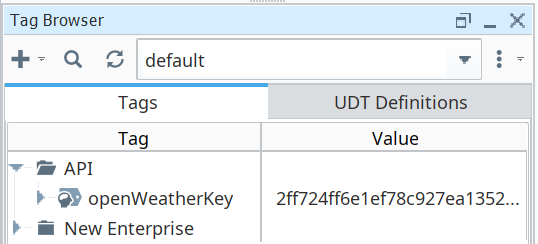
- In the Tag Browser, create a folder named API. Create a memory tag in that folder named openWeatherKey of type String. Set the value to the key you generated above. The RESTful Consumer, getWeather, will retrieve this key when calling the online weather app.